# C# Method Nodes
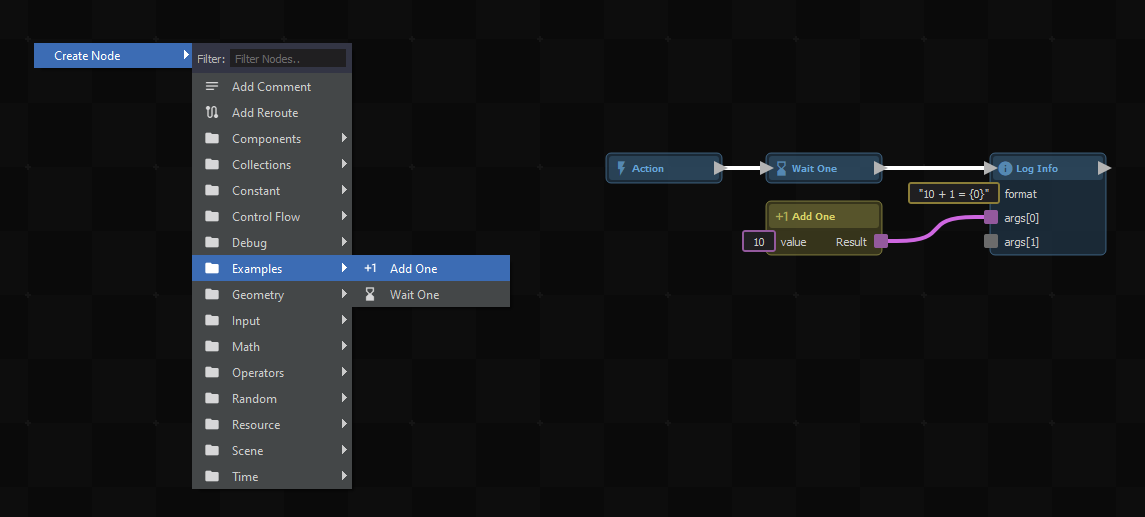
Making a custom node in C# is as easy as writing a static method with a special *\[ActionGraphNode( id )\]* attribute. You should also add *\[Pure\]* if you want your node to be an expression node - a node without signals.
```csharp
///
/// Increments the value by 1.
///
[ActionGraphNode( "example.addone" ), Pure]
[Title( "Add One" ), Group( "Examples" ), Icon( "exposure_plus_1" )]
public static int AddOne( int value )
{
return value + 1;
}
///
/// Waits for one second.
///
[ActionGraphNode( "example.waitone" )]
[Title( "Wait One" ), Group( "Examples" ), Icon( "hourglass_bottom" )]
public static async Task WaitOne()
{
await Task.Delay( TimeSpan.FromSeconds( 1d ) );
}
```