
Let's create an entity in Sandbox.
This guide walks you through creating a custom entity that bounces in a random direction every few seconds, using a configurable bounce strength and TimeSince for timing.
What is a .sent?
A .sent is a ScriptedEntity asset. It's a GameResource that tells the spawn menu about your entity. It points to a prefab, which contains the actual GameObjects and Components that define the entity's behavior.
Creating the Component
Create a new C# file for your bouncing behavior:
public class BouncingEntity : Component
{
    /// <summary>
    /// How strong each bounce impulse is.
    /// </summary>
    [Property, Range( 0, 5000 )]
    public float BounceStrength { get; set; } = 1000f;

    /// <summary>
    /// How often (in seconds) the entity bounces.
    /// </summary>
    [Property]
    public float BounceInterval { get; set; } = 5f;

    /// <summary>
    /// Tracks time since the last bounce.
    /// </summary>
    private TimeSince timeSinceBounce;

    protected override void OnStart()
    {
        // Start the timer immediately
        timeSinceBounce = 0f;
    }

    protected override void OnFixedUpdate()
    {
        // Only the authority should apply physics
        if ( IsProxy ) return;

        if ( timeSinceBounce < BounceInterval )
            return;

        // Reset the timer
        timeSinceBounce = 0f;

        // Get the Rigidbody to apply force
        var rb = GetComponent<Rigidbody>();
        if ( !rb.IsValid() ) return;

        // Pick a random direction (normalized) and apply impulse
        var randomDirection = Vector3.Random.Normal;
        rb.ApplyImpulse( randomDirection * BounceStrength );
    }
}
Creating the Prefab
- In the editor, create a new Prefab (e.g. entities/bouncing_entity.prefab)
- Add a Model Renderer - pick any model (a sphere works well for testing)
- Add a Rigidbody component - this gives the entity physics
- Add your BouncingEntity component
- Configure the default BounceStrength and BounceInterval in the inspector
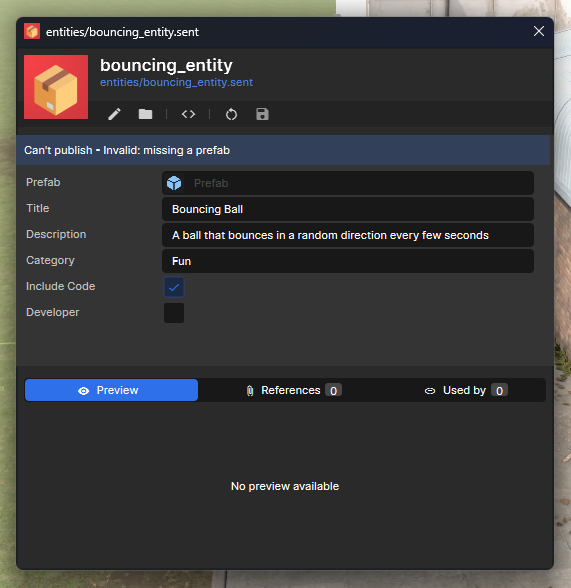
Creating the Resource
- In the Asset Browser, right-click → Create → Sandbox Entity
- Set the Prefab field to your bouncing_entity.prefab
- Set a Title (e.g. "Bouncing Ball")
- Set a Description (e.g. "A ball that bounces in a random direction every few seconds")
- Set a Category (e.g. "Fun") to group it in the spawn menu
- Enable IncludeCode since this entity uses custom code
ClientEditable
The engine exposes a neat attribute called [ClientEditable] that you can put on your properties and they'll be customizable through Sandbox's context menu. This means you can modify and configure entities while they are in the world.
TimeSince
TimeSince is a lightweight struct that stores the time it was last set. Reading it returns how many seconds have elapsed since that assignment:
TimeSince myTimer;

// Start the timer
myTimer = 0f;

// Later...
if ( myTimer > 5f )
{
    // 5 seconds have passed!
    myTimer = 0f; // Reset
}
It automatically uses Time.Now under the hood, no need to manually track time.
What could I do to improve this?
- Add an upward bias: Replace Vector3.Random.Normal with something like (Vector3.Random.Normal + Vector3.Up).Normal so it tends to bounce upward
- Add a sound: Play a SoundEvent on each bounce for feedback
- Scale with mass: Multiply BounceStrength by the rigidbody's mass for consistent behavior across different-sized objects
And that's it! Spawn the entity from the entity tab in the spawn menu, and it will bounce around on its own.