
HaxeBox
Released
HaxeBox lets you write code in Haxe that integrates seamlessly with s&box.
HaxeBox is a library for developing s&box projects with Haxe.
Github repo: https://github.com/lemonsqueezy-lab/HaxeBox
Github repo: https://github.com/lemonsqueezy-lab/HaxeBox
What is included
- Sandbox API support with automatic extern type generation.
- Sandbox attribute support.
- Declarative UI markup directly in Haxe.
- Automatic `haxe` build with toast notifications.
- Hotloading.
Installation
1. Install s&box editor.
2. Install Haxe.
3. Install the Haxe library hxcs (required to compile Haxe to C#).
4. Open s&box Editor.
5. Install HaxeBox via Library Manager.
6. Restart the editor
2. Install Haxe.
3. Install the Haxe library hxcs (required to compile Haxe to C#).
4. Open s&box Editor.
5. Install HaxeBox via Library Manager.
6. Restart the editor
HaxeBox settings
Settings are applied per project. The config file is stored in the project root and is read by the editor plugin.
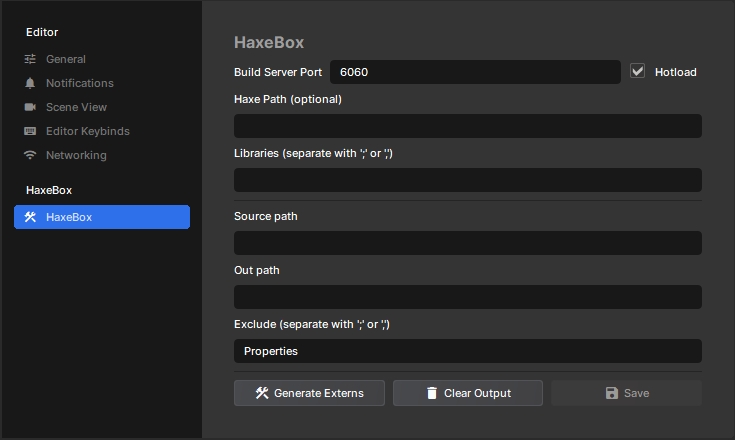
You can change settings in s&box editor preferences (
Edit -> Preferences -> HaxeBox):- Build Server Port - port for
haxe --wait/--connect. - Hotload - enables Haxe file watching and auto-build. Otherwise, build runs when the game starts in editor.
- Haxe Path - path to
haxe(if empty,haxefromPATHis used). - Libraries - Haxe libs for
-lib(separators: ; or ,). - Source Path - folder with Haxe code (default: code).
- Out Path - folder for generated C# code (default: code/__haxe__).
- Exclude - exclusions for
include(...)(separators: ; or ,).
Buttons:
- Generate Externs - generates extern types from runtime.
- Clear Output - deletes generated HaxeBox files.
- Save - saves settings.
Build
In addition to automatic build via hotload or at game start in editor, HaxeBox also runs build when project settings Release Mode, Whitelist, or Define Constants change, and during publish/export in Release mode.
During build, HaxeBox automatically rewrites
During build, HaxeBox automatically rewrites
build.hxml in the project root. Editing build.hxml manually is not useful, but you can still run build manually with haxe build.hxml in terminal.UI markup in Haxe
UI markup is available for classes that inherit directly (or indirectly) from
Such classes support special
sandbox.ui.Panel or sandbox.PanelComponent.Such classes support special
ui metadata (on class level):@:ui.markup(...) generates BuildRenderTree from markup expression(s).@:ui.stylesheet(...) auto-loads stylesheet(s) (StyleSheet.Load / Panel.StyleSheet.Load).@:ui.track(...) generates BuildHash so the panel updates when dependencies change.@:ui.attr (on field/property) marks it as a node attribute, so it can be set from markup (@MyPanel(name = "...")).
@:ui.markup(...) generates BuildRenderTree from markup expression(s).@:ui.stylesheet(...) auto-loads stylesheet(s) (StyleSheet.Load / Panel.StyleSheet.Load).@:ui.track(...) generates BuildHash so the panel updates when dependencies change.@:ui.attr (on field/property) marks it as a node attribute, so it can be set from markup (@MyPanel(name = "...")).Example:
@:ui.stylesheet("styles/Profile.scss")
@:ui.track(name)
@:ui.markup({
	@label name;
})
class Profile extends sandbox.ui.Panel {
	@:ui.attr public var name:String;
}

@:ui.stylesheet("styles/Root.scss")
@:ui.markup({
	@Profile(name = "smoothie") {}
})
class Root extends sandbox.PanelComponent {
}
@:ui.markup syntax@:ui.stylesheet("styles/MyPanel.scss")
@:ui.track(name)
@:ui.markup({
@button(~btn, -"button") @:text "b" + "t" + "n";
for (i in 0...5) {
var img = 'icon$i.png';
@div(-"card", onclick = () -> onCardClick(i)) {
@img(src = 'images/$img', alt = img) {}
@label(-"title") '$name $i';
}
}
})
class MyPanel extends sandbox.ui.Panel {
public var name:String = "player";
}Inside
@:ui.markup(...), a DSL is used with the following rules:- nodes are opened with
@*node type*(for example@div/@button/@img, etc.) - node attributes are listed in parentheses right after node type:
(*key* = *value*, ...). - child nodes are taken from the next expression (or expression block for multiple child nodes).
- to insert text content into a node, wrap expression with
@:textor@:content
For convenience, you can use shortcuts:
~name- shortcut for element reference capture (@ref="name").-"cls-a cls-b"- shortcut forclass =.- Some simple expressions (strings, identifiers, arrays) become text content without wrapping in
@:textor@:content.
Common problems
haxenot found:set
HaxePathin HaxeBox settings.- HaxeBox and project paths are not defined:
build was started with wrong
build.hxmlor without defines added by plugin.- ui.* metadata is ignored because class is not Panel/PanelComponent:
base class must be
sandbox.ui.Panelorsandbox.PanelComponent.- Empty/outdated extern type database:
click
Generate Externsand rebuild project.