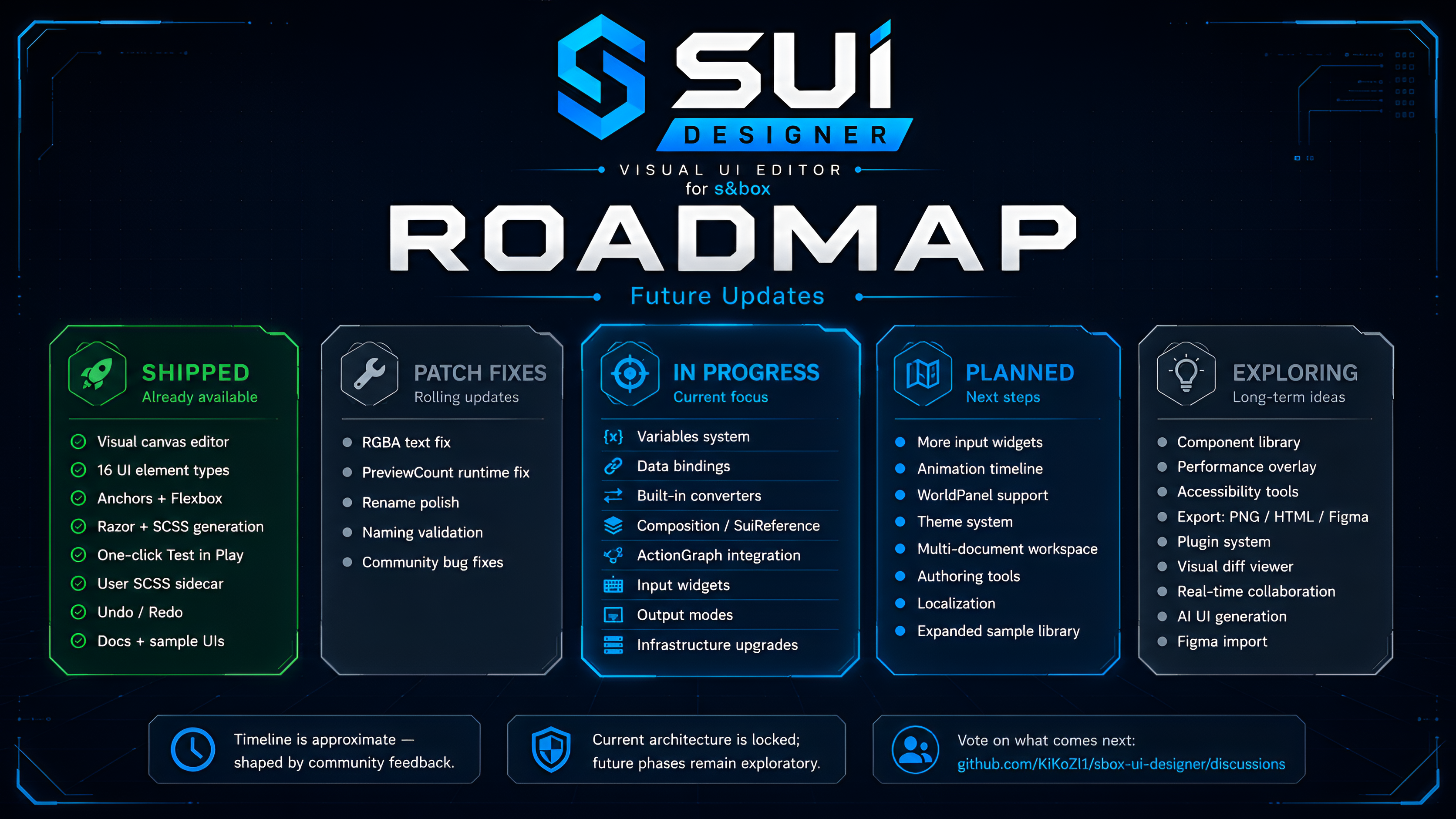
SUI Designer shipped its first public version a few days ago, and the response was way warmer than I expected.
I started this as a tool to solve a problem I personally felt while learning s&box: UI is powerful, but the workflow is very code-first. Coming from Unreal / UEFN, I immediately missed having something closer to UMG or Widget Blueprint a place where you can build layout visually, test quickly, and still keep control over the final code.
The first release proved that the idea works.
Now the goal is to turn SUI Designer into a serious visual UI workflow for s&box.
Razor is powerful. SCSS is flexible. The s&box UI system gives developers a lot of control.
But when you are trying to build actual game UI, control is only one part of the problem.
You also need speed.
You need to move panels around, test proportions, align elements, experiment with anchors, build HUDs, create inventory screens, tweak buttons, adjust modals, and quickly see how everything feels in-game.
Doing all of that purely by hand can be intimidating, especially for people coming from visual workflows like Unreal UMG, Unity uGUI, Roblox tools, or even Figma.
That is the gap SUI Designer is trying to fill.
The goal is not to hide Razor.
The goal is to give s&box a visual authoring layer that still outputs real Razor and SCSS.
You can create a native .sui asset, double-click it, and open a visual editor inside s&box.
The current version includes:
visual canvas editing
element palette
hierarchy panel
details inspector
drag, resize and edit workflow
16 UI element types
anchor presets
pivot offset
Flexbox controls
text sizing modes
custom color picker
multi-select
alignment tools
snap-to-grid
undo / redo
Razor generation
SCSS generation
.User.scss sidecar files
one-click Test in Play
sample UI files
documentation
The most important part is the output.
SUI does not generate a black box.
It generates real .razorand .razor.scss files that land in your project and can still be edited manually.
That matters because I do not want this tool to trap developers inside a custom runtime system. I want it to speed up the boring parts of UI authoring while still letting people take control when they need it.
These variables should support simple types like string, int, float, bool, and Color, but the system is also being designed with more advanced cases in mind, such as textures, enums, component references, and lists.
The generated PanelComponent will expose those values as properties, so gameplay code can stay simple:
This makes UI more modular and easier to maintain.
It also opens the door for list rendering.
Instead of manually placing 24 inventory slots, you could eventually bind a list and let SUI instantiate repeated elements.
Conceptually:
ForEach Items -> InventorySlot
That kind of workflow is important for inventories, loot bags, crafting recipes, quest logs, scoreboards, shops, ability lists, and many other game UI patterns.
ActionGraph integration
I want SUI to support both programmer-focused and designer-friendly workflows.
Some people want to write C#.
Some people want to wire simple behavior visually.
Both should be valid.
For events like button clicks, slider changes, toggles, dropdown selection, and custom converters, the planned direction is to support two authoring paths.
Code path
SUI generates a stub in a .partial.cs file.
You implement the logic manually.
This keeps user code outside generated files.
ActionGraph path
SUI exposes an ActionGraph slot that can be wired visually.
This would allow simpler behavior to be authored without opening Visual Studio.
Same .sui document.
Same generated Razor output.
Different logic authoring path.
That flexibility is important if SUI is going to be useful for teams, not only solo programmers.
SUI Designer started as a personal tool because I wanted a visual UI workflow while learning s&box.
But after the first public release, I think it can become something more useful for the community.
s&box already gives developers a powerful foundation. My goal with SUI is to make UI creation easier to approach, faster to iterate on, and more friendly to different kinds of creators.
Programmers should still own the code.
Designers should still be able to shape the interface visually.
Beginners should have a way to start without being buried in Razor and SCSS on day one.
That is the balance I want to build toward.
Thanks again for the support, feedback, testing, and encouragement so far.
More soon.
people
Log in to reply
You can't reply if you're not logged in. That would be crazy.