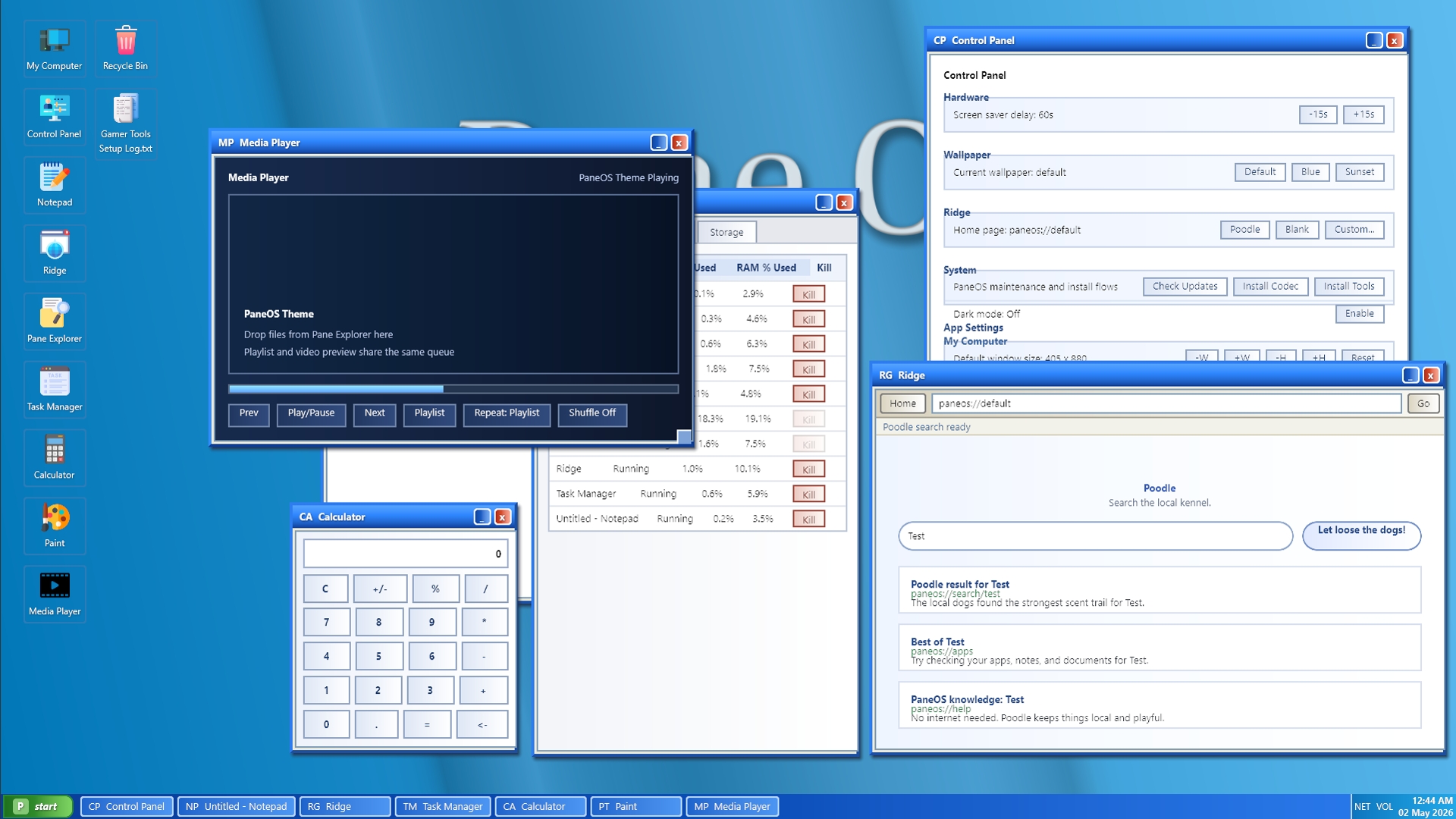
PaneOS has grown from a simple in-game computer overlay into a surprisingly feature-rich little operating system, and it is starting to feel like a real interactive desktop. It is still very much a WIP, with plenty of interface cleanup, polish, bug fixing, and a full pretty pass still to come, but the foundation is now getting exciting.
So far, PaneOS includes a working desktop with movable, resizable windows, desktop shortcuts, a taskbar, app launching, minimizing/restoring, lock/sleep/restart flows, wallpaper support, screensaver behavior, and a growing set of built-in apps. There is also a simulated hardware profile behind the scenes, including RAM, CPU, GPU, storage, internet speed, process usage, app status, and system performance behavior that can feed into apps like Task Manager and About PC.
The current app lineup includes Notepad, Ridge browser, Pane Explorer, Task Manager, About PC, Control Panel, Calculator, Paint, and Media Player. Some apps already have deeper functionality too: Notepad can open/save files, Ridge has a Poodle-style search homepage, Pane Explorer can browse the virtual save archive, Task Manager shows running processes/performance/storage, Control Panel handles settings like wallpaper and dark mode, and Paint has basic drawing support.
One of the biggest pieces added is the Pane Explorer file system. PaneOS now uses a save-backed archive structure with user folders, My Documents, Desktop, Apps, Recycle Bin behavior, file/folder creation, renaming, deleting, restoring, shortcuts, file associations, and app launching from files like .exe, .txt, .url, and .lnk. The desktop is also starting to reflect the virtual Desktop folder, which means files and shortcuts can become part of the in-game computer experience rather than just static UI.
There is also a lot happening under the hood. Apps now have configurable process metadata like executable names, CPU/RAM/GPU usage expectations, storage usage, file associations, startup behavior, and responsiveness states. Backend-only processes such as PaneOS32.exe, Networking.exe, and PvcHost.exe help make the computer feel more alive. The system can simulate high CPU/RAM pressure, not-responding states, memory/performance issues, and app-level status changes.
The UI is still rough in places, and that is expected right now. Some layouts, scaling, icons, dark mode styling, and app interfaces still need a proper cleanup and visual pass. But the exciting part is that PaneOS is no longer just a mock desktop. It is becoming a playful, interactive, game-integrated computer system with real state, files, apps, processes, settings, and room for lots more weird little OS-flavored features next.
Source Code:
GitHub
GitHub - Picklelord/pane-os: S&Box interactive computer with basic apps
S&Box interactive computer with basic apps. Contribute to Picklelord/pane-os development by creating an account on GitHub.
Test Project:
GitHub
GitHub - Picklelord/pane-os-test-project: Test Project for the Pane OS Library Package
Test Project for the Pane OS Library Package. Contribute to Picklelord/pane-os-test-project development by creating an account on GitHub.