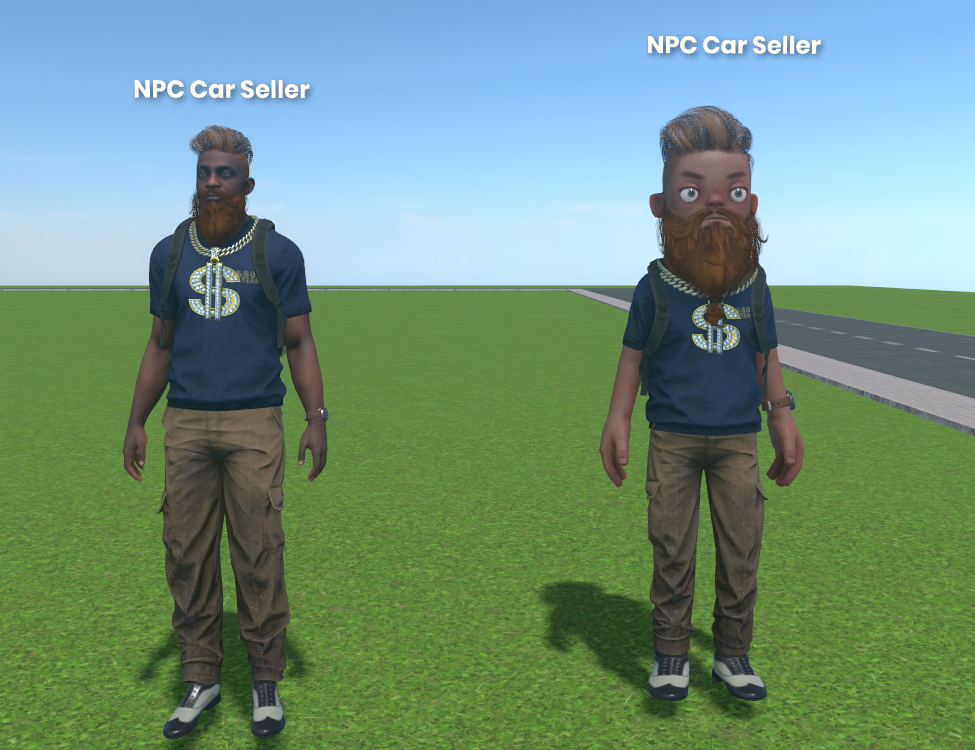
There's a very simple way to sync your avatar's clothing in a multiplayer game. Ofc, I'd like Dresser to do this automatically, but it doesn't work for me personally
1. Simple way
Ok, you probably already have a Player component. You need to be able to drag Dresser (it's default) component into it.
// in Player.cs, it's custom component, just make it and you can name that how you want

[Property] public Dresser Dresser { get; private set; }
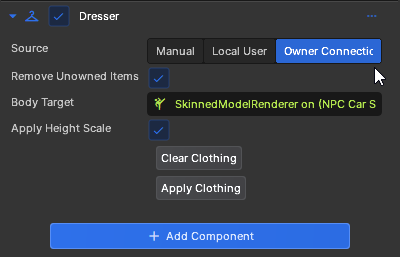
Change Source in Dresser to "Owner Connection"
What is the difference between Owner Connection and Local User?
Owner Connection - The information about the ClothingContainer is retrieved from the owner of the network object (in this case, player).
Local User - regardless of who owns the network object, you will only see your own clothing on other characters.
All that's left is to define a simple method. I remember having issues without Dresser.Clear. You can try it without it.
[Rpc.Broadcast]
private void DressForAll(Dresser dresser)
{
    Log.Info($"[Dresser] Sync {dresser.Network.Owner.SteamId} ({Rpc.Caller.SteamId})");

    Dresser.Clear(); //? probably not needed since we only dress on host and host should spawn with default clothes, but just in case
    Dresser.Apply();
}
We send our Dresser to all players and let them know they can equip it. This will work if clients are allowed to create Network Objects.
2. Server Authority
If clients aren't allowed to create Network Objects, and we're considering Server Authority at all?
In that case, just pass it to the Host (Rpc.Host). It will create the objects for you. Don't forget to check Rpc.Caller to see if it is the owner of the Dresser it is sending.
If you're referring to a large online game with many random players, remember that you can't trust the client! Always verify on the server side (host) what it's sending you, and don't forget about RPC floods.
3. Hard way
You can take a look at Dresser source code yourself and explore in more detail how to configure everything you need through the code.
Dresser.Source = Dresser.ClothingSource.Manual; //! it's really important, we make own releastion
ClothingContainer container = ClothingContainer.CreateFromConnection(Rpc.Caller, false);
Dresser.Clothing = container.Clothing;
await Dresser.Apply();
Final
I hope that someday this guide will become outdated and there will be an easier way to scale this dresser. Feel free to suggest your own solutions, I’d be happy to include them in this guide. Good luck to everyone, and happy coding in s&box!