
Building a 2D top-down game in a 3D engine like Facepunch’s s&box requires bridging the gap between world space physics and 2D sprite rendering. In this guide, we’ll build a custom
SpriteController component using C# and s&box's Scene system. You’ll learn how to transform camera-relative WASD input into smooth 8-way directional movement, map input vectors directly to 4-cardinal sprite animations, and handle collision smoothly without unwanted directional flips when bumping into walls.1. Setting Up Component References & Properties
To make the controller flexible, we expose component references and movement variables to the s&box Inspector using the
[Property] attribute.How it Works:
- Component References: Exposes
CharacterController,SpriteRenderer, andCameraComponentso you can drag-and-drop them in the Scene Inspector. - Movement Variables: Exposes movement speeds and acceleration for real-time tweaking.
- Automatic Fallbacks:
OnStart()automatically acquires missing components on the sameGameObjectif they aren't manually assigned in the Inspector.
[Property, Group( "Components" )] public CharacterController Controller { get; set; }
[Property, Group( "Components" )] public SpriteRenderer SpriteRenderer { get; set; }
[Property, Group( "Components" )] public CameraComponent TargetCamera { get; set; }

[Property, Group( "Movement Settings" )] public float WalkSpeed { get; set; } = 150f;
[Property, Group( "Movement Settings" )] public float RunSpeed { get; set; } = 250f;
[Property, Group( "Movement Settings" )] public float Acceleration { get; set; } = 10f;

protected override void OnStart()
{
	// Auto-acquire components if missing
	Controller ??= Components.Get<CharacterController>();
	SpriteRenderer ??= Components.Get<SpriteRenderer>();
	TargetCamera ??= Scene.GetAllComponents<CameraComponent>().FirstOrDefault();

	// Load fallback sprite resource if unassigned
	if ( SpriteRenderer != null && SpriteRenderer.Sprite == null )
	{
		SpriteRenderer.Sprite = ResourceLibrary.Get<Sprite>( "sprites/[name].sprite" );
	}
}2. Calculating Camera-Relative Direction (CalculateWishDir)
Raw WASD input assumes fixed world coordinates. To ensure movement aligns with where the player's camera is pointing, we project input vectors onto the camera's orientation.
How it Works
- Reads
Input.AnalogMovewhereXcorresponds to W/S (Forward/Backward) andYcorresponds to A/D (Left/Right). - Projects the camera's
ForwardandRightvectors onto the horizontal ground plane by zeroing out the Z-axis (.WithZ( 0 ).Normal). - Scales the camera vectors by input and returns a normalized direction vector.
private Vector3 CalculateWishDir()
{
	Vector3 moveInput = Input.AnalogMove;
	Vector3 wishDir = Vector3.Zero;

	if ( TargetCamera != null )
	{
		// Flatten camera directions onto the horizontal XY plane
		Vector3 camForward = TargetCamera.WorldRotation.Forward.WithZ( 0 ).Normal;
		Vector3 camRight = TargetCamera.WorldRotation.Right.WithZ( 0 ).Normal;

		// Calculate world direction relative to camera facing angle
		wishDir = (camForward * moveInput.x) - (camRight * moveInput.y);
	}
	else
	{
		// Fallback for fixed 2D world projection
		wishDir = new Vector3( moveInput.x, -moveInput.y, 0f );
	}

	return wishDir.IsNearZeroLength ? Vector3.Zero : wishDir.Normal;
}
3. Applying Physics & Character Movement (UpdateMovement)
Once we know the intended direction (
wishDir), we pass it to the s&box CharacterController along with acceleration and gravity calculations.How it Works:
- Checks if the player is holding the
"Run"key to toggle betweenRunSpeedandWalkSpeed. - Uses
Vector3.Lerpto smoothly ramp velocity based onAcceleration * Time.Delta. - Checks
Controller.IsOnGroundto applyScene.PhysicsWorld.Gravitywhen airborne. - Executes
Controller.Move()to perform bounding-box collision sweeps against map geometry.
private void UpdateMovement( Vector3 wishDir )
{
	if ( Controller == null ) return;

	// Determine target speed based on Sprint input
	float targetSpeed = Input.Down( "Run" ) ? RunSpeed : WalkSpeed;
	Vector3 targetVelocity = wishDir * targetSpeed;

	// Smoothly interpolate horizontal movement
	Vector3 currentVel = Controller.Velocity;
	Vector3 horizontalVel = new Vector3( currentVel.x, currentVel.y, 0 );
	horizontalVel = Vector3.Lerp( horizontalVel, targetVelocity, Time.Delta * Acceleration );

	// Apply gravity when falling
	float currentZ = currentVel.z;
	if ( !Controller.IsOnGround )
	{
		currentZ += Scene.PhysicsWorld.Gravity.z * Time.Delta;
	}
	else
	{
		currentZ = 0;
	}

	Controller.Velocity = horizontalVel.WithZ( currentZ );
	Controller.Move();
}
4. Mapping Input Vectors to Directional Facing (UpdateFacingDirection)
To determine which direction the 2D sprite should face (
Up, Down, Left, Right), we analyze the components of the horizontal input vector.How it Works
- Filters out minor analog stick drift using a minimum threshold (
LengthSquared < 0.001f). - Compares
MathF.Abs(x)againstMathF.Abs(y)to determine whether the movement is primarily vertical or horizontal. - Updates
currentDirectionenum to store the character's facing orientation even after stopping.
private enum Direction { Down, Up, Left, Right }
private Direction currentDirection = Direction.Down;

private void UpdateFacingDirection( Vector3 inputVector )
{
	if ( inputVector.LengthSquared < 0.001f ) return;

	// Dominant Vertical vs Horizontal check
	if ( MathF.Abs( inputVector.x ) > MathF.Abs( inputVector.y ) )
	{
		currentDirection = inputVector.x > 0 ? Direction.Up : Direction.Down;
	}
	else
	{
		currentDirection = inputVector.y < 0 ? Direction.Left : Direction.Right;
	}
}
5. Animation State Transitions & Playback Safeguards (UpdateSpriteAnimation)
We trigger animations based on intended player input (
wishDir) rather than physical velocity. This prevents the character sprite from rapidly flipping or resetting into an idle animation while running continuously into walls.How it Works
- Checks if
wishDircontains intentional input. - Formats string sequence names matching your
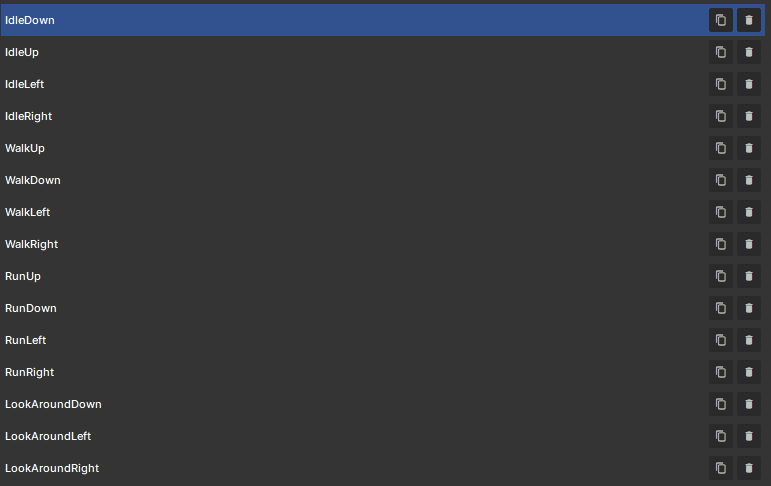
.spriteasset conventions (e.g.,WalkUp,RunLeft,IdleDown). - Uses
ChangeAnimation()to track state changes and ensureSpriteRenderer.PlayAnimation()is only invoked when changing sequences, preventing animation frame resets on every tick.
private string activeSequence = string.Empty;

private void UpdateSpriteAnimation( Vector3 wishDir )
{
	if ( SpriteRenderer == null || SpriteRenderer.Sprite == null ) return;

	bool isAttemptingToMove = !wishDir.IsNearZeroLength;
	bool isSprinting = Input.Down( "Run" );

	string targetSequence;

	if ( isAttemptingToMove )
	{
		UpdateFacingDirection( wishDir );
		string action = isSprinting ? "Run" : "Walk";
		targetSequence = $"{action}{currentDirection}";
	}
	else
	{
		targetSequence = $"Idle{currentDirection}";
	}

	ChangeAnimation( targetSequence );
}

private void ChangeAnimation( string sequenceName )
{
	// Guard clause: avoid re-starting sequence if already playing
	if ( activeSequence == sequenceName ) return;

	activeSequence = sequenceName;
	SpriteRenderer.PlayAnimation( sequenceName );
}
Conclusion:
The
SpriteController implementation for s&box provides a foundation for top-down 2D movement and directional sprite animation state management.Key Technical Takeaways
- Camera-Relative Movement: By projecting
Input.AnalogMoveonto the camera's ground-plane directional vectors (ForwardandRightwith zeroed-out Z values), movement directions align with player perspective. - Input-Driven State Machine: Animation states derive directly from intended player input (
wishDir) rather than physical velocity (Controller.Velocity). This prevents directional flickering and false-idle states when pushing into solid physics geometry. - Performance Safeguards: Guarding
SpriteRenderer.PlayAnimation()behind active sequence tracking (activeSequence == sequenceName) ensures frame progression isn't reset on every update tick.
Full Code:
using Sandbox;
using System;
/// <summary>
/// Handles 2D sprite movement, top-down camera projection, direction mapping,
/// and automated state animation transitions for an sandbox character.
/// </summary>
public sealed class SpriteController : Component
{
// =========================================================================
// COMPONENT REFERENCES & PROPERTIES
// =========================================================================
[Property, Group( "Components" )] public CharacterController Controller { get; set; }
[Property, Group( "Components" )] public SpriteRenderer SpriteRenderer { get; set; }
[Property, Group( "Components" )] public CameraComponent TargetCamera { get; set; }
[Property, Group( "Movement Settings" )] public float WalkSpeed { get; set; } = 150f;
[Property, Group( "Movement Settings" )] public float RunSpeed { get; set; } = 250f;
[Property, Group( "Movement Settings" )] public float Acceleration { get; set; } = 10f;
// Path to the primary .sprite asset containing sequences (WalkUp, IdleDown, etc.)
private const string SpriteResourcePath = "sprites/[name].sprite";
// Enum matching the cardinal direction suffix used in sprite animation sequences
private enum Direction { Down, Up, Left, Right }
private Direction currentDirection = Direction.Down;
// Animation state tracking
private string activeSequence = string.Empty;
// Expose current character velocity for external debug/HUD scripts
public Vector3 Velocity => Controller?.Velocity ?? Vector3.Zero;
// =========================================================================
// INITIALIZATION
// =========================================================================
protected override void OnStart()
{
// Automatically acquire necessary components on the same GameObject if unassigned in Inspector
Controller ??= Components.Get<CharacterController>();
SpriteRenderer ??= Components.Get<SpriteRenderer>();
TargetCamera ??= Scene.GetAllComponents<CameraComponent>().FirstOrDefault();
// Load default sprite resource if none is currently assigned
if ( SpriteRenderer != null && SpriteRenderer.Sprite == null )
{
SpriteRenderer.Sprite = ResourceLibrary.Get<Sprite>( SpriteResourcePath );
}
}
// =========================================================================
// ENGINE UPDATE LOOP
// =========================================================================
protected override void OnUpdate()
{
// 1. Calculate the player's intended direction in world/camera space
Vector3 wishDir = CalculateWishDir();
// 2. Apply movement physics to the CharacterController
UpdateMovement( wishDir );
// 3. Update active animation sequence based on input and facing direction
UpdateSpriteAnimation( wishDir );
}
// =========================================================================
// MOVEMENT CALCULATIONS
// =========================================================================
/// <summary>
/// Translates raw WASD/stick input into a normalized world-space vector relative to camera rotation.
/// </summary>
private Vector3 CalculateWishDir()
{
// Input.AnalogMove: X = W/S (Forward/Back), Y = A/D (Left/Right)
Vector3 moveInput = Input.AnalogMove;
Vector3 wishDir = Vector3.Zero;
if ( TargetCamera != null )
{
// Project camera directions onto the horizontal XY ground plane (ignoring Z elevation)
Vector3 camForward = TargetCamera.WorldRotation.Forward.WithZ( 0 ).Normal;
Vector3 camRight = TargetCamera.WorldRotation.Right.WithZ( 0 ).Normal;
// Construct movement relative to camera orientation
wishDir = (camForward * moveInput.x) - (camRight * moveInput.y);
}
else
{
// Direct world-space fallback if no camera component is linked
wishDir = new Vector3( moveInput.x, -moveInput.y, 0f );
}
// Return zero vector or normalized vector to ensure consistent movement speed diagonally
return wishDir.IsNearZeroLength ? Vector3.Zero : wishDir.Normal;
}
/// <summary>
/// Applies velocity, acceleration, and gravity to the s&box CharacterController.
/// </summary>
private void UpdateMovement( Vector3 wishDir )
{
if ( Controller == null ) return;
// Select speed based on sprint key ("Run" action)
float targetSpeed = Input.Down( "Run" ) ? RunSpeed : WalkSpeed;
Vector3 targetVelocity = wishDir * targetSpeed;
// Smoothly interpolate horizontal movement velocity
Vector3 currentVel = Controller.Velocity;
Vector3 horizontalVel = new Vector3( currentVel.x, currentVel.y, 0 );
horizontalVel = Vector3.Lerp( horizontalVel, targetVelocity, Time.Delta * Acceleration );
// Apply gravity step when airborne
float currentZ = currentVel.z;
if ( !Controller.IsOnGround )
{
currentZ += Scene.PhysicsWorld.Gravity.z * Time.Delta;
}
else
{
currentZ = 0;
}
// Update physics velocity and execute CharacterController movement collision checks
Controller.Velocity = horizontalVel.WithZ( currentZ );
Controller.Move();
}
// =========================================================================
// SPRITE ANIMATION STATE MACHINE
// =========================================================================
/// <summary>
/// Selects and plays animation sequences based on intentional input (wishDir) rather than physical velocity.
/// This prevents sprite direction flipping when pushing into wall collisions.
/// </summary>
private void UpdateSpriteAnimation( Vector3 wishDir )
{
if ( SpriteRenderer == null ) return;
// Fallback check: ensure sprite asset is valid
if ( SpriteRenderer.Sprite == null )
{
SpriteRenderer.Sprite = ResourceLibrary.Get<Sprite>( SpriteResourcePath );
if ( SpriteRenderer.Sprite == null ) return;
}
// Check if player intends to move (prevents wall collision false-idles)
bool isAttemptingToMove = !wishDir.IsNearZeroLength;
bool isSprinting = Input.Down( "Run" );
string targetSequence;
if ( isAttemptingToMove )
{
// Determine cardinal direction using raw input vector
UpdateFacingDirection( wishDir );
string action = isSprinting ? "Run" : "Walk";
targetSequence = $"{action}{currentDirection}";
}
else
{
// Standstill state: Play simple Idle animation for the current facing direction
targetSequence = $"Idle{currentDirection}";
}
// Trigger sequence state change
ChangeAnimation( targetSequence );
}
/// <summary>
/// Evaluates input direction against camera projection axes to update cardinal facing direction.
/// </summary>
private void UpdateFacingDirection( Vector3 inputVector )
{
// 1. Ignore negligible input/stick drift to prevent unintentional direction flips
if ( inputVector.LengthSquared < 0.001f ) return;
// 2. Compare absolute X (Forward/Up) vs absolute Y (Lateral/Side) movement
if ( MathF.Abs( inputVector.x ) > MathF.Abs( inputVector.y ) )
{
// +X = Moving Up/Forward, -X = Moving Down/Backward
currentDirection = inputVector.x > 0 ? Direction.Up : Direction.Down;
}
else
{
// In camera space: -Y = Moving Left, +Y = Moving Right
currentDirection = inputVector.y < 0 ? Direction.Left : Direction.Right;
}
}
/// <summary>
/// Safely calls SpriteRenderer.PlayAnimation only when switching to a NEW sequence name.
/// Prevents resetting frame progression on every tick.
/// </summary>
private void ChangeAnimation( string sequenceName )
{
if ( activeSequence == sequenceName ) return;
activeSequence = sequenceName;
SpriteRenderer.PlayAnimation( sequenceName );
}
}