Scene Loading Issue

Started by iRefuse · 4 months ago · 3 replies · 129 views

#1
iRefuse
Member
JoinedFeb 2026 Posts2 Score105
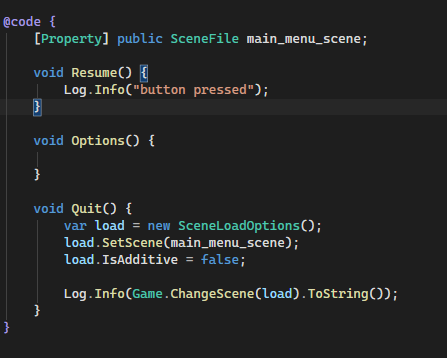
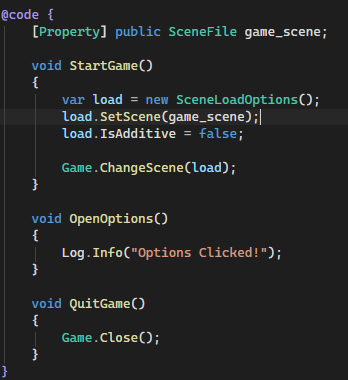
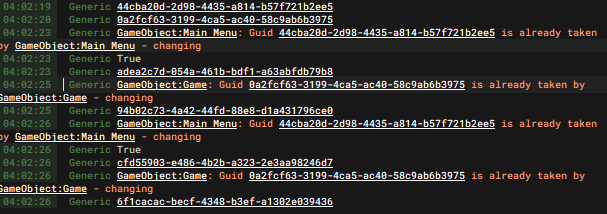
I'm loading a scene using Game and Scene. I'm also trying to Change the scene using Game.ChangeScene. They all work. But the issue is whenever I load a scene twice no matter the method. It gives me these errors. Saying the GUID of Main Menu or Game scenes already exist. Making me believe that there are scenes in the background that are still loaded. I'm not sure why that would be the case. Just want to fix these errors. Any help is appreciated! 
edited 4 months ago#2
code
Member
JoinedMay 2026 Posts19 Score13
It's hard to guess, but your most likely trying to load the scene twice, drop a breakpoint and debug to see where. Also for menu and (most games in 2020+, you should be additivly loading scenes), unless it's a huge game keeping everything in memory is most likely the best case for indie games. 

You need a single authority for scene transitions.
CustomSceneManager if you want to use a singleton.

Also use codeblocks, don't use images. 
edited 4 months ago#3
iRefuse
Member
JoinedFeb 2026 Posts2 Score105
public sealed class Test : Component
{
	[Property]
	public SceneFile new_scene;
	protected override void OnUpdate()
	{
		if (Input.Pressed( "Jump" ))
		{
			Log.Info( "Change scene to: " + new_scene.ResourceName );

			if ( !Game.ActiveScene.IsLoading )
			{
				if ( Game.ActiveScene.Id != new_scene.Id )
				{
					var load = new SceneLoadOptions();
					load.SetScene( new_scene );
					load.IsAdditive = false;
					Game.ChangeScene( load );
				}
			}
		}
	}
}

Console Output:
 07:27:59   Generic Change scene to: game
 07:27:59   Generic Change scene to: main_menu
 07:27:59   Generic GameObject:Main Menu: Guid 44cba20d-2d98-4435-a814-b57f721b2ee5 is already taken by GameObject:Main Menu - changing
 07:27:59   Generic Change scene to: game
 07:27:59   Generic GameObject:Game: Guid 0a2fcf63-3199-4ca5-ac40-58c9ab6b3975 is already taken by GameObject:Game - changing
 07:28:00   Generic Change scene to: main_menu
 07:28:00   Generic GameObject:Main Menu: Guid 44cba20d-2d98-4435-a814-b57f721b2ee5 is already taken by GameObject:Main Menu - changing
 07:28:00   Generic Change scene to: game
 07:28:00   Generic GameObject:Game: Guid 0a2fcf63-3199-4ca5-ac40-58c9ab6b3975 is already taken by GameObject:Game - changing
 07:28:00   Generic Change scene to: main_menu
 07:28:00   Generic GameObject:Main Menu: Guid 44cba20d-2d98-4435-a814-b57f721b2ee5 is already taken by GameObject:Main Menu - changing


edited:
I've tried this out still getting the same error. I'm not understanding why loading or changing a scene twice results in an error. 
What I mean by twice is: Main Menu scene -> Game scene -> Main Menu scene results in an error.


#4
code
Member
JoinedMay 2026 Posts19 Score13
I'm just assuming when you load a scene, the engine could keep old object identity (GUIDs) around longer than expected. So when you go:

Main Menu → Game → Main Menu

you’re not actually replacing state cleanly, you’re reintroducing objects that still exist in memory, so the GUID registry detects duplicates and starts “changing” them to resolve collisions instead of discarding them. For best practice this should be behind a scene state. 

You shouldn't be doing this in a arbitrary component and especially in a update, like mentioned this should be a scene state manager, but if you do want to: 

public sealed class Test : Component
{
	[Property] public SceneFile new_scene;
	bool isChanging;

	protected override void OnUpdate()
	{
		if ( isChanging )
			return;

		if ( Input.Pressed( "Jump" ) )
		{
			if ( Game.ActiveScene.Id == new_scene.Id )
				return;

			isChanging = true;

			var load = new SceneLoadOptions();
			load.SetScene( new_scene );
			load.IsAdditive = false;

			Game.ChangeScene( load );
		}
	}
}

people
Log in to reply
You can't reply if you're not logged in. That would be crazy.