Ask your stupidest, most basic programming questions here.

Started by · one year ago · 39 replies · 4,547 views


Log.Info($"Currently active: {Game.ActiveScene.Name}");
			Scene.LoadFromFile( "scenes/climb.scene" );
Log.Info($"Currently active: {Game.ActiveScene.Name}");this.Scene.Name into console to my climb scene, but even that writes "jump" after the transition, but "climb" when i'm starting in the climb scene. Why does thisLog.Info($"Currently active: {Game.ActiveScene.Name}");
Scene.LoadFromFile( "scenes/climb.scene" );
Log.Info($"Currently active: {Game.ActiveScene.Name}");
give me the name of the "old" scene twice, "jump" in this case? I expect it to print "climb" into the console.
I also tried adding a gameobject with a component that does nothing, but printthis.Scene.Nameinto console to my climb scene, but even that writes "jump" after the transition, but "climb" when i'm starting in the climb scene.
I'm going crazy. Please help me. :pray:
async Task LoadNextLevel( string levelName )
 {
   Scene.LoadFromFile( $"scenes/{levelName}.scene" );
   await Task.DelayRealtimeSeconds(2);
   Log.Info( "ASYNC TASK SUCCESSFUL" );
   Log.Info( $"Currently active: {Game.ActiveScene.Name}" );
}Log.Info($"Currently active: {Game.ActiveScene.Name}");LoadNextLevel("climb");
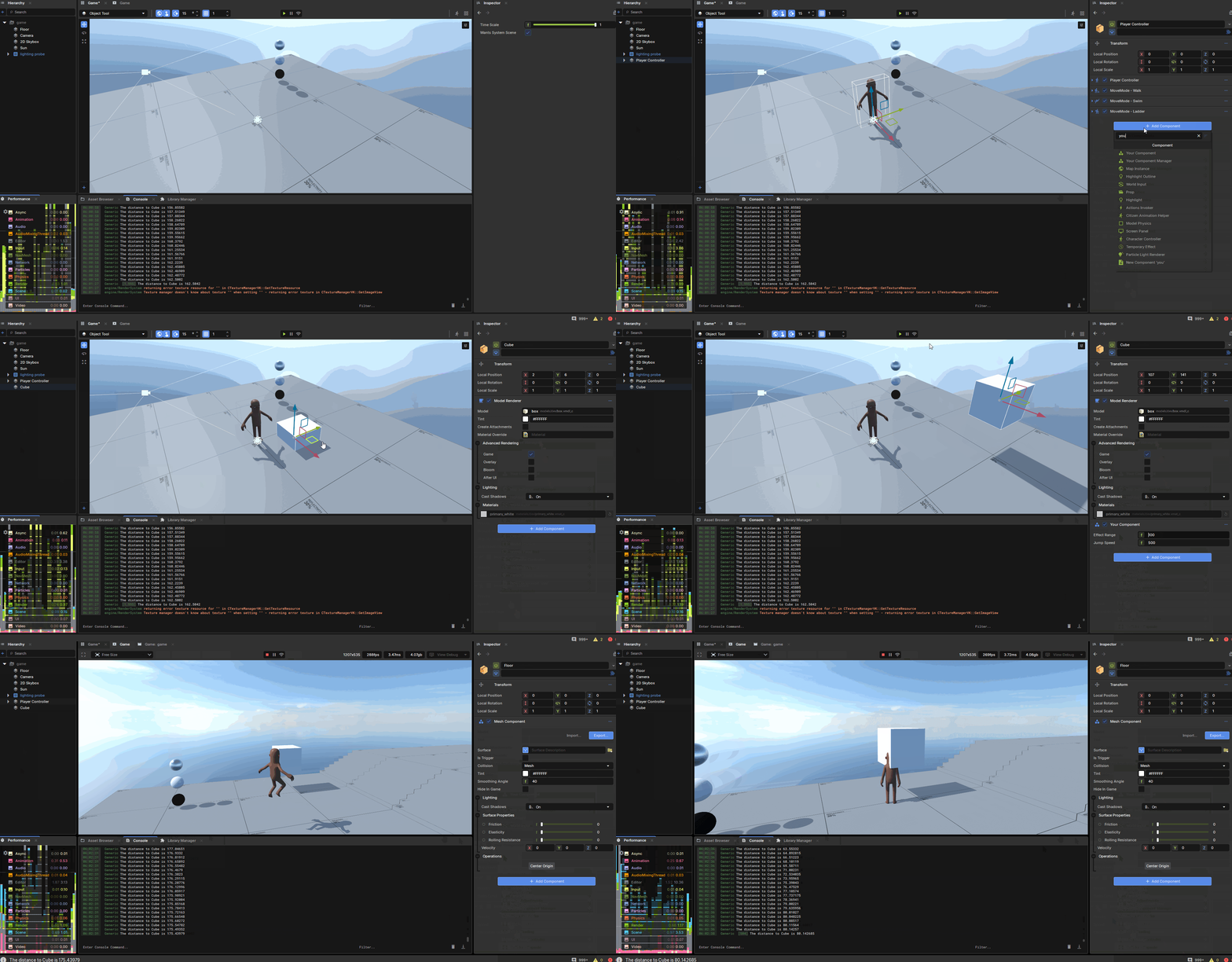
using Sandbox;

/// <summary>
/// This component goes on the player in this example.
/// </summary>
public sealed class YourComponentManager : Component
{
    [Property]
    public PlayerController PlayerController { get; set; }

    // This is our list of components - we set this in OnStart so we don't need to do it again. If you want to add or remove components from this, you'll need to add extra functionality.
    public IEnumerable<YourComponent> MyComponents;

    protected override void OnStart()
    {
       base.OnStart();

       // At the start of the game - get all the 'YourComponent' components and save them in a list we can refer to later.
       MyComponents = Scene.GetAllComponents<YourComponent>();

       foreach ( var component in MyComponents )
       {
          Log.Info( component.GameObject.Name );
       }
    }

    //
    protected override void OnUpdate()
    {
       base.OnUpdate();

       // This is the location of this component (so on the player)
       var myPos = LocalPosition;

       // Go through each component in our list.
       foreach ( var component in MyComponents )
       {
          // The distance between the player and the component.
          var dist = component.LocalPosition - myPos;

          // Print the distance to each game object to the console.
          Log.Info( "The distance to " + component.GameObject.Name + " is " + dist.Length);

          // If the distance between the player and the component is less than the effect range set in the YourComponent, we can do stuff.
          if ( dist.Length <= component.EffectRange )
          {
             // If the player is in range of the component - make the player jump higher. You will need to make sure you reset this in the PlayerController somewhere when they are no longer in range.
             PlayerController.JumpSpeed = component.JumpSpeed;
          }
       }
    }
}using Sandbox;
public sealed class YourComponent : Component
{
// The ComponentManager checks this distance to see if the player is in range.
[Property] public float EffectRange { get; set; }
// This is your component - you can do whatever you want in here.
[Property] public float JumpSpeed { get; set; } = 500.0f;
}

protected override void OnStart()
{
    Log.Info( Screen.Size ); //am unaware of its larger importance, thought might be necessary in context
}

protected override void OnUpdate()
{
    DebugScreen();
}

void DebugScreen()
{
    Graphics.DrawText( //Rect...wut???)
}
protected override void OnUpdate()
{
// code
  base.OnUpdate()
  var dist = myPos - componentPos
  if (dist < 50) { Log.Info("Do Something") }
}public sealed class MyComponentTrigger : Component,Component.ITriggerListener
{
// code
private void OnTriggerEnter( GameObject go )
{
Log.Info($"{go.Name} has entered trigger of {GameObject}")
}
}