trophy 11246
Jan 2023 16 posts
Ask your stupidest, most basic programming questions here.

trophy 318
Aug 2023 80 posts
hey is there a tweening library
trophy 150
Jun 2021 181 posts
@k0fe

i've got one here that i made based off the godot api:
https://github.com/MrBrax/clover_meadows_sbox/blob/main/code/Utilities/TweenManager.cs
delete
Deleted Post
trophy 1545
Jul 2022 103 posts
How do you code
delete
Deleted Post
trophy 318
Aug 2023 80 posts
@Braxen +rep good job mate


Is there any way to tell that Prefab is not an instanced GameObject? 
trophy 2105
Sep 2021 14 posts
How to start doing stuff? I always play with software for a week and then throw it in corner.
trophy 5
Dec 2022 19 posts
I don't know if its basic but like how would one make a random team assigner? would you have the two teams as a float and then give the players a random value of 1 or 2 when they join a game (assuming that 0 would be spectator) or is it more difficult then what I'm thinking? 

edit: Also do forgive me if that is basically all I have to do, I'm new to coding in general and well wanna learn
trophy 3523
Dec 2023 58 posts
How optimised is S&box on it's own and as someone that knows amlost nothing of coding how much worry should I put in optimising my own game? 
trophy 233
Dec 2024 1 post
Turtwiggy 1 Year Ago edited 1 Year Ago
How to implement the right analog stick?  I'm trying to get the AnalogLook values roughly ~ [-1, 1] so that if I hold the right analog right I can smoothly rotate the camera around. 

Input.AnalogMove is a vec3 that seems to return [-1, 1] (this is fine)
Input.AnalogLook seems to return some sort of delta Angles scaled by sensitivity (can you adjust sensitivity in the editor?)

I have a feeling there might problem with my controller setup. I'm using the switch pro controller via steam input, but my Input.ControllerCount is 0, and my Input.GetAnalog(InputAnalog.RightStickX) also seems to also be returning 0. (However, it works fine on the web html5 gamepad tester) 

 🤦‍♂️  I should've tried this earlier, but using betterjoy and masking it as a 360 controller made it work fine.

EditEdit: By fine, I mean the values being returned by Input.AnalogLook seem to be more sensible now.  Input.ControllerCount is 0, and my Input.GetAnalog(InputAnalog.RightStickX) are still 0.

EditEditEdit: Also seems like I needed to update the s&box controller configuration in steam and the buttons that the editor recognizes are keyboard keys bound to buttons. 
 
delete
Deleted Post
trophy 5348
Aug 2024 56 posts
Why does this
Log.Info($"Currently active: {Game.ActiveScene.Name}");
Scene.LoadFromFile( "scenes/climb.scene" );
Log.Info($"Currently active: {Game.ActiveScene.Name}");

give me the name of the "old" scene twice, "jump" in this case? I expect it to print "climb" into the console.

I also tried adding a gameobject with a component that does nothing, but print this.Scene.Name into console to my climb scene, but even that writes "jump" after the transition, but "climb" when i'm starting in the climb scene. 
I'm going crazy. Please help me. :pray:
trophy 1930
Dec 2024 3 posts
Hi there,

I am sitting infront of the Documentation right now,
Competent enough to read,yet end up usually being
even more stupified when trying to comprehend its content.

So "Gameresources" are a cool concept but when should 
I apply it and what should one limit it to assuming the context is that,
I am attempting to make an inventory system or similar with a subset of various items that can be held within.
Sounds like a logical use case to me i am not insane for doing it that way right?
trophy 1320
Oct 2021 148 posts
Why does this
Log.Info($"Currently active: {Game.ActiveScene.Name}");
Scene.LoadFromFile( "scenes/climb.scene" );
Log.Info($"Currently active: {Game.ActiveScene.Name}");

give me the name of the "old" scene twice, "jump" in this case? I expect it to print "climb" into the console.

I also tried adding a gameobject with a component that does nothing, but print this.Scene.Name into console to my climb scene, but even that writes "jump" after the transition, but "climb" when i'm starting in the climb scene. 
I'm going crazy. Please help me. :pray:
Try asyncing the scene.loadfromfile, log.info is ran immediately after the scene.loadfromfile, where the scene is still loading into runtime.
trophy 5348
Aug 2024 56 posts
gasleet 12 Months Ago edited 11 Months Ago
Edit:  I realised this is better suited for "Help". Sorry!

Thanks for your answer! 🙂
I now created this async task:
async Task LoadNextLevel( string levelName )
 {
   Scene.LoadFromFile( $"scenes/{levelName}.scene" );
   await Task.DelayRealtimeSeconds(2);
   Log.Info( "ASYNC TASK SUCCESSFUL" );
   Log.Info( $"Currently active: {Game.ActiveScene.Name}" );
 }

and call this upon collision:
Log.Info($"Currently active: {Game.ActiveScene.Name}");
LoadNextLevel("climb");

I also gave my player a DontDestroyOnLoad flag, because he gets replaced when a new scene is loaded, which caused the async task to not be completed, but this bugs him&the scene out - Anyway i still got  
01:03:51   Generic ASYNC TASK SUCCESSFUL
01:03:51   Generic Currently active: Jump
in my Console. 

I have the bad feeling i'm doing something fundamentally wrong here, i also implemented the async task poorly 😓. I just want to advance levels: If level 1, load level 2. If level 2, load level 3. Are scenes the wrong way of doing this entirely?
trophy 120
Nov 2023 7 posts
Absolute baby programmer, here.

I'm trying to have the PlayerController "find" every GameObject that contains a specific Component in a Scene. I essentially want to measure the distance from the player against each object, and use the closest one.

Is Scene.GetAllComponents(ComponentName) the way to start? Can I reference properties (like floats) that are in the component, and use them for the PlayerController for instance to modify speed? I.E. When PlayerController is near Object A, Acceleration is 500, but near Object B, it's 100?

Asking because I'm ramming my head against wall "thinking it's possible", don't know if what I have in mind is beyond programs limits, or just my own.
trophy 1130
Feb 2023 82 posts
fishy 10 Months Ago edited 10 Months Ago
It's definitely possible. There's also going to be a few different ways you can do it - the best way will come down to your individual use case and how many components you need to track, etc.

using Sandbox;

/// <summary>
/// This component goes on the player in this example.
/// </summary>
public sealed class YourComponentManager : Component
{
    [Property]
    public PlayerController PlayerController { get; set; }
    
    // This is our list of components - we set this in OnStart so we don't need to do it again. If you want to add or remove components from this, you'll need to add extra functionality.
    public IEnumerable<YourComponent> MyComponents;
    
    protected override void OnStart()
    {
       base.OnStart();

       // At the start of the game - get all the 'YourComponent' components and save them in a list we can refer to later.
       MyComponents = Scene.GetAllComponents<YourComponent>();

       foreach ( var component in MyComponents )
       {
          Log.Info( component.GameObject.Name );
       }
    }

    // 
    protected override void OnUpdate()
    {
       base.OnUpdate();

       // This is the location of this component (so on the player)
       var myPos = LocalPosition;
       
       // Go through each component in our list.
       foreach ( var component in MyComponents )
       {
          // The distance between the player and the component.
          var dist = component.LocalPosition - myPos;
          
          // Print the distance to each game object to the console.
          Log.Info( "The distance to " + component.GameObject.Name + " is " + dist.Length);

          // If the distance between the player and the component is less than the effect range set in the YourComponent, we can do stuff.
          if ( dist.Length <= component.EffectRange )
          {
             // If the player is in range of the component - make the player jump higher. You will need to make sure you reset this in the PlayerController somewhere when they are no longer in range.
             PlayerController.JumpSpeed = component.JumpSpeed;
          }
       }
    }
}
This will get all the components when the game starts and save a list of them in the component. Every frame, it will then cycle through them and check if any of them are within range of the player.

using Sandbox;

public sealed class YourComponent : Component
{
    // The ComponentManager checks this distance to see if the player is in range.
    [Property] public float EffectRange { get; set; }
    
    // This is your component - you can do whatever you want in here.
    [Property] public float JumpSpeed { get; set; } = 500.0f;
}
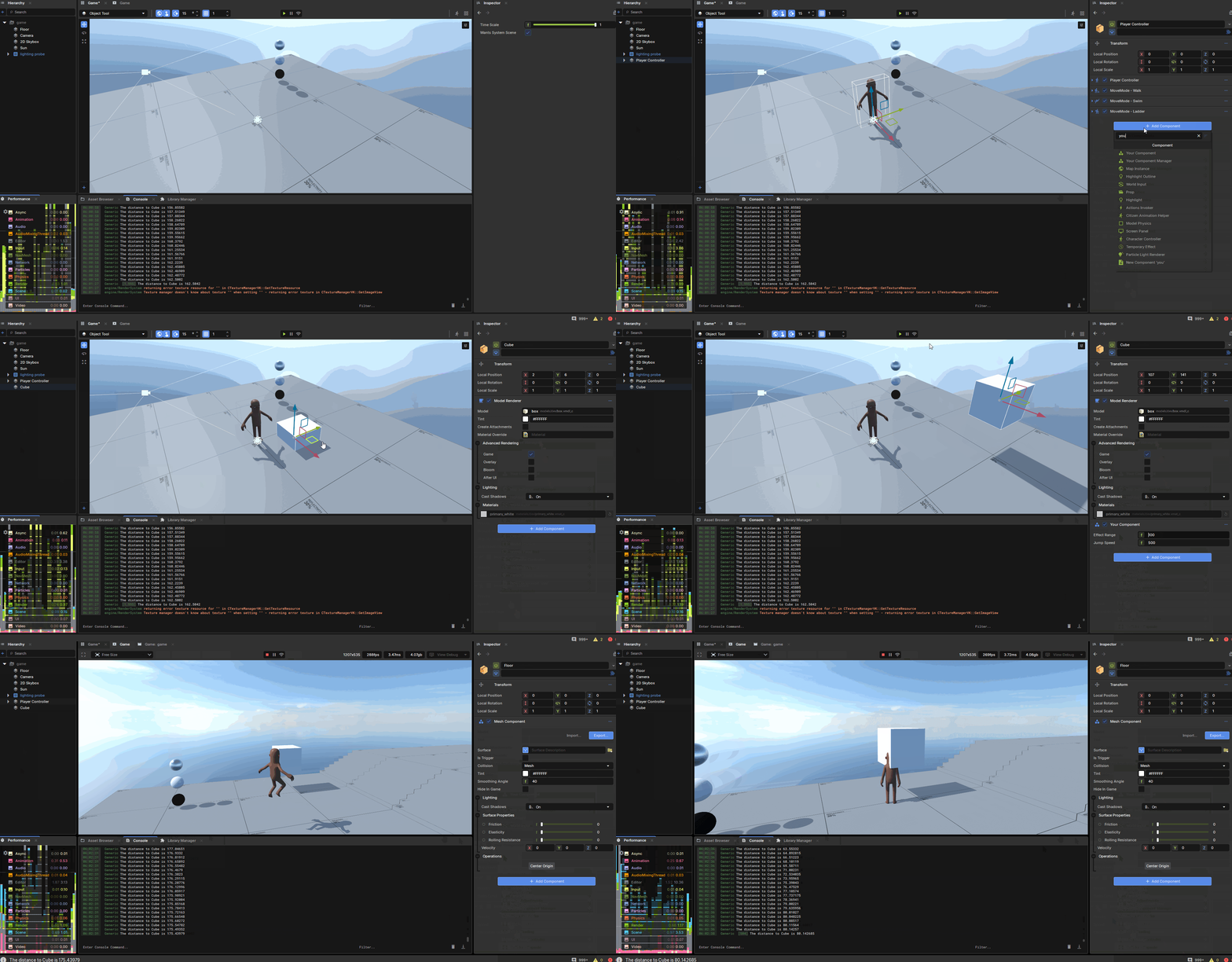
This is the component that they search for. - and in this case changes the jump height of the player.

This isn't the most performant stuff but it'll get you started. Ideally you don't want to have to cycle through a potentially large list and check the distance to the player every frame - but you can build off from this. Maybe you can look into adding a sphere trigger to the player that searches for nearby components, and you only track the distance if they are within the range of that sphere trigger.
edited:
That's it 'in action'.
trophy 120
Nov 2023 7 posts
UnsocialBirdman 7 Months Ago edited 5 Months Ago
Still absolute baby programmer, here.

A lot of how I am learning is through trial and error, and while I can see very clear results when I change a PlayerSpeed value, I don't have much feedback on more vague properties I've been experimenting with (I.E. Vector3.Direction()), whether it's set up right - working in the background.

What I want to do is create a debug panel/graphic/textbox, that lists these abstract values changing in real time, that which might help me see what works and what doesn't. How might I do that? I'm absentmindedly poking Graphics.DrawText() with a stick.

Rough approximation of my script ongoing:

protected override void OnStart()
{
    Log.Info( Screen.Size ); //am unaware of its larger importance, thought might be necessary in context
}

protected override void OnUpdate()
{
    DebugScreen();
}

void DebugScreen()
{
    Graphics.DrawText( //Rect...wut???)
}
A big thing that's tripping me up is this part:

static
Rect DrawText( Rect position, string text, Color color, string fontFamily, float fontSize, float fontWeight, TextFlag flags ) 

Namely, how "Rect position" translates when inputting I assume a Vector2 number. 
I'm always running into the issue that I haven't referenced a member up in the [Property] tab, so my gut says I'm missing something very important up there that I need to call for DrawText to even work.
Did I answer my own question? Do I need a [Property] pertaining to a Vector2?

Also for future reference how would I post my script like how fishy did it above me? All color-coded and fancy. Apparently it does this automatically.
trophy 120
Nov 2023 7 posts
How do I delete my last stupid question?

I really do want to learn, so my first response in a tangent should not be "plz write me a full script." Apologies.

I've since found a video pertaining to the creation of a S&box UI interface, so if anyone's got the same questions as me, they've corrected a lot of my faulty understandings in it.
trophy 0
Aug 2025 7 posts
deluxulous ✌ 7 Months Ago edited 7 Months Ago
Hi everyone. I'm just about brand new to game development (I have some limited 'skiddie' experience in GarrysMod), and I'm pretty green at programming as well. I have had a decent number of years experience primarily in Python and using SQL but haven't delved too deeply into anything in particular. I apologize if I misuse any terminology or concepts. I picked up C# programming recently because s&box interests me as a concept and I think it has a lot of potential. I've already been learning a lot!

I was wondering if there is a "most efficient" way for doing distance checks against other objects (and similar cases for checks that need to be done on a regular or frame by frame basis). The example by Fishy above is great, but it got me thinking about triggers. What's the preferred method from a resource standpoint for these checks to be done? Assume this would be a large scale number of objects, for example checking if objects are in range to be picked up.

I assume the trigger is still checking and updating every frame the same as OnUpdate() so I don't believe that would be a factor.

Ex: Instead of using something like:
protected override void OnUpdate()
{
// code
  base.OnUpdate()
  var dist = myPos - componentPos
  if (dist < 50) { Log.Info("Do Something") }
}

Would it be more resource efficient to use a trigger with ITriggerListener? Is it expensive to use many triggers vs. OnUpdate calls?

public sealed class MyComponentTrigger : Component,Component.ITriggerListener
{
  // code
  private void OnTriggerEnter( GameObject go )
  {
     Log.Info($"{go.Name} has entered trigger of {GameObject}")
  }
}


trophy 135
Oct 2023 17 posts
deluxulous, all physical function are stress for update calling. Use trigger or raycast for check a one call functions. For example - hit for enemy, interactive objects, can place at ground or another object like supermarket sim for rack. At other cases use Vector3.Distance, your method. Maybe you want check enemy vision a player, use vector3.dot. Generally - use physical cases for single calling, and use default vector3 process for update logic. Sorry for my english, he's bad, but i hope, to helped you.
trophy 0
Aug 2025 7 posts
That does make sense to me. Thank you for your response, it is much appreciated.
trophy 120
Nov 2023 7 posts
UnsocialBirdman 3 Months Ago edited 3 Months Ago
trophy 300
Jan 2023 4 posts
R@ 2 Months Ago edited 38 Days Ago
I have tons of code I want to test on the server. I know about converting to .sent, and publishing the specific entity or map and that works, but I need it all to boot on the server to validate code and ensure I comprehend networking/rpcs for this engine. I don't want to convert project to a standalone, It is a mod for S&box, not a full game. I know Actiongraph works but I didn't go that route for S&box. I don't see Addon Code support mentioned on Roadmap, does it work already and I just can't figure it out?

- Okay so I finally figured out you don't need to create an addon project. Instead just run standalone, add the packages, call what you need in the scene. If you have experience with other game servers, It will throw you off a bit but it's actually close to Enfusion.
trophy 75
Mar 2026 1 post
How do I setup simple scene (let's say `Flatgrass`) for 4 players (multi). Like: start hosting server and I want to connect to it for up to 4 players.
trophy 1320
Oct 2021 148 posts
doesn't require coding @zbigniewcebula. Just startup a party at the main menu with your friends, and then goto the games tab and pull up sandbox and select the flatgrass map, should be enough.
trophy 705
Sep 2025 7 posts
Hey, so I'm struggling to understand how to use the Action Graph. Are there any good resources out there to help me learn it?
trophy 10
Jul 2024 2 posts
Action Graph is getting deprecated, so it's probably better to just actually write C# code or learn Doo.
trophy 705
Sep 2025 7 posts
aww i hope something good replaces it
people
Log in to reply
You can't reply if you're not logged in. That would be crazy.