I am noticing that even when I disable interpolation, I am getting extreme latency when running the game locally between the host and client, I tested this by making both windows the same size and comparing the position of a moving game object that had it's interpolation disabled, then I took a screen shot and compared the screen position of the ball on both clients, and I am getting a significant difference, something in the range of 300ms of latency. I am struggling to even make a basic game like pong feel good when running LOCALLY and have no idea how I am supposed to make a more complex multiplayer game with decent performance.
This is impossible to answer; there’s too many variables involved without seeing how your networking and simulation are set up or your code, you have to be more specific or debug to a point that you have some entry into what your code is doing.
I am working on making some more robust bench marks in an empty project. Probably should have put off posting until then but I wanted to see if others were experiencing the same issue first.
edited:
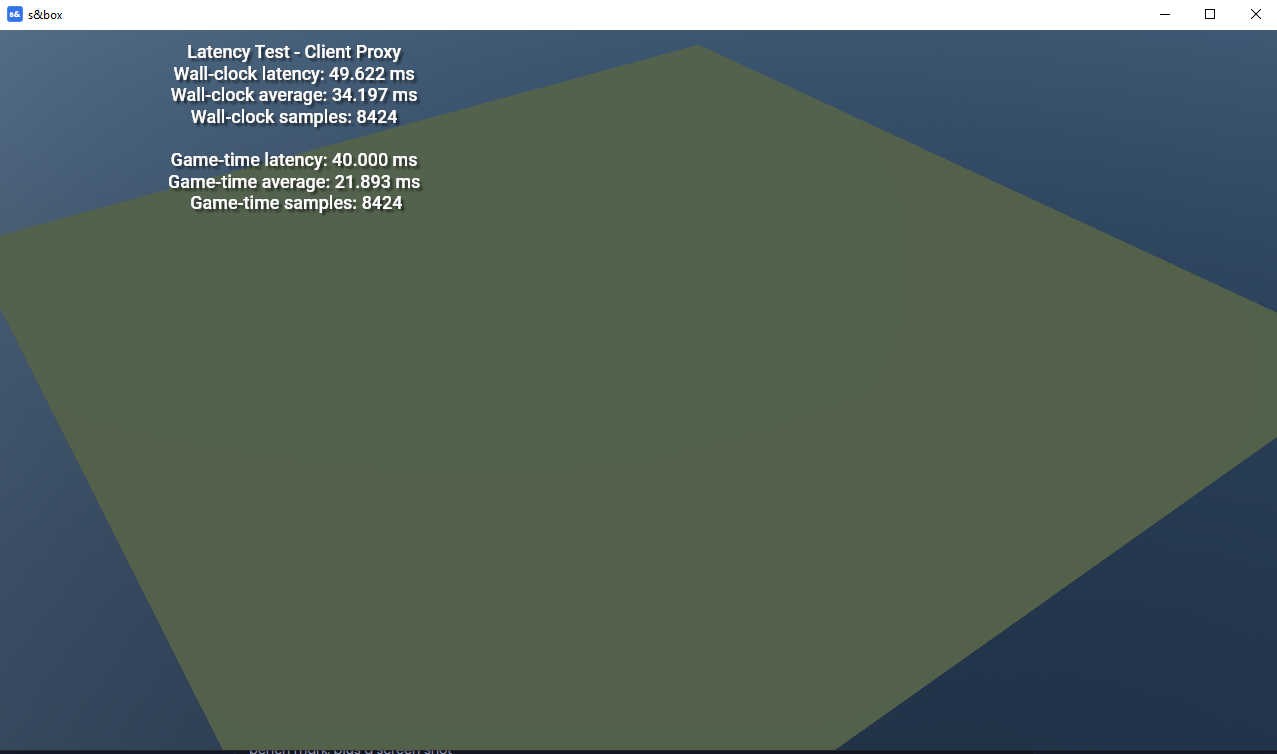
I may have done my math wrong to get that 300ms number. but I am still getting like 30+ ms latency. Here is my bench mark, plus a screen shot. I am going to have to do some visual test and see how those go. This is testing the latency for Sync properties, I should probably do some test with RPCs next. Also if anyone happens to have any good extrapolation advice for objects which rarely change their velocity that they could share would be very helpful.
using Sandbox;
using System.Diagnostics;

/// <summary>
/// Minimal sync latency test.
///
/// Usage:
/// 1. Create a new minimal project.
/// 2. Create a new empty GameObject.
/// 3. Add this component to it.
/// 4. Make the GameObject a network object in the editor (not network snapshot!).
/// 5. Start the game.
/// 6. Begin hosting.
/// 7. Connect a second client on the same machine.
/// </summary>
public sealed class LatencyTestSuite : Component
{
	[Sync( SyncFlags.FromHost ), Change( nameof( OnHostTimestampChanged ) )]
	public long HostTimestamp { get; set; }

	[Sync( SyncFlags.FromHost ), Change( nameof( OnHostGameTimeChanged ) )]
	public double HostGameTime { get; set; }

	private double lastWallClockLatencyMs;
	private double lastGameTimeLatencyMs;

	private int wallClockSampleCount;
	private double wallClockLatencyTotalMs;

	private int gameTimeSampleCount;
	private double gameTimeLatencyTotalMs;

	protected override void OnUpdate()
	{
		if ( Input.Pressed( "Attack1" ) )
		{
			wallClockSampleCount = 0;
			wallClockLatencyTotalMs = 0;
			gameTimeSampleCount = 0;
			gameTimeLatencyTotalMs = 0;
		}
	}

	protected override void OnFixedUpdate()
	{
		if ( IsProxy )
		{
			DrawClientOverlay();
			return;
		}

		HostTimestamp = Stopwatch.GetTimestamp();
		HostGameTime = Time.NowDouble;
	}

	private void OnHostTimestampChanged( long oldValue, long newValue )
	{
		if ( !IsProxy )
			return;

		lastWallClockLatencyMs = TimestampDeltaMilliseconds(
			newValue,
			Stopwatch.GetTimestamp()
		);

		wallClockSampleCount++;
		wallClockLatencyTotalMs += lastWallClockLatencyMs;
	}

	private void OnHostGameTimeChanged( double oldValue, double newValue )
	{
		if ( !IsProxy )
			return;

		lastGameTimeLatencyMs = (Time.NowDouble - newValue) * 1000.0;

		gameTimeSampleCount++;
		gameTimeLatencyTotalMs += lastGameTimeLatencyMs;
	}

	private static double TimestampDeltaMilliseconds( long startTimestamp, long endTimestamp )
	{
		return (endTimestamp - startTimestamp) * 1000.0 / Stopwatch.Frequency;
	}

	private void DrawClientOverlay()
	{
		var liveWallClockLatencyMs = TimestampDeltaMilliseconds(
			HostTimestamp,
			Stopwatch.GetTimestamp()
		);

		var liveGameTimeLatencyMs = (Time.NowDouble - HostGameTime) * 1000.0;

		var averageWallClockLatencyMs = wallClockSampleCount > 0
			? wallClockLatencyTotalMs / wallClockSampleCount
			: 0.0;

		var averageGameTimeLatencyMs = gameTimeSampleCount > 0
			? gameTimeLatencyTotalMs / gameTimeSampleCount
			: 0.0;

		DebugOverlay.ScreenText(
			new Vector2( 300, 100 ),
			$"""
			Latency Test - Client Proxy
			Wall-clock latency: {liveWallClockLatencyMs:F3} ms
			Wall-clock average: {averageWallClockLatencyMs:F3} ms
			Wall-clock samples: {wallClockSampleCount}

			Game-time latency: {liveGameTimeLatencyMs:F3} ms
			Game-time average: {averageGameTimeLatencyMs:F3} ms
			Game-time samples: {gameTimeSampleCount}
			""",
			18
		);
	}
}
edited:
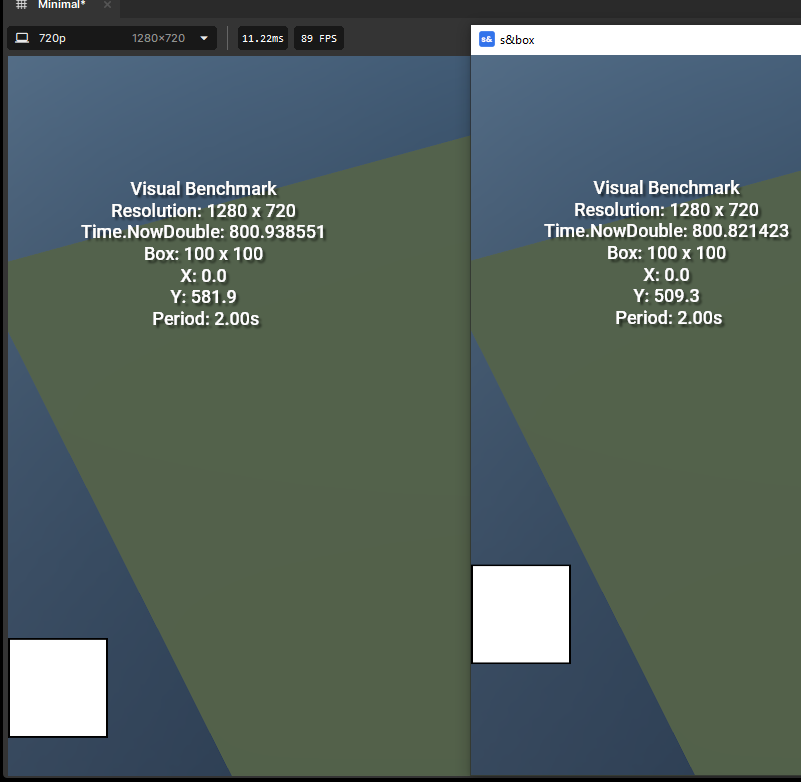
Here is another benchmark. dosn't actually send anything at all over the network this time, just a visual comparison of the game clocks. This benchmark was written fully by AI just for transparency sake, but this still seems to show what I was experiencing in my project. You need to make sure the windows have the same resolution so you can compare just how bad the offset is.This shows a ~117ms latency, why? locally, shouldn't the game timers be very close, mayyyybe a few ms off?
using Sandbox;

/// <summary>
/// Visual latency / timing benchmark.
///
/// Usage:
/// 1. Create an empty GameObject.
/// 2. Add this component to it.
/// 3. Start the game.
/// 4. Start hosting and join.
/// 4. Put two game windows side by side and compare the square position.
///
/// The square is 100x100 pixels and moves vertically in a triangle wave
/// using Time.NowDouble. It is clamped so it never leaves the window,
/// assuming the window is larger than 100x100.
/// </summary>
public sealed class VisualBenchmark : Component
{
	private const float BoxSize = 100.0f;

	[Property] public float PeriodSeconds { get; set; } = 2.0f;
	[Property] public float EdgePadding { get; set; } = 0.0f;
	[Property] public bool RightEdge { get; set; } = true;

	protected override void OnPreRender()
	{
		var screenWidth = Screen.Width;
		var screenHeight = Screen.Height;

		var x = RightEdge
			? screenWidth - BoxSize - EdgePadding
			: EdgePadding;

		var yMin = EdgePadding;
		var yMax = screenHeight - BoxSize - EdgePadding;

		var y = yMin;

		if ( yMax > yMin )
		{
			var phase = (Time.NowDouble / PeriodSeconds) % 1.0;
			var triangle = phase < 0.5
				? phase * 2.0
				: 2.0 - phase * 2.0;

			y = yMin + (float)triangle * (yMax - yMin);
		}

		var rect = new Rect( x, y, BoxSize, BoxSize );

		using ( Gizmo.Scope() )
		{
			Gizmo.Draw.Color = new Color( 1f, 1f, 1f, 1f );

			Gizmo.Draw.ScreenRect(
				rect,
				new Color( 1f, 1f, 1f, 1f ),
				Vector4.Zero,
				new Color( 0f, 0f, 0f, 1f ),
				new Vector4( 2f, 2f, 2f, 2f ),
				BlendMode.Normal
			);
		}

		DebugOverlay.ScreenText(
			new Vector2( 200, 200 ),
			$"""
			Visual Benchmark
			Resolution: {screenWidth:F0} x {screenHeight:F0}
			Time.NowDouble: {Time.NowDouble:F6}
			Box: 100 x 100
			X: {x:F1}
			Y: {y:F1}
			Period: {PeriodSeconds:F2}s
			""",
			18
		);
	}
}
Your second point is taken. your first point is not. If it preforms this poorly locally, am I supposed to expect it to preform better remotely? How am I supposed to go about making a multiplayer game that preforms well remotely in these conditions? My issue is that this local performance is worse than I'd expect with a decent remote connection to the host, and it's really hard to tell if I am doing things correctly when it seems the base case looks pretty bad.
Your second point is taken. your first point is not.
If it preforms this poorly locally, am I supposed to expect it to preform better remotely? How am I supposed to go about making a multiplayer game that preforms well remotely in these conditions?
My issue is that this local performance is worse than I'd expect with a decent remote connection to the host, and it's really hard to tell if I am doing things correctly when it seems the base case looks pretty bad.
Well firstly, this isn’t a proper latency test. The code isn’t measuring latency correctly, Stopwatch isn’t the right approach for this, and there are several other issues including testing while running the game in editor mode.
[Sync(SyncFlags.FromHost)] creates Engine pipeline delay Sync properties are snapshot/interpolation based
OnHostTimestampChanged and DrawClientOverlay are not the same timestamp
stppwatch is being sampled at DrawClientOverlay on render time
HostTimestamp is interpolated
you're only resetting your samples, nothing else
The benchmark never measures round-trip time
Time.NowDouble is not guaranteed deterministic across peers
The code mixes simulation time and wall-clock time
Measuring sync vars every FixedUpdate is noisy and misleading
But localhost testing also hides a lot of real networking problems because:
latency is near zero
packet loss is basically nonexistent
jitter is nonexistent
bandwidth is unrealistically high
both instances often share the same clock, CPU, and frame timing
That doesn’t really tell you anything about real-world client latency. Respectfully, the code reads like it was written by AI as a performative piece that doesn't understand latency tests. If the underlying networking concepts aren’t understood deeply then your biggest problem isn't going to be the libs. The bigger concern should be designing a solid system for the game itself. The networking library is very unlikely to be your bottleneck.
People have to understand how complex multiplayer games are, it's not like you can put a component on a game object and have a multiplayer game. By making "Networking simple" they are really understating how hard it actually is, and unless your game is a clone of Garrys Mod, then you will have to put a lot of work into the networking system.
Well firstly, this isn’t a proper latency test. The code isn’t measuring latency correctly, Stopwatch isn’t the right approach for this, and there are several other issues including testing while running the game in editor mode.
[Sync(SyncFlags.FromHost)] creates Engine pipeline delay Sync properties are snapshot/interpolation based
OnHostTimestampChanged and DrawClientOverlay are not the same timestamp
stppwatch is being sampled at DrawClientOverlay on render time
HostTimestamp is interpolated
you're only resetting your samples, nothing else
The benchmark never measures round-trip time
Time.NowDouble is not guaranteed deterministic across peers
The code mixes simulation time and wall-clock time
Measuring sync vars every FixedUpdate is noisy and misleading
But localhost testing also hides a lot of real networking problems because:
latency is near zero
packet loss is basically nonexistent
jitter is nonexistent
bandwidth is unrealistically high
both instances often share the same clock, CPU, and frame timing
That doesn’t really tell you anything about real-world client latency. Respectfully, the code reads like it was written by AI as a performative piece that doesn't understand latency tests. If the underlying networking concepts aren’t understood deeply then your biggest problem isn't going to be the libs. The bigger concern should be designing a solid system for the game itself. The networking library is very unlikely to be your bottleneck.
People have to understand how complex multiplayer games are, it's not like you can put a component on a game object and have a multiplayer game. By making "Networking simple" they are really understating how hard it actually is, and unless your game is a clone of Garrys Mod, then you will have to put a lot of work into the networking system.
Yes, the test were made with AI. as stated prior. if you'd like here is a visual test I made without AI assistance... I get the same results, and this is a 100% valid test, there is roughly a 75ms (the exact number is irrelevant, it's in that ballpark) when running in the editor.
using Sandbox;
using System;

public sealed class CubeRpcMovement : Component
{
	static double localPhase; //this is not interpolated automatically.
	const bool doExtrapolation = true; //if there was no jitter, this would make the visual output smoother, however
	public static double TriangleWave( double time, double min, double max, double period)
	{
		return (Math.Abs( max - min ) / period * (period - Math.Abs( (time % (2 * period)) - period )) + min);
	}
	float sendTimer = 0.0f; //used to keep track of time since last message sent
	const double offset = 0.0; //in testing, I found I had to add 0.075 before they visually synced up.
	protected override void OnUpdate()
	{
		if ( !IsProxy )
		{
			if ( Networking.IsHost )
			{
				localPhase = Time.NowDouble; //This could litterally be from any time source, it dosn't matter! if the packet arrived instantly to the client, they should both render in exactly the same position, or, at most should be 1 frame off.
				sendTimer += Time.Delta; //used to reduce the number of messages sent, this was to do a test if sending every frame caused issues, did not change the result, so it is commented out
				//if ( sendTimer > 1.0f/15 )
				//{
					sendTimer = 0;
					RecievePhaseFromHost( localPhase );
				//}
			}
			if( doExtrapolation && !Networking.IsHost)
			{
				localPhase += Time.Delta;
			}
			if ( Networking.IsHost )
			{
				WorldPosition = new Vector3( (float)TriangleWave( localPhase, -512.0, 512.0, 2.0 ), 0 );
			} else
			{
				WorldPosition = new Vector3( (float)TriangleWave( localPhase+offset, -512.0, 512.0, 2.0 ), 0 ); //this was used to estimate latency by adjusting offset until they more or less visually matched, obviously not perfect
			}

		} else
		{
			var renderer = Components.Get<ModelRenderer>();
			if ( renderer != null )
			{
				renderer.Enabled = false; //done so you won't see the host's interpolated game object
			}
		}
	}
	[Rpc.Broadcast(NetFlags.SendImmediate)]//if I understand this correctly, this should bypass naggle, might also allow unordered arival? need to test
	static void RecievePhaseFromHost(double phase)
	{
		if ( !Networking.IsHost )
		{
			localPhase = phase;
		}
	}
}
I was also able to run the test with the release version of the project (which, unless I am missing something is a very difficult task because you need to run two copies of the game connected with different steam accounts, I had to buy a second copy and run steam through sandboxie) and the performance is much better, the RPC either arrives on the same frame, or the next frame! So I suppose S&Box is viable for my project after all! however, the ~75ms delay when running in editor makes it very difficult to test, ideally you'd test under ideal conditions, then use the artificial delay and packet loss tool to see how well your game ran under various networking conditions. It almost feels like a bug in the editor build, the editor build runs pretty well and when using Steamworks.NET inside a debug build I never experienced delays like S&Box has, and it makes the artificial delay tool pretty much useless for testing how your game preforms under different circumstances since the base case is already on the bad side of average.