Berm
Released
Sculpt a whole world with sliders and a brush — then launch a server and explore it with friends.
Berm
Build a world. Walk into it. Bring friends. Export it for your game.
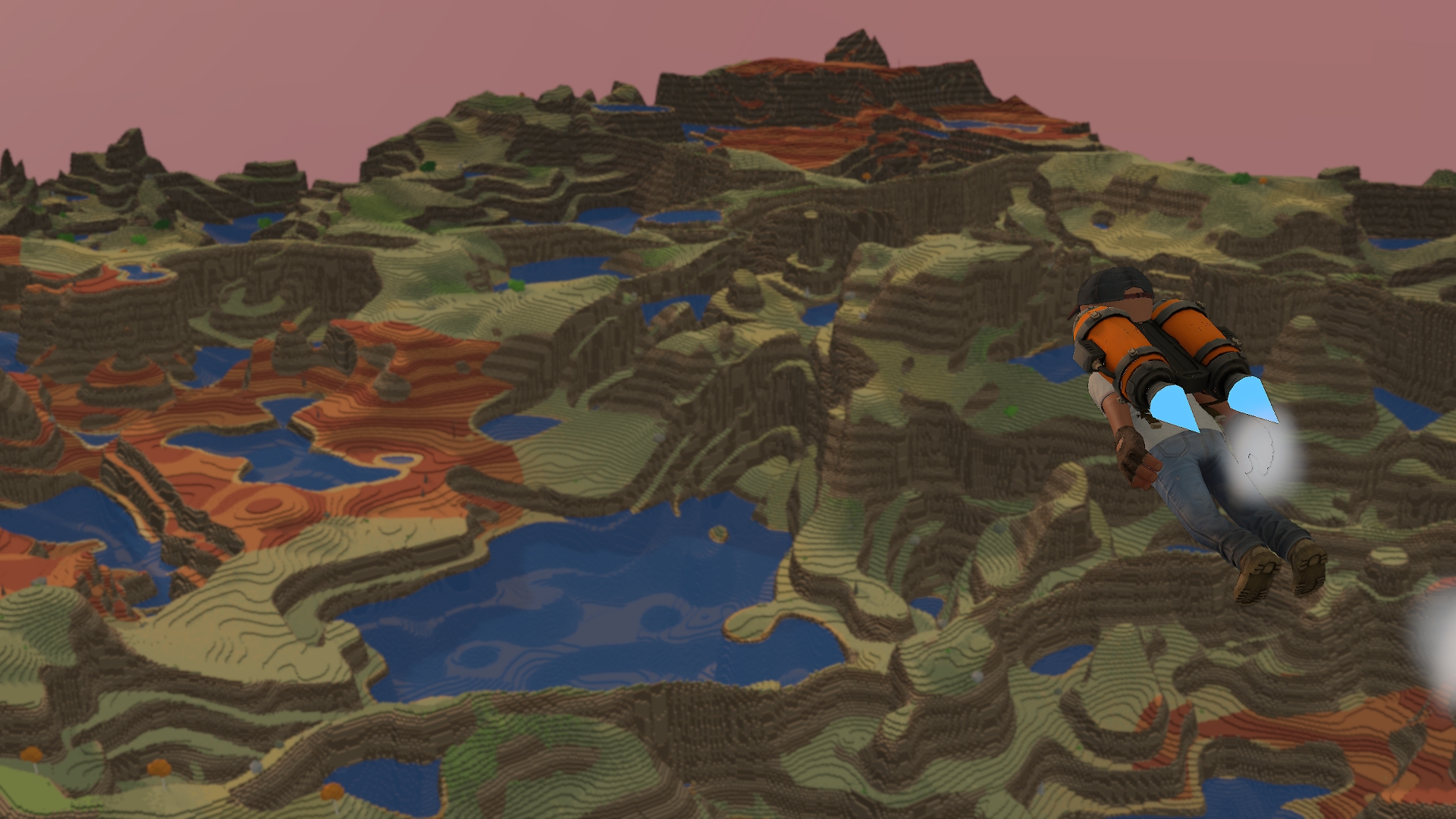
Berm is a procedural sandbox that turns a handful of sliders into a pixel-art world you can walk around in - terraced mesas, snow-capped peaks, carved river valleys, and sun-baked desert, all generated in seconds. Roll the dice for a fresh seed, dial in the look you want, then drop in and run around the world you just made. A short guided walkthrough points out the controls as you go, so you are building inside the first minute.
- Generate
Pull the sliders and hit Regenerate. Height and ruggedness shape everything from gentle coastal flats to craggy mountain ranges. Push the sea level to flood the valleys into an archipelago, sweep the moisture dial from bone-dry desert to lush forest, and scatter rivers and winding roads across the terrain. Every world is built from its seed, so a world you love is a world you get back exactly - same seed, same world, every time. Pick your terrain style right at creation, too: Voxel, Low-poly, or Smooth.
- Choose your look
The same landscape can wear three different styles at the flip of a control: Voxel for the classic blocky, terraced pixel-art grain; Low-poly for clean faceted slopes; and Smooth for softly rounded hills. Eight biomes - ocean, beach, desert, grassland, forest, badlands, rock, and snow - with strata banding across the cliffs and a snow line that creeps down the peaks.
- Sculpt it by hand
Not quite right? Grab the brush and reshape the world live. Raise hills, carve craters, flatten a plateau, smooth a ridge, repaint the ground, add or drain water, plant forests, or clear the props away. Fresh tiles grow in blended to their biome, so new ground never looks pasted on. Span a gap with a bridge - stone and wooden decks with matching corner pieces that chain together as far as you want. Everything you change stays put.
- Explore it
Hop into a character and actually walk the world you built - run, sprint, double-jump across terraces, slide down slopes, and swim the lakes. A sun disc tracks a real day-night cycle overhead while clouds drift across the sky, and as host you can set the weather to Clear, Cloudy, or Rain whenever the mood calls for it. Chasing the perfect shot? Drop into free cam, then open the photo tool for depth of field and a lens zoom to frame the whole diorama. Or just fly: free cam soars over the whole thing.
- Gear up and get around
Getting around is half the fun, so every character carries a hotbar of traversal gadgets, all unlocked from the start. Strap on the jetpack and thrust into the sky (boost for extra speed, refuel on the ground), pop the glider to soar across valleys, spring sky-high on the boots' double jump, fire the grapple at a cliff to reel in and swing off your momentum, drift up under a balloon and float gently back down, or hold up the lantern to light your way at night. Then crank the gravity dial for floaty moon-jumps or heavy-boots mode, and the whole kit bends with it.
- Play it together
When your world is ready, hit Launch Server and hand your friends an invite code. Everyone loads into the exact same world - no downloads, no waiting, because the world rebuilds from its seed on every machine. Sculpt it together in real time: everyone sees everyone else's brush strokes as they land, and a host toggle lets guests sculpt too. Proximity voice keeps it social, so closer means louder.
- Save and share
Name a world and it lands under Your worlds, ready to reload whenever you want. Export one to a file to back it up or pass it along, and import a world a friend sent you to drop straight into their build.
- Twenty achievements track the milestones as you generate, sculpt, explore, and mess around.
Quick Controls
Getting around
- Possess or drop to orbit: T
- Orbit camera (drag): right mouse
- Rotate orbit camera: Q / E
- Zoom: mouse wheel
- Free cam: I
- Photo tool (in free cam): Z
- Change view: K
- World map: M
- World panel / menu: Tab
On foot
- Move: WASD
- Sprint: Shift
- Walk: Alt
- Jump (double in air): Space
- Slide / crouch: C
- Reset to spawn: R
- Push to talk: V
Gadgets and building
- Hotbar: 1-9
- Cycle slot: mouse wheel
- Lantern: L
- Grapple strength: [ / ]
- Toggle brush: B
- Paint (hold to apply): left mouse
- Paint colour: P
- Place props: O
Interface
- Toggle this legend: H
- Hide the UI: U
- Hide tips: Y
Suggestions, bugs, feedback? It is an alpha, so there will be plenty. Join the Discord and tell me everything.