
Roleplay
Released
A Roleplay Framework that's brings gamemodes to s&box powered by Lua
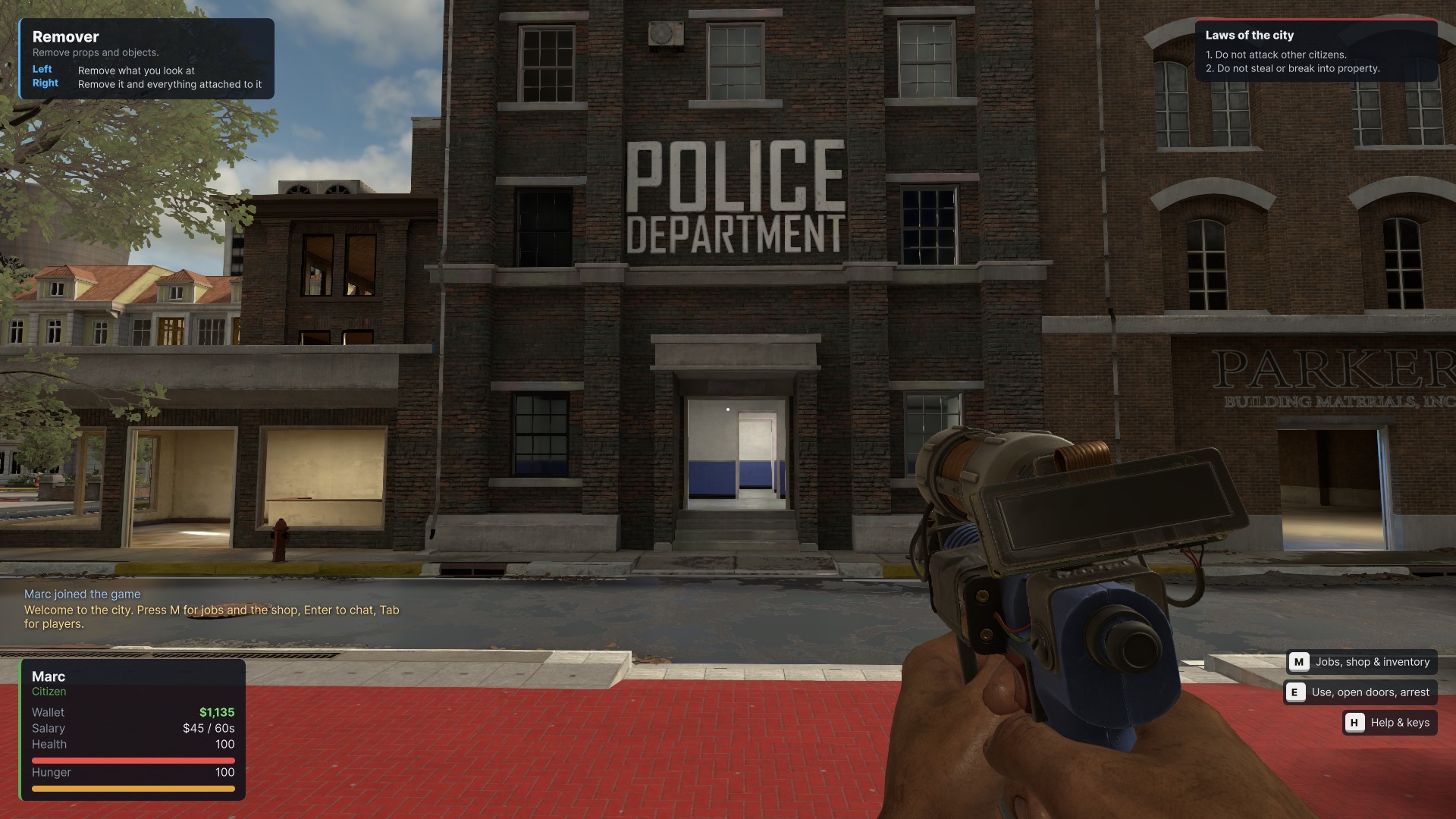
A fully Lua-extensible roleplay framework for S&box, inspired by Garry's Mod and designed to give players and server owners the freedom to create their own roleplay experiences.
Build your own roleplay server, create custom gamemodes, extend existing systems, or develop entirely new gameplay experiences. The framework provides a modular foundation with familiar roleplay mechanics, tools, and systems while keeping customization at the center.
Build your own roleplay server, create custom gamemodes, extend existing systems, or develop entirely new gameplay experiences. The framework provides a modular foundation with familiar roleplay mechanics, tools, and systems while keeping customization at the center.
Features
- Lua Scripting: Extend and customize gameplay using Lua.
- Custom Gamemodes: Create your own gamemodes with independent scripts, settings, and gameplay rules.
- DarkRP-Inspired Systems: Build roleplay experiences with jobs, money, shops, items, doors, and other familiar mechanics.
- Modular Architecture: Organize features into modules that can be developed and maintained independently.
- Addon Support: Extend gamemodes with separate addons.
- Chat and Scoreboard: Core multiplayer roleplay interfaces.
- Weapons and Tools: Gameplay weapons and tools, including physics and building utilities.
- Spawn Menu: Spawn and manage available gameplay objects.
- Permissions: Control access to administrative and gameplay functionality.
- Networking: Communicate between server and clients through the framework's supported systems.
- UI Integration: Build and customize interfaces for your gamemode.
- Dedicated Server Support: Host multiplayer roleplay experiences.
- Automatic Lua Distribution: Shared and client-side Lua scripts are distributed to connected players.
- Custom Gamemodes: Create your own gamemodes with independent scripts, settings, and gameplay rules.
- DarkRP-Inspired Systems: Build roleplay experiences with jobs, money, shops, items, doors, and other familiar mechanics.
- Modular Architecture: Organize features into modules that can be developed and maintained independently.
- Addon Support: Extend gamemodes with separate addons.
- Chat and Scoreboard: Core multiplayer roleplay interfaces.
- Weapons and Tools: Gameplay weapons and tools, including physics and building utilities.
- Spawn Menu: Spawn and manage available gameplay objects.
- Permissions: Control access to administrative and gameplay functionality.
- Networking: Communicate between server and clients through the framework's supported systems.
- UI Integration: Build and customize interfaces for your gamemode.
- Dedicated Server Support: Host multiplayer roleplay experiences.
- Automatic Lua Distribution: Shared and client-side Lua scripts are distributed to connected players.
Create Your Own Experience
The framework is intended to be extended. You are not limited to the included roleplay setup.
Create custom jobs, gameplay mechanics, interfaces, tools, modules, and complete gamemodes. Use the included systems as a foundation or replace and expand them to suit your project.
Gameplay customization is primarily handled through Lua, with C# providing the underlying framework integration.
Whether you want to create a traditional roleplay server, a DarkRP-inspired experience, or something completely different, this framework gives you a starting point.
For Developers
The framework includes a Lua-based development structure with support for custom gamemodes, addons, modules, and server-side or client-side scripts.
Developers can work directly with the editable Lua files in the S&box data directory, create new gamemodes from the included template, and reload scripts while developing.
See the developer guide for directory locations, setup instructions, and examples.
Developer Guide – Creating Gamemodes for Roleplay
This guide explains how to find the editable Lua directory, create your own gamemode, organize scripts, and start developing for the Roleplay framework in S&box.
1. Finding the Gamemodes Directory
The editable Lua files are stored inside the S&box data directory.
The general path is:
< S&box Installation >/data/roleplaydev/roleplay/roleplay/lua/The exact path depends on your S&box installation and the organization/game identifiers.
Finding Your Exact Directory
1. Start the game at least once.
2. Allow the framework to initialize.
3. Open the startup console or log.
4. Look for the `stage gamemodes` startup stage.
5. Check the log messages for the Lua data directory and gamemode loading information.
On the first startup, the framework copies its built-in gamemode files into the editable data directory, including the README.
Important: Existing files in the data directory are not overwritten. This allows you to modify your scripts without having your changes replaced by the built-in files.
Lua Source Configuration
The LuaSource setting in
framework.json controls where gamemode scripts are loaded from.- data: Loads the editable Lua files from the S&box data directory. This is the default.
- builtin: Loads Lua files from the game's built-in
Assets/lua directory and ignores editable data copies.For normal development, use `data`.
2. Gamemode Directory Structure
Gamemodes are located inside:
roleplay/lua/gamemodes/Each gamemode has its own directory containing a `gamemode.json` manifest and a `gamemode` folder for its Lua scripts.
Example:
myrp/
├── gamemode.json
└── gamemode/
├── sh_init.lua
├── sv_init.lua
├── cl_init.lua
└── modules/
├── jobs/
│ ├── sh_jobs.lua
│ └── sv_jobs.lua
└── economy/
├── sh_economy.lua
└── sv_economy.lua
3. Creating Your First Gamemode
The framework includes a gamemode template.
Find it here:
gamemodes/_template/To create your own gamemode:
1. Copy the `_template` directory.
2. Rename the copied directory to your gamemode ID.
3. Open `gamemode.json`.
4. Change the `id` and `title` to match your gamemode.
5. Start adding your own Lua scripts.
For example, create:
gamemodes/myrp/Your manifest should look similar to this:
{
"id": "myrp",
"title": "My RP",
"version": "1.0.0",
"apiVersion": 1,
"entry": {
"shared": "gamemode/sh_init.lua",
"server": "gamemode/sv_init.lua",
"client": "gamemode/cl_init.lua"
},
"dependencies": ["base"],
"maps": {
"default": "minimal"
}
}
The `id` must match the directory name.
Directories beginning with _ are skipped by the gamemode registry. This is why the template directory is named
_template4. Understanding Lua Script Types
The framework uses filename prefixes to determine where scripts run.
Shared Scripts – sh_
Shared scripts run on both the server and client.
Examples:
- `sh_init.lua`
- `sh_jobs.lua`
- `sh_config.lua`
Use shared scripts for definitions and logic that both sides need.
Server Scripts – sv_
Server scripts run only on the server and are never sent to clients.
Examples:
- `sv_init.lua`
- `sv_economy.lua`
- `sv_database.lua`
Use server scripts for authoritative gameplay logic, permissions, and server-side systems.
Client Scripts – cl_
Client scripts run only on the client.
Examples:
- `cl_init.lua`
- `cl_hud.lua`
- `cl_scoreboard.lua`
Use client scripts for interfaces, visual effects, and client-side functionality.
**Security:** Never put secrets or sensitive server logic in shared or client scripts. Public shared and client files are distributed to players.
5. Loading Additional Files
The manifest defines the main entry points for your gamemode.
You can organize additional code into folders and load it using `include()`.
Example:
include("gamemode/modules/jobs/sh_jobs.lua")
include("gamemode/modules/jobs/sv_jobs.lua")
Paths are relative to the gamemode folder. Parent-directory traversal using `..` is not allowed.
Keep your code organized into separate modules instead of putting everything into one large file.
6. Using the Base Gamemode
Your gamemode can depend on `base`.
The base gamemode provides common functionality, including systems such as chat and the scoreboard and props, spawnmenu.
You can override base functionality in your own gamemode.
For example:
function GM:Name(...)
    return "My Custom Gamemode"
end
When overriding a function and you want to preserve its base behavior, call the base implementation:
function GM:SomeFunction(...)
    self.BaseClass.SomeFunction(self, ...)

    -- Your custom code here
end
Check the framework's Lua API documentation for the available functions and hooks.
7. Configuring Your Gamemode
Open:
framework.jsonSet the default gamemode:
{
  "DefaultGamemode": "myrp"
}
Replace `myrp` with your gamemode's ID.
You can also select a gamemode when creating a local server, if the selection is available in the server setup interface.
Restart the game or server after changing the default gamemode.
8. Developing and Reloading Lua Scripts
You can reload your gamemode without restarting the entire game.
Use the console command:
rp_lua_reloadThis reloads the gamemode's Lua scripts.
The reload system attempts to load the updated scripts first. If the reload fails, the previously running scripts remain active.
Connected players receive updated client-side files when applicable.
This command is intended for the server or host.
Development Mode
For faster iteration, enable:
{
  "DevMode": true
}
In development mode, the server checks for script changes approximately every two seconds and reloads when changes are stable.
Use this for local development and testing.
Do not enable development mode on a public production server.
9. Creating Addons
Addons allow you to extend gamemodes without putting all functionality directly into the gamemode itself.
The addon directory is:
roleplay/lua/addons/The framework includes an addon template:
addons/_template/Copy the template and give your addon a unique directory and ID.
Example:
addons/myaddon/
├── addon.json
├── sh_init.lua
├── sv_init.lua
└── cl_init.lua
An addon manifest contains information such as its ID, title, version, supported gamemodes, and dependencies.
Example:
{
  "id": "myaddon",
  "title": "My Addon",
  "version": "1.0.0",
  "apiVersion": 1,
  "gamemodes": ["myrp"],
  "dependencies": []
}
The `sh_`, `sv_`, and `cl_` files placed directly in the addon directory are automatically loaded according to their prefixes.
Addon Console Commands
List available addons:
rp_addonsEnable an addon:
rp_addon_enable <id>Disable an addon:
rp_addon_disable <id>Replace `<id>` with the addon ID.
10. DarkRP Customization
For DarkRP-specific customization, use the DarkRP gamemode directory.
Configuration files are located in:
darkrp/gamemode/config/Feature modules are organized under:
darkrp/gamemode/modules/<feature>/This allows you to customize individual systems without having to put every feature into one file.
11. Important Development Notes
- The framework core located in `lua/framework` is loaded from the game itself.
- Your editable data gamemode can replace the built-in gamemode with the same ID.
- Downloaded client scripts are stored separately for each server. These are not the directories you should edit.
- Lua runs in a sandbox. Do not expect unrestricted file-system, operating-system, network, or .NET access.
- Use the framework's supported storage APIs, such as `storage.Get` and `storage.Set`, for persistence.
- The framework is inspired by Garry's Mod, but it is not fully compatible with Garry's Mod Lua or existing addons. Existing addons may need modifications.
13. Dedicated Server
The framework supports dedicated servers.
A basic server launch example is:
sbox-server.exe +game "roleplaydev.roleplay" +hostname "My RP Server"Replace the project path and server hostname with your own values.
Start Developing!
The recommended workflow is:
1. Start the game once to generate the editable Lua directory.
2. Find the directory using the startup log.
3. Copy
gamemodes/_template/
4. Rename it and configure gamemode.json.5. Add your own shared, server, and client scripts.
6. Set your gamemode as the default.
7. Start a local server and test your changes.
8. Use
rp_lua_reload to iterate quickly.9. If you need help with lua coding look at foum and the base and darkrp gamemodes
The framework is designed to be extended. Create your own systems, modules, addons, and complete roleplay experiences using Lua.