Who's using SceneObjects?

Started by matt · one year ago · 18 replies · 882 views

#1
matt
Facepunch
JoinedApr 2021 Posts266 Score2,045
Is anyone still using SceneObjects / SceneWorlds?

If so why?

We're gonna get rid of them and get everyone using proper scenes.
#2
Dimmer
Member
JoinedMar 2023 Posts61 Score1,250
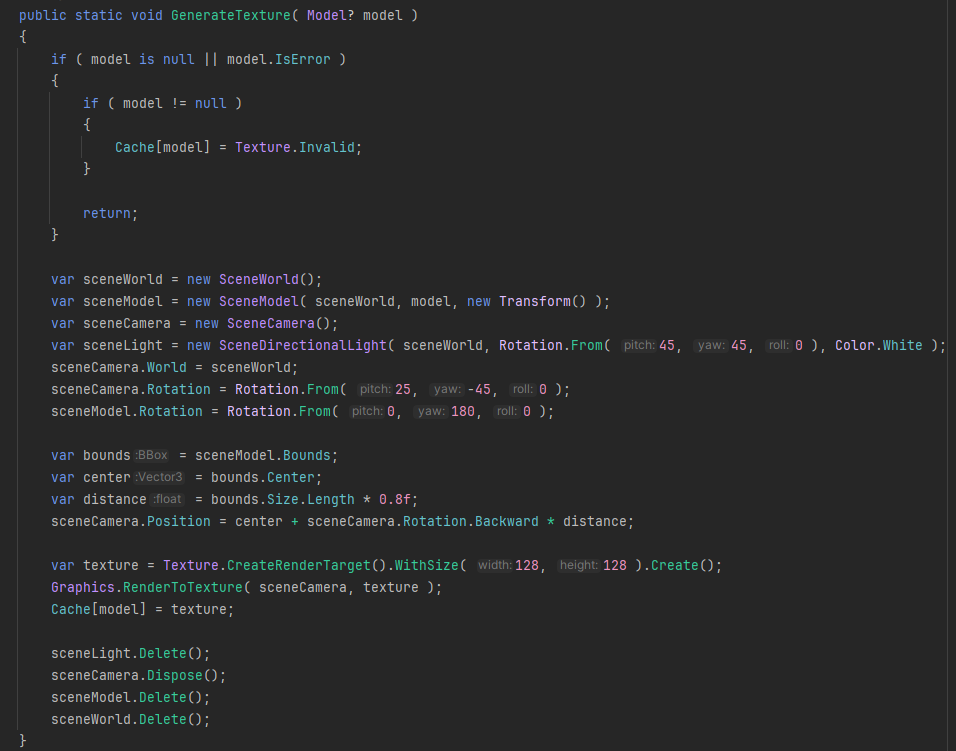
My thumbnailsss, I'm currently using it to create a fake world so I can render models/prefabs to a texture.

There's probably a better way but this is just what I got from somewhere.

#3
ceitine
Member
JoinedMay 2021 Posts34 Score865
we use SceneCustomObjects for rendering blocks, SceneWorlds and SceneObjects for icon generation etcetc, 

i think they're neat and give you more control without having to add extra shit for simple stuff

is this a long term plan or something you guys are trying to get out asap?
i'm not exactly opposed to a change but i personally think it's nice to have freedom with them
#4
fortune
Member
JoinedJul 2021 Posts9 Score1,175
I use scene objects for an icon generator tool I wrote, but that could be replaced with an actual scene pretty easily. Otherwise I access the SceneModel on a skinned renderer, that's about it.
#5
Skipin
Member
JoinedOct 2021 Posts94 Score1,432
#6
DoctorGurke
Member
JoinedMay 2021 Posts6 Score175
Basically what ceitine said, they’re just neat when doing custom rendering. sceneObject.Batchable and directly setting render Attributes are big ones too.
I’ve been using direct scene panels in tools and ui more recently, the latter having some issues associated with it literally running a full scene (iirc sound breaks with scene panels?). When your goal is just to render a specific fx it’s nice only actually dealing with rendering/scene object stuff without extra baggage. 
#7
matt
Facepunch
JoinedApr 2021 Posts266 Score2,045
> i'm not exactly opposed to a change but i personally think it's nice to have freedom with them 

what freedom do you have with them that you don't with gameobjects?
#8
ceitine
Member
JoinedMay 2021 Posts34 Score865
i just meant the freedom of being able to use the lower level api
#9
dawn
Member
JoinedSep 2022 Posts24 Score365
its easy to setup things , for example ui / visual things , 

how accessable is the replacement  

how would it work matt? 
#10
fishy
Member
JoinedFeb 2023 Posts82 Score1,548
I'm using them because I have no idea what I'm doing. The API is so hard to navigate or find things we're told to use intellisense to try and piece things together - which oftentimes leads to coming across things like this which we're then told, we shouldn't be using? A lot of my work in in editor tools so far so I'm not sure if that makes a difference.

Scene.SceneWorld uses wording like:

 This property is essential for managing and interacting with the world state of the scene, including entities and their components. 

So I'm using a SceneWorld because the documentation says it's essential for managing and interacting with the world state of a scene.

All this of course brings me to SceneWorld which again doesn't exactly tell me anything about how or why I should use it over something else - and any differences in functionality or use cases I have to try and piece together myself. This is half the reason why I use SceneWorlds and - by extension - SceneObjects.

My other option of course is to look through editor code included with the engine to see how things are done, and when I see editor apps like ShaderGraph using SceneWorld and SceneModels in it's preview window, I'm going to work on the assumption that using them is not only good, but maybe even the best way of doing stuff? Even SceneRendering still has comments mentioning rendering SceneWorlds - so I use them because I can only guess based on what I can find that they should be used.

Tell me what I should use instead and I'll be happy to use them but up until now it's mostly been trying to figure it out based on very limited and dated documentation along with supplied engine stuff.
#11
matt
Facepunch
JoinedApr 2021 Posts266 Score2,045
You've hit on why we should remove them, because you've accidentally used them.

You can create normal scenes procedurally and render them to textures.
		var scene = new Scene();
		using ( scene.Push() )
		{
			var go = new GameObject();
			var mr = go.AddComponent<ModelRenderer>();
			mr.Model = Model.Load( "models/error.vmdl" );

			var gameobject = new GameObject();
			var camera = gameobject.AddComponent<CameraComponent>();
			camera.RenderToTexture( your_texture );
		}	
You also gain the advantages of being able to just load a scene or use scene prefabs for your dynamic scenes, instead of making the entire thing in code.
#12
fishy
Member
JoinedFeb 2023 Posts82 Score1,548
Thanks for the solution, I'll work on replacing some old stuff tomorrow, I thought that might be the intended way of doing things but seeing other editor examples do it the other way swayed me towards SceneWorld/SceneObject originally.

But, what exactly is the difference between them, or what was the intended use case for one or the other?
#13
ryleigh
Facepunch
JoinedApr 2021 Posts24 Score4,430
for SkinnedModelRenderer I use
SceneObject.ClearMaterialOverride
SceneObject.SetMaterialGroup
SceneModel.CurrentSequence


#14
ducc
Banned
JoinedSep 2022 Posts101 Score155
I use SceneCustomObjects all the time. Why?

tl;dr: It's to get easy access to a render block. I must have easy access to a render block.

But to explain futher, there's a lot of data that I build using compute shaders. 

Within a single render override, I'll often dispatch many compute shaders in series, and it's common that one compute shader will depend on the output of another. 

To organize things, I've created a system of "render jobs" that can be created at any time and execute in the render override of a SceneCustomObject managed by a GameObjectSystem.

For example, this is how I'm using three different compute shaders to implement an isosurface extraction job that creates a mesh using SDF primitives:
  1. Given a buffer of SDF primitives and the dimensions and resolution of a voxel grid, a compute shader outputs between zero and one vertices per voxel using the surface nets algorithm.
  2. I check the hidden counter of the output buffer to see how many vertices were output. A second compute triangulates the vertices, outputting between 0 and 18 indices per vertex.
  3. Because the normals estimated while running the surface nets algorithm look terrible, I use another compute shader that takes the vertices and indices of the mesh and recalculates the normals in three subsequent dispatches:
    1. For each vertex, the a temporary buffer of vertex normals is set to zero.
    2. For each triangle, the triangle normals is added to that triangle's vertex normals in an atomic way.
    3. For each vertex, the accumulated temporary normals are normalized and added to the actual vertex buffer.
There are a three reasons I still need a render block to do this:

First, I need to be able to use ResourceBarrierTransition to prevent race conditions, and to ensure that hidden counter values are available when I try to read them back during the job.
Second, the number of threads dispatched by one compute shader depends on hidden counter values of compute shaders dispatched previously in the same frame. 
Third, because it makes no sense to a dispatch a compute shader when the prerequisites for it to run correctly aren't met (e.g. the first compute shader didn't output any vertices at all), there are times when the render job needs to be cancelled before everything completes.

The easiest way to make me not feel the need to use SceneObjects is to make it easy to get a render block.

For example:
  • Add an OnRender virtual function to GameObject that always executes in a render block.
  • Add rendering stages for GameObjectSystems to listen to.
And that would pretty much make everything way easier for me.

#15
DoctorGurke
Member
JoinedMay 2021 Posts6 Score175
Found a specific usecase for a SceneCustomObject and SceneModel.
SceneModel.Update( Time.Delta );
As far as I see model thumbnails do the same thing to render the model in its idle animation.
I'd appreciate an easy way to render an animated model and simulate it when rendering with command lists. Current docs are just for a static CommandList and the regular DrawModel methods dont seem to work for animated models.


#16
ShadowBrain
Member
JoinedApr 2021 Posts32 Score6,358
I think ape tavern mostly use them for setting attributes since that's currently the only way to access dynamic expressions for materials.
This could easily (and should probably) be moved over to the model renderer component instead though. 
#17
DoGGy
Member
JoinedMar 2023 Posts16 Score8,002
I use them to combine different objects(like colliders and renderers) to one Game object. It's also lets me to not think about "what if collider is gonna be moved, but renderer won't?" -like questions when I right my code.
#18
Oz
Member
JoinedJul 2022 Posts18 Score100
I had a bunch of ideas I could use them for, but pretty much all can be done with gameobjects....which is not a valid reason to remove them imo. They provide an alternative way of doing things, which in real projects can comes in handy, even if rare. 

Take what I say with a grain of salt however, I'm pretty new to this engine. 
edited one year ago#19
boxrocket
Member
JoinedJul 2023 Posts2 Score0
I commonly use SceneModel (which I would imagine is part of the SceneObjects being removed) for cases where I want to control when the bones on a skinned mesh update, very convenient to just be able to call Update when I want instead of needing to worry about the execution order of the engine.
I guess it's also nice to have a more "pure" list of components, where each one is something that can be controlled in the editor and does a specific thing, as opposed to also having at the bottom 20 skinnedmodelrenderers all controlled by code. Tends to kind of annoy me to have stuff taking up space in the editor that I can't edit or that would break shit if I were to edit it, especially on projects with teams where other people will always find a way to break stuff and then push the broken stuff to git if the editor isnt idiot proof. (Putting the skinnedmodelrenderers on hidden gameobjects is less convenient but could work well for this)

My animgraph3 also uses a SceneWorld with a bunch of SceneModels to get animation data (another case where it's wouldn't be possible to use SkinnedModelRenderer because I need to control when the bones update), but a way to just directly access the animation data in a Model would be way nicer for that specific purpose.

My compute shader particles are also rendered using a SceneObject, though Im assuming that there's a way to do that with command lists. (not sure where to run code in a render block if not from a sceneobject though)

tldr the functionality of SceneModel.Update() is the main thing that would really suck to not have.
people
Log in to reply
You can't reply if you're not logged in. That would be crazy.