Mount file paths can be confusing to talk or reason about.
When writing a mount, you must consider three different types of path, which I will explain in this post.
Source Path
The source path is an absolute, canonical path of the original game data as it exists on the user's system.
Here's example of the source path of a loose sound file, AUDIO_DRONE from DELTARUNE:
C:\Program Files (x86)\Steam\steamapps\common\DELTARUNE\mus\AUDIO_DRONE.ogg
For files that are packed within an archive, a full source path will include the path of the archive as well as the information necessary to find that file within the archive.
The type of information used may be unique to the game or engine, and may include the following:
- File offset, with or without length.
- An index or name used by a file table within the archive.
- A record type and index within that set of records.
Display Path
Whenever you add a resource to a MountContext, you must specify a path. This path will be added to the hierarchy of folders that your mount will display in the Asset Browser.
I call this path the display path because it does not necessarily have any relationship to the source path we discussed previously, and most of the path can be set to anything you want.
For example, that AUDIO_DRONE.ogg I described earlier, could have a display path of:
sounds/launcher/AUDIO_DRONE.ogg
Any directory or filename may be used in a display path, however the extension should match the ResourceType given to the MountContext, if applicable.
For example, because AUDIO_DRONE.ogg is meant to be handled as a sound file, its display path should end with .vsnd, like:
sounds/launcher/AUDIO_DRONE.ogg.vsnd
And you could even replace the existing extension, like:
sounds/launcher/AUDIO_DRONE.vsnd
The ResourceType values of Model, Material, Texture, and Sound are expected to correlate with extensions .vmdl, .vmat, .vtex, and .vsnd respectively.
As of the time of this writing, the Scene ResourceType is not supported. As far as I know, there is no special behavior associated with ResourceTypes None, Text, or Binary.
If a specific extension or ResourceType should be handled specially, then any game using your mount will need to account for this behavior itself.
For example, let's say that your mount should provide information on how a sprite maps to a texture atlas. You arbitrarily decide that every sprite your mount will adhere to the following conventions when added to the MountContext:
ResourceType.Text is used- The display path ends in
.sprite - The value returned by
ResourceLoader.Load is a JSON string with properties for: - Texture atlas index
- Texture atlas size
- The position and size of the sprite
Any game using your mount would need to be aware of all of these conventions, and know to load sprites in this way.
Resource Path
The third path we'll discuss is a resource path that is used in any context where it's unclear to what mount or FileSystem a given path is expected to belong.
A resource path is a display path that it is prepended by both:
- A
mount URI scheme, i.e., mount:// - A directory with a name matching the ident of your BaseGameMount
For example:
mount://deltarune/sounds/launcher/AUDIO_DRONE.vsnd
If a method such as Texture.Load is used to fetch your resource using a path string, that method will expect a resource path as an argument.
IMPORTANT: Because a display path is local to your BaseGameMount, static methods that load a resource will fail when given a display path instead of a resource path!
Mount Troubleshooting
Here are some common problems with mounts, and solutions for dealing with them.
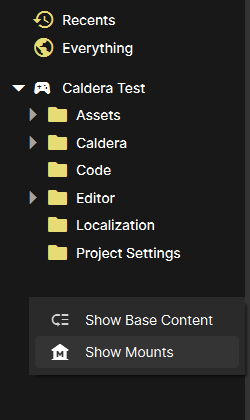
The mount section of Asset Browser is missing:
- Right click on a blank area on the left part of the Asset Browser
- Click "Show Mounts" in the menu that appears
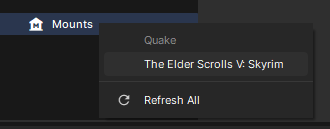
A mount is missing from the list appears when right-clicking on Mounts:
- Ensure that your BaseGameMount is in the
Editor C# project generated for your s&box project - Ensure that
BaseGameMount.IsInstalled is set to true in BaseGameMount.Initialize.
A mount is loaded, but one or more of its resources are missing from the Asset Browser:
- Ensure that the display path of the resource does not contain special directories such as
../ that could confuse s&box.
A mount resource appears in the Asset Browser, but an exception is thrown when clicking on the resource or generating its thumbnail:
- Ensure that your ResourceLoader for that type of resource is not throwing an exception.
- Ensure that the resource path of the resource consistently uses the same style of slash characters.
- Ensure that the file extension of your display path matches the extension expected for that type of resource.
A Model appears in the scene when dragged from the Asset Browser to the scene editor, but will not load again after saving and reloading the scene:
- Ensure that ModelBuilder.WithName is given the resource path of your Model.
- Ensure that your Model display path ends with
.vmdl