Playtester feedback, merged

A crosshair you can find, cooldowns you can see, patch notes that explain themselves, and your next career unlock on the title and game over screens.

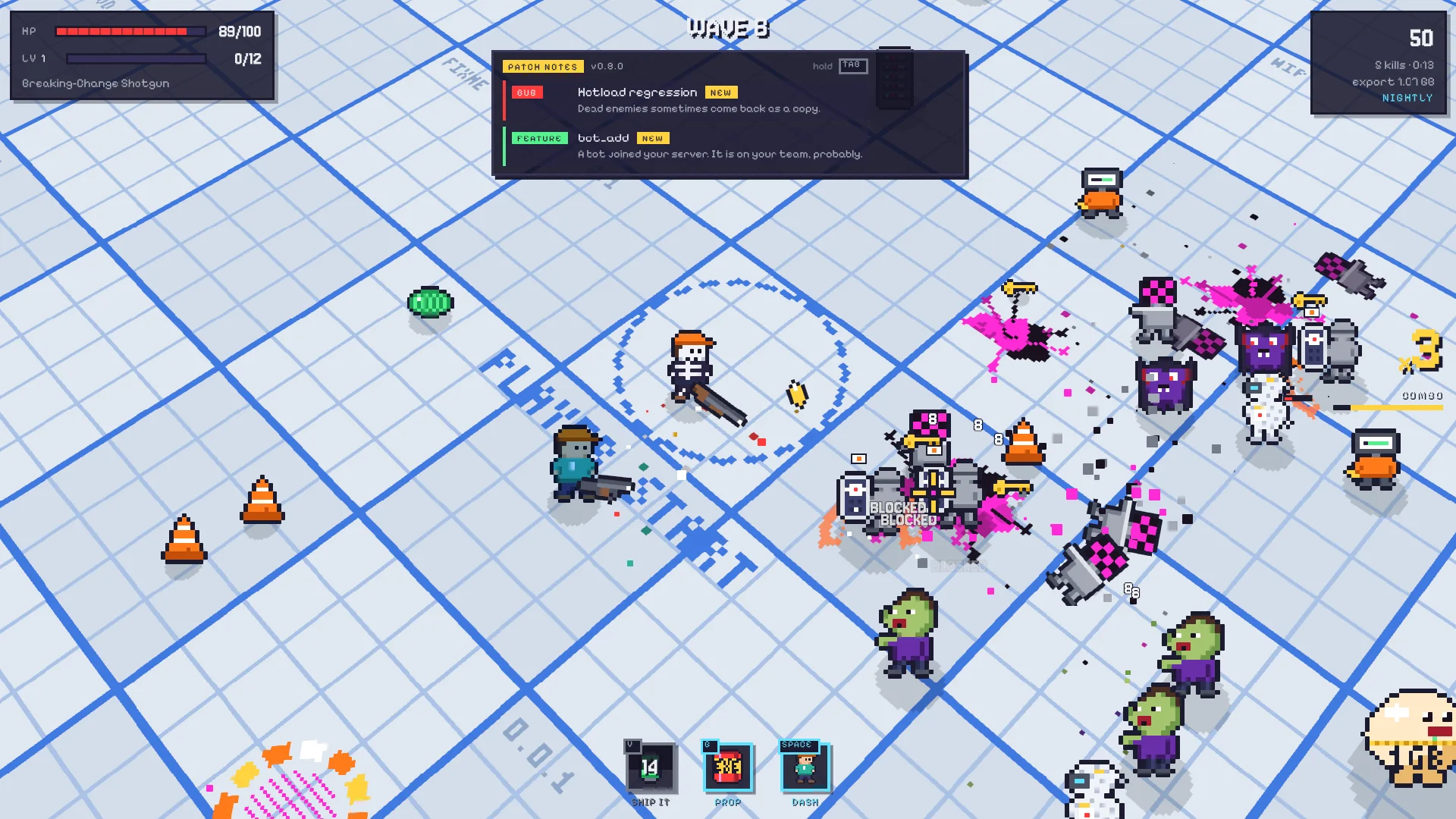
One of the reviews of the game said what a lot of you probably felt: in a busy fight you can lose your own crosshair, the screen gets cluttered, and it isn't always clear what's going on. Fair. This update is all about that.

🎯 A crosshair you can find

  • Bigger by default: the crosshair is a size up, and its bars and centre dot have a dark outline, so it reads on any floor and in any fight.
  • Your size and colour: small (the old one), medium or large, in white, green, cyan, yellow or pink. Options → Visuals, or straight from the pause screen.
  • Numbers make way: damage numbers fade when they're right on top of your crosshair.
  • Reduced effects: a new setting that halves the particles and only shows the damage numbers that matter: crits, heals, hits you take and BLOCKED.

⏱️ Cooldowns you can see

  • Ability bar: V, G and dash moved from tiny tags in the corner to a bar at the bottom of the screen: an icon each, a cooldown that drains with the seconds left, and a pop when it's ready again.

📝 Patch notes that explain themselves

  • Under the wave: each wave's patch notes sit under the wave number, red for the ones that make the wave harder, green for the rest.
  • Explained the first time: the first time you meet a patch note, the notes open by themselves and tell you what it does. After that they stay out of your way.
  • Hold Tab: see them all in full, any time. The pause screen lists them too.
  • When they change: a feature the Designer cuts, a note a hotfix rolls back or a regression that ships mid-wave shows right on its chip.

📈 Your career, front and centre

  • On the title screen: the Career tile shows what your next promotion unlocks and how much XP is left, and says so when your first build of the day still counts double.
  • On game over: the career box shows your next unlock too, and the whole screen now fits every resolution and aspect ratio, even after a long run with a stack of promotions.

Playtester feedback, merged

8 November 2026
Areas
16 changes in this update
Added

7 changes
HUD
  • Ability bar - V, G and dash at the bottom of the screen: an icon, the cooldown with seconds left, a pop when ready

  • Patch notes - each wave's notes as chips under the wave; hold Tab or pause to read what they do

  • Patch notes - a note you've never seen opens in full by itself and tells you what it does

Options
  • Crosshair size - small, medium or large (Options > Visuals, and on the pause screen)

  • Crosshair colour - white, green, cyan, yellow or pink

  • Reduced effects - half the particles, and only the damage numbers that matter

Title screen
  • Career - the tile shows your next unlock, the XP to go, and x2 XP TODAY while your first build of the day counts double

Improved

7 changes
HUD
  • Crosshair - a size bigger by default, with a dark outline so it reads on any floor

  • Damage numbers - fade when they're on top of your crosshair

  • Patch notes - a cut, rolled-back or regressed note shows on its chip

Game over
  • Career - the next unlock and the XP to go; several promotions share one card

  • Commits - the most-stacked first, long lists end in "+N more"

Pause screen
  • Patch notes - this wave's notes in full

  • Settings - comfort and visuals in two rows

Fixed

2 changes
Game over
  • Layout - after a long run with several promotions the sheet no longer runs off the screen, at any aspect ratio

Co-op (experimental)
  • Game over - the two players sit side by side, and long Steam names end in "..." instead of running over

people
Log in to reply
You can't reply if you're not logged in. That would be crazy.