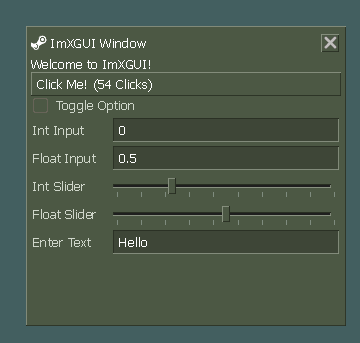
XGUI-3
Released
Code/XGUI/Elements/ColourPickerControl.cs
using Sandbox.UI;
using System;
using System.Globalization;
namespace XGUI;

public class ColourPickerControl : Panel
{
	private Color _color;
	public Color CurrentColor
	{
		get => _color;
		set
		{
			if ( _color != value )
			{
				_color = value;
				UpdateVisuals(); // Update both display and inputs
				ValueChanged?.Invoke( value );
			}
		}
	}

	public event Action<Color> ValueChanged;

	private Panel _colorDisplayButton; // Clickable display
	private TextEntry _rInput;
	private TextEntry _gInput;
	private TextEntry _bInput;
	private TextEntry _aInput;

	private XGUIPopup _dropdownPanel;
	private bool _isDropdownOpen = false;

	public ColourPickerControl()
	{
		SetClass( "colourpicker", true );

		// RGB Inputs Container
		var rgbContainer = Add.Panel( "rgb-container" );

		// R Input
		_rInput = AddChild<TextEntry>( "" );
		_rInput.Numeric = true;
		//_rInput.OnTextEdited += ( string s ) => OnRgbInputChanged( s, 0 );
		_rInput.AddEventListener( "onblur", () => OnRgbInputChanged( _rInput.Text, 0 ) ); // Ensure update on losing focus
		_rInput.SetClass( "floatinput", true );

		// G Input
		_gInput = AddChild<TextEntry>( "" );
		_gInput.Numeric = true;
		//_gInput.OnTextEdited += ( string s ) => OnRgbInputChanged( s, 1 );
		_gInput.AddEventListener( "onblur", () => OnRgbInputChanged( _gInput.Text, 1 ) );
		_gInput.SetClass( "floatinput", true );

		// B Input
		_bInput = AddChild<TextEntry>( "" );
		_bInput.Numeric = true;
		//_bInput.OnTextEdited += ( string s ) => OnRgbInputChanged( s, 2 );
		_bInput.AddEventListener( "onblur", () => OnRgbInputChanged( _bInput.Text, 2 ) );
		_bInput.SetClass( "floatinput", true );

		// A Input (Optional)
		_aInput = AddChild<TextEntry>( "" );
		_aInput.Numeric = true;
		//_aInput.OnTextEdited += ( string s ) => OnRgbInputChanged( s, 3 );
		_aInput.AddEventListener( "onblur", () => OnRgbInputChanged( _aInput.Text, 3 ) );
		_aInput.SetClass( "floatinput", true );

		// Clickable Color Display
		_colorDisplayButton = Add.Panel( "colourwidget" );
		_colorDisplayButton.AddEventListener( "onclick", ToggleDropdown );

		// Dropdown Panel (Initially Hidden)
		_dropdownPanel = AddChild<XGUIPopup>( "colour-popup-panel" );
		_dropdownPanel.PopupSource = _colorDisplayButton;
		SetupDropdownContent( _dropdownPanel ); // Populate the dropdown

		UpdateVisuals(); // Set initial state
	}

	private void UpdateVisuals()
	{
		_colorDisplayButton.Style.BackgroundColor = CurrentColor;

		// Update text inputs without triggering their change events excessively
		if ( float.TryParse( _rInput.Text, out float rVal ) && rVal != CurrentColor.r )
			_rInput.Text = (CurrentColor.r * 1).ToString();
		else if ( string.IsNullOrWhiteSpace( _rInput.Text ) ) // Handle empty initial state
			_rInput.Text = (CurrentColor.r * 1).ToString();

		if ( float.TryParse( _gInput.Text, out float gVal ) && gVal != CurrentColor.g )
			_gInput.Text = (CurrentColor.g * 1).ToString();
		else if ( string.IsNullOrWhiteSpace( _gInput.Text ) )
			_gInput.Text = (CurrentColor.g * 1).ToString();

		if ( float.TryParse( _bInput.Text, out float bVal ) && bVal != CurrentColor.b )
			_bInput.Text = (CurrentColor.b * 1).ToString();
		else if ( string.IsNullOrWhiteSpace( _bInput.Text ) )
			_bInput.Text = (CurrentColor.b * 1).ToString();

		if ( float.TryParse( _aInput.Text, out float aVal ) && aVal != CurrentColor.a )
			_aInput.Text = (CurrentColor.a * 1).ToString();
		else if ( string.IsNullOrWhiteSpace( _aInput.Text ) )
			_aInput.Text = (CurrentColor.a * 1).ToString();

		// Update dropdown visibility
		_dropdownPanel.Style.Display = _isDropdownOpen ? DisplayMode.Flex : DisplayMode.None;
	}

	private void OnRgbInputChanged( string textValue, int componentIndex ) // 0=R, 1=G, 2=B
	{
		if ( float.TryParse( textValue, NumberStyles.Any, CultureInfo.InvariantCulture, out float floatVal ) )
		{
			// Clamp and convert to byte

			Color newColor = CurrentColor;
			bool changed = false;

			switch ( componentIndex )
			{
				case 0: // R
					if ( newColor.r != floatVal )
					{
						newColor = newColor.WithRed( floatVal );
						changed = true;
					}
					break;
				case 1: // G
					if ( newColor.g != floatVal )
					{
						newColor = newColor.WithGreen( floatVal );
						changed = true;
					}
					break;
				case 2: // B
					if ( newColor.b != floatVal )
					{
						newColor = newColor.WithBlue( floatVal );
						changed = true;
					}
					break;
				case 3: // A
					if ( newColor.a != floatVal )
					{
						newColor = newColor.WithAlpha( floatVal );
						changed = true;
					}
					break;
			}

			if ( changed )
			{
				CurrentColor = newColor; // This will trigger ValueChanged via the setter
			}
			// Even if not changed, ensure the input reflects the clamped byte value
			switch ( componentIndex )
			{
				case 0: _rInput.Text = floatVal.ToString(); break;
				case 1: _gInput.Text = floatVal.ToString(); break;
				case 2: _bInput.Text = floatVal.ToString(); break;
				case 3: _aInput.Text = floatVal.ToString(); break;
			}

		}
		// Optional: Handle invalid input (e.g., clear it, reset to old value, show error)
	}

	private void ToggleDropdown()
	{
		_isDropdownOpen = !_isDropdownOpen;
		if ( _dropdownPanel.Parent == this )
		{
			_dropdownPanel.Parent = FindRootPanel();
			_dropdownPanel.Style.Left = _colorDisplayButton.Box.Rect.Left;
			_dropdownPanel.Style.Top = _colorDisplayButton.Box.Rect.Bottom;
		}
		else
		{
			_dropdownPanel.Parent = this;
		}
		UpdateVisuals(); // Update display style of dropdown
	}

	private void SelectColorFromDropdown( Color chosenColor )
	{
		CurrentColor = chosenColor; // This updates visuals and triggers ValueChanged
	}

	// --- Dropdown Content ---
	// Replace this with a more sophisticated picker eventually!
	private void SetupDropdownContent( Panel parent )
	{
		parent.Style.FlexDirection = FlexDirection.Column; // Or Row/Grid as needed
		parent.SetClass( "panel", true );
		var widget = parent.AddChild<ColourWidget>();
		var grid = parent.Add.Panel( "swatch-grid" );

		widget.OnChange += SelectColorFromDropdown;

		// TODO: Add a proper color wheel / saturation / value picker here later
	}

	protected override int BuildHash() => HashCode.Combine( _color, _isDropdownOpen );
}