Tips Kit
Released
Write onboarding tips inside your running game: live preview, test fire, and tips that retire when the player does the thing.
The coach shows one tip at a time, orders them by priority and prerequisites, and retires each one the moment the player performs the action it teaches. It hides while a modal, a conversation or a full-screen overlay is up, and progress persists per game so returning players are not re-taught.
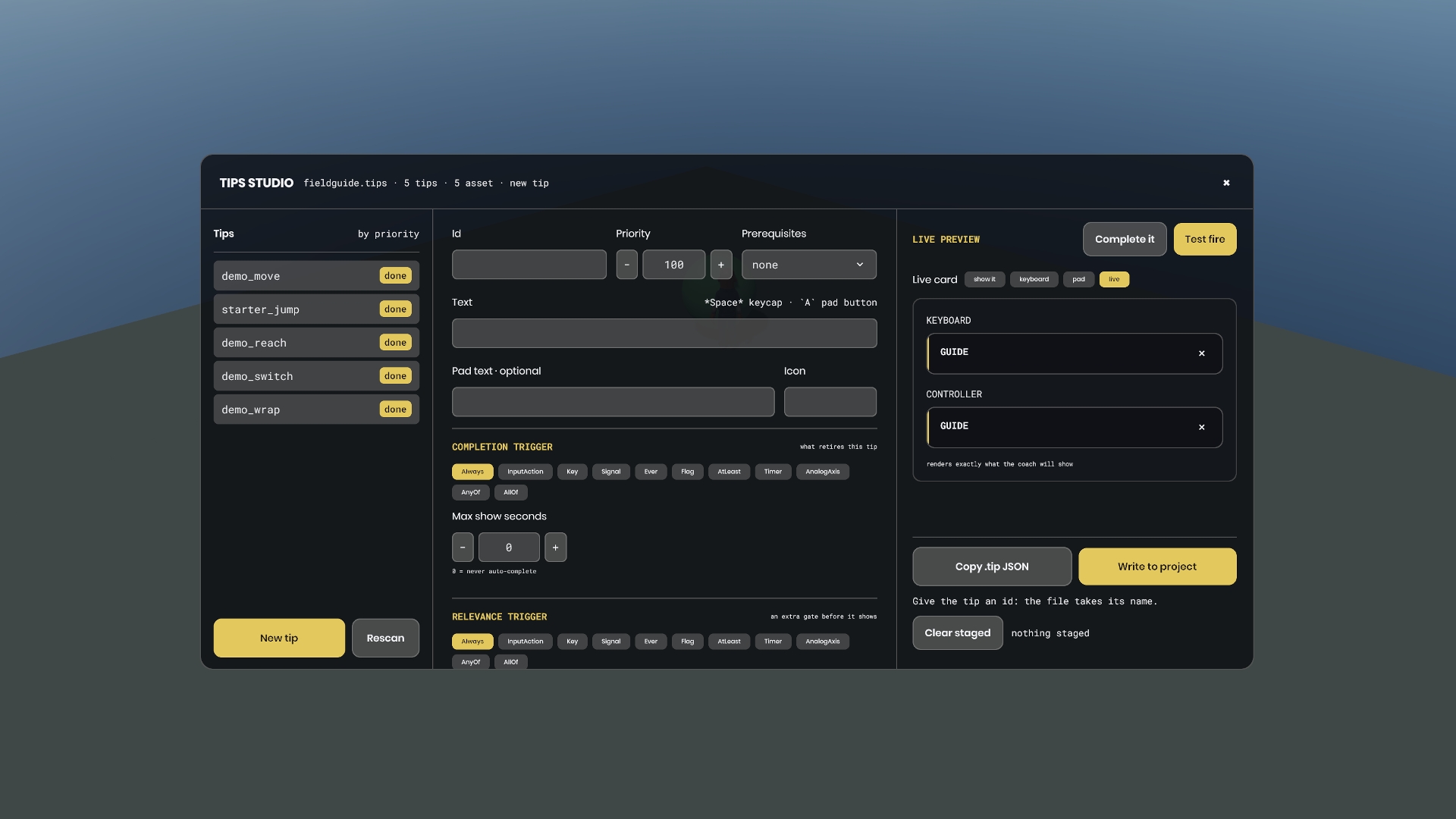
The headline is the Tips Studio. Add the panel to a dev scene, press play, press T, and you are writing tips inside your running game: your catalog on the left with the source each tip resolved from, the tip you are editing in the middle, and the preview on the right. The preview is not a mockup. It is the real card with your stylesheet, drawn twice, once as a keyboard player reads it and once as a controller player does, so the pad wording and the pad chips are in front of you without owning a controller. Pick InputAction for a trigger and the action list is your project's own actions read from the engine.
Test fire makes the draft the live tip under its own id. Its completion is the real one from there, so you do the action in the game and watch it retire, and whatever waits on that tip becomes eligible in front of you. When it reads right, Copy .tip JSON puts the file's exact contents on your clipboard from in game, or Write to project stages it and an editor menu action writes real .tip assets into Assets/tips. Edit a tip afterwards, in the inspector or in a text editor, and the change reaches the running session with no restart.
Tips retire on an input action, a raw key, a named signal, a timer, an analog stick past a magnitude, a live condition you push, or a component you drop on an object in the world, and the common cases need no bridge code at all. Text supports keyboard keycaps and gamepad chips, a tip can carry separate pad wording, and one map remaps every keycap to a pad label at once. Catalogs registered from a scene can hand themselves back when that scene ends, so a tip from the last scene never sits unretireable over this one.
The demo scene runs all of it with no wiring of your own. After install the kit lands under your project's Libraries folder, not your own Assets, so find the scene by searching tips_demo in the Asset Browser with Everything selected, or walk the sidebar to Libraries, fieldguide.tips, Assets, scenes. Press play and a citizen in a blue jumpsuit walks, jumps, crosses the yard to an amber marker and switches it on, one tip retiring per beat. The last card asks you to press T, and pressing it both opens the Tips Studio and retires that tip, so the walkthrough ends with you looking at the five tips you just walked, ready to edit them.
Requirements: the demo needs one input action, Jump, which the stock s&box Input.config already binds to Space and the pad A button. If your project still has the default config you have nothing to do. Everything else in the demo is a raw read: W A S D movement, R to replay, and T to open the Studio, so no letter key needs registering. The kit itself binds nothing and ships no actions of its own. You only name an action when you author a tip that completes on one, and the Studio's picker lists whatever your project already has. The demo uses engine content only, so there is nothing to download and no art to make.
MIT, source-distributed. It compiles alone, references no other library and no game code, and reaches into your game through a few small seams. Read it, edit it, delete what you do not need, starting with the Code/Demo folder and Assets/demo.
One developer, extracted from the onboarding coach in BERM.
Suggestions, bugs, feedback? It is an alpha, so there will be plenty. Join the Discord and tell me everything.