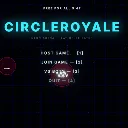
CircleRoyale
Released
an agar.io-style multiplayer .io game built in s&box (Facepunch's C# engine), where players control a neon glowi
UI/MainMenu.cs
using Sandbox.UI;

/// <summary>
/// 主菜单(M4):建服 / 加入 / 人机对战 / 退出。纯 C# Panel(编辑器热重载友好,同 GameHud 模式)。
/// 菜单阶段世界"壳"已建好(网格 + 相机照常渲染),菜单半透明压暗盖在上面。
/// M5:比赛参数设置移进了**游戏房间**(LobbyPanel 二级界面)——HOST/VS BOTS 进房调参,点 START 开局。
/// 点击 + 键盘快捷键双通道(编辑器内嵌视口可能收不到鼠标点击,键盘保底):1=建服 2=加入 3=人机 4=退出。
/// 样式在同目录 MainMenu.cs.scss(按"类名.cs.scss"自动加载)。
/// </summary>
public sealed class MainMenu : PanelComponent
{
	Label _status;
	bool _built;

	protected override void OnStart()
	{
		base.OnStart();
		BuildUi();
	}

	void BuildUi()
	{
		var root = Panel;
		if ( root is null ) return;

		// 已建好且引用有效 → 不重复建(热重载半残时整体清空重建)
		if ( _built && _status.IsValid() && root.ChildrenCount > 0 ) return;

		root.DeleteChildren( true );

		var title = new Label() { Classes = "title" };
		title.Text = "CIRCLEROYALE";
		root.AddChild( title );

		var sub = new Label() { Classes = "subtitle" };
		sub.Text = "NEON ARENA — EAT OR BE EATEN";
		root.AddChild( sub );

		AddButton( root, "HOST GAME  —  [1]", "host" );
		AddButton( root, "JOIN GAME  —  [2]", "join" );
		AddButton( root, "VS BOTS    —  [3]", "bots" );
		AddButton( root, "QUIT       —  [4]", "quit" );

		_status = new Label() { Classes = "status" };
		root.AddChild( _status );

		var ver = new Label() { Classes = "version" };
		ver.Text = GameConfig.Version;
		root.AddChild( ver );

		var hint = new Label() { Classes = "hint" };
		hint.Text = "WASD MOVE — SPACE SPLIT — R FEED";
		root.AddChild( hint );

		_built = true;
	}

	void AddButton( Panel root, string text, string id )
	{
		var b = new Label() { Classes = $"btn {id}" };
		b.Text = text;
		// lambda 必须捕获 this(调实例方法)——无捕获的静态 lambda 在热重载后无法重映射,
		// 点击会抛 NoMatchLambda 异常(实测:按钮全变"点了没反应")
		b.AddEventListener( "onclick", () => OnMenuButton( id ) );
		root.AddChild( b );
	}

	/// <summary> 菜单按钮点击(实例方法:热重载可重映射) </summary>
	void OnMenuButton( string id ) =>
		CircleroyaleGame.Current?.MenuAction( id switch { "host" => 0, "join" => 1, "bots" => 2, _ => 3 } );

	protected override void OnUpdate()
	{
		base.OnUpdate();

		// 强制光标可见可交互(面板默认 PointerEvents=None,Auto 模式下没人"想要鼠标"光标就没了);
		// Hide() 时恢复 Auto。放在 OnUpdate 每帧断言,任何样式级联意外都兜得住
		Mouse.Visibility = MouseVisibility.Visible;

		BuildUi();

		// 键盘保底(编辑器内嵌视口鼠标事件不可靠,键盘一定能进来)
		if ( Input.Pressed( "Slot1" ) ) CircleroyaleGame.Current?.MenuAction( 0 );
		if ( Input.Pressed( "Slot2" ) ) CircleroyaleGame.Current?.MenuAction( 1 );
		if ( Input.Pressed( "Slot3" ) ) CircleroyaleGame.Current?.MenuAction( 2 );
		if ( Input.Pressed( "Slot4" ) ) CircleroyaleGame.Current?.MenuAction( 3 );
	}

	/// <summary> 状态行(连接中 / 失败重试提示) </summary>
	public void SetStatus( string text )
	{
		if ( _status.IsValid() ) _status.Text = text;
	}

	/// <summary> 开局后隐藏菜单(Panel 无 Enabled,直接禁掉整个 GameObject),并把光标还给游戏 </summary>
	public void Hide()
	{
		if ( !GameObject.Enabled ) return;   // 已隐藏:别动光标(ReconcileUi 每帧调,房间页要光标可点)
		Mouse.Visibility = MouseVisibility.Auto;
		GameObject.Enabled = false;
	}

	/// <summary> 从房间/结算回菜单(M5):重新显示(OnUpdate 恢复光标断言) </summary>
	public void Show()
	{
		GameObject.Enabled = true;
		BuildUi();
		if ( _status.IsValid() ) _status.Text = "";
	}
}