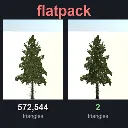
Flatpack
Released
Bakes any model into an impostor card. Thousands of props, a fraction of the GPU cost.
Editor/FlatpackBakeSettings.cs
Defines enums and settings for the Flatpack baking tool, specifying atlas sizes, quality presets, and configuration parameters for generating baked assets.
using Sandbox;

namespace Flatpack.EditorTools;

/// <summary>
/// Atlas sizes the baker offers.
/// </summary>
public enum FlatpackAtlasSize
{
	[Title( "512" )] Size512 = 512,
	[Title( "1024" )] Size1024 = 1024,
	[Title( "2048" )] Size2048 = 2048,
	[Title( "3072" )] Size3072 = 3072,
	[Title( "4096" )] Size4096 = 4096,
}

/// <summary>
/// Quality levels for a bake. Each one sets the number of views, the atlas size and the depth search steps, picked
/// from the iteration 4 measurements (see <c>Benchmarks/iteration-4-quality-levels</c>).
/// </summary>
public enum FlatpackQuality
{
	[Title( "Low" ), Description( "12 x 12 views, 1024 atlas, 8 search steps. About 5 MB. For props you only see from far away (past about 16 bounding radii)." )]
	Low,

	[Title( "Medium" ), Description( "12 x 12 views, 2048 atlas, 16 search steps. About 19 MB. The default: holds up from about 4 to 6 bounding radii." )]
	Medium,

	[Title( "High" ), Description( "24 x 24 views, 4096 atlas, 16 search steps. About 75 MB. Same as Medium up close, closer to the real model past 8 bounding radii." )]
	High,

	[Title( "Ultra" ), Description( "12 x 12 views, 3072 atlas, 32 search steps. About 42 MB and about 1.5x the GPU cost of Medium. The sharpest level up close: for props that swap near the camera." )]
	Ultra,

	[Title( "Auto" ), Description( "Bake at Low, measure the card against the model at the target distance, and step up a level until it holds up. Slower to bake; saves memory on models that look fine at a lower level." )]
	Auto,

	[Title( "Custom" ), Description( "Set views, atlas size and search steps yourself." )]
	Custom,
}

/// <summary>
/// Everything the baker needs to know besides the model. Shown in the bake window with a control sheet.
/// </summary>
public sealed class FlatpackBakeSettings
{
	/// <summary>
	/// How good the impostor looks, against memory and GPU cost. Pick Custom to set the numbers yourself.
	/// </summary>
	[Property] public FlatpackQuality Quality { get; set; } = FlatpackQuality.Medium;

	/// <summary>
	/// For Auto: the distance, in bounding radii, where the card has to match the model (from there outward). Set it to
	/// the swap distance you'll use; the Flatpack Renderer's automatic one is 30.
	/// </summary>
	[Property, Range( 2, 60 ), Step( 1 ), ShowIf( nameof( Quality ), FlatpackQuality.Auto )] public float AutoTargetRadii { get; set; } = 30.0f;

	/// <summary>
	/// Measure the finished bake against the model (a second or two) and store where it holds up. The Flatpack Renderer
	/// then never swaps closer than that, and the inspector shows it.
	/// </summary>
	[Property] public bool MeasureQuality { get; set; } = true;

	/// <summary>
	/// Frames per atlas side. 12 gives 144 views, 15 degrees apart on the hemisphere. 8 ghosts visibly; past 12, more
	/// views only help a little unless the atlas grows with them. Used when Quality is Custom.
	/// </summary>
	[Property, Range( 4, 32 ), Step( 1 ), ShowIf( nameof( Quality ), FlatpackQuality.Custom )] public int GridSize { get; set; } = 12;

	/// <summary>
	/// Atlas width and height. Each frame gets AtlasSize / GridSize pixels. Used when Quality is Custom.
	/// </summary>
	[Property, ShowIf( nameof( Quality ), FlatpackQuality.Custom )] public FlatpackAtlasSize AtlasSize { get; set; } = FlatpackAtlasSize.Size2048;

	/// <summary>
	/// Depth search steps per frame, written into the material (you can change it there later). The biggest single
	/// lever on both quality and GPU cost: 8 ghosts thin parts, 32 costs about 1.5x of 16. Used when Quality is Custom.
	/// </summary>
	[Property, Range( 0, 32 ), Step( 1 ), ShowIf( nameof( Quality ), FlatpackQuality.Custom )] public int SearchSteps { get; set; } = 16;

	/// <summary>
	/// The views, atlas size and search steps this bake will use: the quality level's, or the custom values.
	/// </summary>
	public (int GridSize, FlatpackAtlasSize AtlasSize, int SearchSteps) Resolve() => Quality switch
	{
		FlatpackQuality.Low => (12, FlatpackAtlasSize.Size1024, 8),
		FlatpackQuality.Medium => (12, FlatpackAtlasSize.Size2048, 16),
		FlatpackQuality.High => (24, FlatpackAtlasSize.Size4096, 16),
		FlatpackQuality.Ultra => (12, FlatpackAtlasSize.Size3072, 32),
		FlatpackQuality.Auto => (12, FlatpackAtlasSize.Size1024, 8),
		_ => (GridSize, AtlasSize, SearchSteps),
	};

	/// <summary>
	/// A copy of these settings at another quality level.
	/// </summary>
	public FlatpackBakeSettings WithQuality( FlatpackQuality quality )
	{
		var copy = (FlatpackBakeSettings)MemberwiseClone();
		copy.Quality = quality;
		return copy;
	}

	/// <summary>
	/// Which view directions get frames.
	/// </summary>
	[Property] public FlatpackLayout Layout { get; set; } = FlatpackLayout.Hemisphere;

	/// <summary>
	/// Turn the card around the object's up axis only, instead of facing the camera fully.
	/// Always on for <see cref="FlatpackLayout.Cylinder"/>.
	/// </summary>
	[Property] public bool ZLockedCard { get; set; }

	/// <summary>
	/// Also bake roughness and ambient occlusion. Without it the impostor uses roughness 1 and no AO.
	/// </summary>
	[Property] public bool BakeRoughnessAo { get; set; } = true;

	/// <summary>
	/// Also bake how much sky each part of the model sees (lit from eight directions, shadowed against unshadowed).
	/// The impostor material's Sky Occlusion slider then darkens enclosed parts, which helps dense foliage keep its dark
	/// interior. Off by default: the real model gets no such occlusion in-engine, so the card matches it better without.
	/// Needs <see cref="BakeRoughnessAo"/>; roughly triples bake time.
	/// </summary>
	[Property, ShowIf( nameof( BakeRoughnessAo ), true )] public bool BakeSelfShadow { get; set; }

	/// <summary>
	/// Render each view this many times larger and average it down. Parts thinner than a texel (wire mesh, twigs) then
	/// bake as partial coverage instead of filling in or vanishing. 2 measured 2 to 3 points fewer wrong pixels up close
	/// for about a third more bake time; 4 adds little. Fine wire mesh (fences) gets worse either way.
	/// </summary>
	[Property, Range( 1, 4 ), Step( 1 )] public int Supersample { get; set; } = 2;

	/// <summary>
	/// How many texels to grow colour out past the silhouette, inside each frame, so mipmaps don't pull in
	/// the transparent background as a dark halo. 0 fills the whole frame.
	/// </summary>
	[Property, Range( 0, 64 ), Step( 1 )] public int EdgePadding { get; set; } = 16;

	/// <summary>
	/// Frame every view to the model's own outline and depth in that view instead of its whole bounding sphere. A tall
	/// statue fills its views instead of a third of them, and the depth spans only the surfaces the view sees, so the
	/// same atlas holds more texels and finer depth on the object.
	/// </summary>
	[Property] public bool FitEachView { get; set; } = true;

	/// <summary>
	/// Bits of depth per texel: 8 (BC4, half a byte a texel) or 16 (R16, 2 bytes). Measured in iteration 8 on the test set
	/// at Medium: 16 bits had 2.3 points fewer wrong pixels at 2 radii and 1.6 at 4, for more video memory (about
	/// 27 MB against 19 at Medium, 60 against 42 at Ultra).
	/// </summary>
	[Property, Range( 8, 16 ), Step( 8 )] public int DepthBits { get; set; } = 8;

	/// <summary>
	/// Folder for the outputs, relative to the project's Assets folder (for example <c>flatpack/trees</c>).
	/// Empty puts them next to the source model, or in <c>flatpack/</c> when the source isn't in this project.
	/// </summary>
	[Property] public string OutputFolder { get; set; } = "";
}