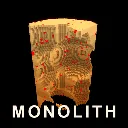
MONOLITH
Released
A monolith of solid cubes hangs in the void. Take it apart.
Voxel/VoidGrid.cs
namespace Monolith;

/// <summary>
/// A wireframe floor under the shape.
///
/// The void gives the eye nothing to hold on to: with a handful of cubes left you cannot tell
/// where you are, which way you are facing, or how far you have drifted. Devil Daggers solves
/// exactly this with a visible floor plane, and the same trick works here. It is geometry
/// rather than a texture so it needs no art.
/// </summary>
public sealed class VoidGrid : Component
{
	[Property] public Color LineColor { get; set; } = new( 0.55f, 0.18f, 0.08f );

	/// <summary>Grid lines per axis. Kept modest: this is a reference, not scenery.</summary>
	[Property] public int Divisions { get; set; } = 32;


	private GameObject gridObject;
	private float builtForExtent = -1f;

	/// <summary>Half-width of the arena, matching the walls the player is contained by.</summary>
	public float HalfExtent => MonolithManager.Instance.IsValid()
		? MonolithManager.Instance.ArenaHalfExtent
		: Tuning.ArenaMinHalfExtent;

	/// <summary>Sizes and positions the grid to sit beneath the given bounds.</summary>
	public void FitTo( BBox bounds )
	{
		// Scales with the shape rather than sitting at a constant. It used to be deliberately
		// fixed, on the reasoning that a floor which changes size feels unstable. That was fine
		// while every stage fitted inside it, and wrong for the shared Monolith, whose barriers
		// orbited outside the walls entirely. The floor has to agree with what contains you.
		float extent = HalfExtent * 2f;

		if ( gridObject.IsValid() && MathF.Abs( extent - builtForExtent ) < 1f )
		{
			PlaceUnder( bounds );
			return;
		}

		builtForExtent = extent;

		gridObject?.Destroy();

		gridObject = new GameObject( true, "Void Grid" );
		gridObject.NetworkMode = NetworkMode.Never;
		gridObject.Parent = GameObject;

		var renderer = gridObject.AddComponent<ModelRenderer>();
		renderer.Model = BuildGrid( extent, Divisions );
		renderer.Tint = LineColor;

		PlaceUnder( bounds );
	}

	private void PlaceUnder( BBox bounds )
	{
		if ( !gridObject.IsValid() ) return;

		// Exactly at the shape's base: this is the arena floor you actually stand on, so it
		// must line up with PlayerMovement.FloorZ rather than float somewhere below.
		gridObject.WorldPosition = new Vector3(
			bounds.Center.x,
			bounds.Center.y,
			bounds.Mins.z );
	}

	protected override void OnDestroy()
	{
		gridObject?.Destroy();
		gridObject = null;
	}

	/// <summary>
	/// Builds the grid as thin flat quads rather than lines, because a quad is guaranteed to
	/// render with any standard material while line primitives are not.
	/// </summary>
	private static Model BuildGrid( float extent, int divisions )
	{
		var vb = new VertexBuffer();
		vb.Init( true );

		float half = extent * 0.5f;
		float step = extent / divisions;
		float width = MathF.Max( 1.5f, extent * 0.0009f );

		int index = 0;
		var up = Vector3.Up;

		for ( int i = 0; i <= divisions; i++ )
		{
			float offset = -half + i * step;

			// Line running along Y.
			AddQuad( vb, ref index,
				new Vector3( offset - width, -half, 0 ),
				new Vector3( offset + width, -half, 0 ),
				new Vector3( offset + width, half, 0 ),
				new Vector3( offset - width, half, 0 ), up );

			// Line running along X.
			AddQuad( vb, ref index,
				new Vector3( -half, offset - width, 0 ),
				new Vector3( half, offset - width, 0 ),
				new Vector3( half, offset + width, 0 ),
				new Vector3( -half, offset + width, 0 ), up );
		}

		// Containing walls: the same grid lines turned up at each edge so the arena reads as a
		// room rather than an infinite plane you might wander off.
		float wall = Tuning.ArenaWallHeight;
		float vStep = wall / 6f;

		for ( int i = 0; i <= divisions; i++ )
		{
			float offset = -half + i * step;

			AddQuad( vb, ref index,
				new Vector3( offset - width, -half, 0 ), new Vector3( offset + width, -half, 0 ),
				new Vector3( offset + width, -half, wall ), new Vector3( offset - width, -half, wall ),
				Vector3.Forward );

			AddQuad( vb, ref index,
				new Vector3( offset - width, half, 0 ), new Vector3( offset + width, half, 0 ),
				new Vector3( offset + width, half, wall ), new Vector3( offset - width, half, wall ),
				Vector3.Backward );

			AddQuad( vb, ref index,
				new Vector3( -half, offset - width, 0 ), new Vector3( -half, offset + width, 0 ),
				new Vector3( -half, offset + width, wall ), new Vector3( -half, offset - width, wall ),
				Vector3.Right );

			AddQuad( vb, ref index,
				new Vector3( half, offset - width, 0 ), new Vector3( half, offset + width, 0 ),
				new Vector3( half, offset + width, wall ), new Vector3( half, offset - width, wall ),
				Vector3.Left );
		}

		// Horizontal bands up the walls, so height is readable while airborne.
		for ( int i = 1; i <= 6; i++ )
		{
			float z = i * vStep;

			AddQuad( vb, ref index,
				new Vector3( -half, -half, z - width ), new Vector3( half, -half, z - width ),
				new Vector3( half, -half, z + width ), new Vector3( -half, -half, z + width ),
				Vector3.Forward );

			AddQuad( vb, ref index,
				new Vector3( -half, half, z - width ), new Vector3( half, half, z - width ),
				new Vector3( half, half, z + width ), new Vector3( -half, half, z + width ),
				Vector3.Backward );

			AddQuad( vb, ref index,
				new Vector3( -half, -half, z - width ), new Vector3( -half, half, z - width ),
				new Vector3( -half, half, z + width ), new Vector3( -half, -half, z + width ),
				Vector3.Right );

			AddQuad( vb, ref index,
				new Vector3( half, -half, z - width ), new Vector3( half, half, z - width ),
				new Vector3( half, half, z + width ), new Vector3( half, -half, z + width ),
				Vector3.Left );
		}

		var mesh = new Mesh( Material.Load( "materials/default.vmat" ) );
		mesh.CreateBuffers( vb );

		return new ModelBuilder().AddMesh( mesh ).Create();
	}

	private static void AddQuad( VertexBuffer vb, ref int index,
		Vector3 p0, Vector3 p1, Vector3 p2, Vector3 p3, Vector3 normal )
	{
		var tangent = (p1 - p0).Normal;

		vb.Add( new Vertex( p0, normal, tangent, new Vector4( 0, 0, 0, 0 ) ) );
		vb.Add( new Vertex( p1, normal, tangent, new Vector4( 1, 0, 0, 0 ) ) );
		vb.Add( new Vertex( p2, normal, tangent, new Vector4( 1, 1, 0, 0 ) ) );
		vb.Add( new Vertex( p3, normal, tangent, new Vector4( 0, 1, 0, 0 ) ) );

		vb.AddRawIndex( index + 0 ); vb.AddRawIndex( index + 1 ); vb.AddRawIndex( index + 2 );
		vb.AddRawIndex( index + 0 ); vb.AddRawIndex( index + 2 ); vb.AddRawIndex( index + 3 );

		index += 4;
	}
}