Layers and Masks
A layer adds animation over a base pose. A bone mask controls which parts of the body it affects.
For example, the legs can keep walking while the upper body waves.
Choose the kind of layer
| Layer node | Use it for |
|---|---|
| Local Layer | A clip or pose controlled by a weight |
| State Machine Layer | Actions with entry, exit, and off states |
Both connect to Layer Blend. They describe a layer; they do not connect directly to Graph Output as a pose.
Overlay blends toward an ordinary pose. Additive adds a change to the base pose and needs an additive source. Use Overlay for the ordinary wave clip in this example.
Make an upper-body mask
Select your .skel asset. In Bone Masks, add a mask named upper_body.
In its bone weights, leave the root, pelvis, and legs at 0, and set the upper-body bones you want to animate to 1. Intermediate weights around the spine can soften the boundary. Use your skeleton's own bone names and inspect the mask preview.
Save the skeleton. In the graph, a Bone Mask node with Mask set to upper_body now refers to that mask.
A mask does nothing by itself: connect it to the layer that should use it. Masks belong to the .skel, not to the model's old AG1 weightlists.
Keep locomotion in the base
Start with your movement blend, then add Layer Blend:
Movement Blend 1D ---> Layer Blend.Base
                      Layer Blend.Result ---> Graph Output
Leave Only Sample Base Root Motion enabled. The action should not replace movement's root motion.
Add the wave layer
Create a separate State Machine for the upper-body action. It needs two states:
| State | Contents |
|---|---|
| Off | An Off State, made with Add Off State |
| Wave | Your non-looping wave clip connected to Graph Output |
Set Off as the default. As in states and transitions, transition from Off to Wave on b_wave, then from Wave to Off on State Completed. Use 0.2-second transitions.
Do not put an idle clip in Off. Off means this layer contributes no pose, letting the base animation show through.
Select the Wave state in the state-machine view. Its State Layer Data graph appears in the secondary pane; expand it if collapsed. Add a Float node with value 1 and connect it to Layer Weight. Add a Bone Mask node, choose upper_body, and connect it to Bone Mask.
Float (1) ----------------> State Layer Data.Layer Weight
Bone Mask (upper_body) ----> State Layer Data.Bone Mask
Back in the main graph, connect the action machine through State Machine Layer:
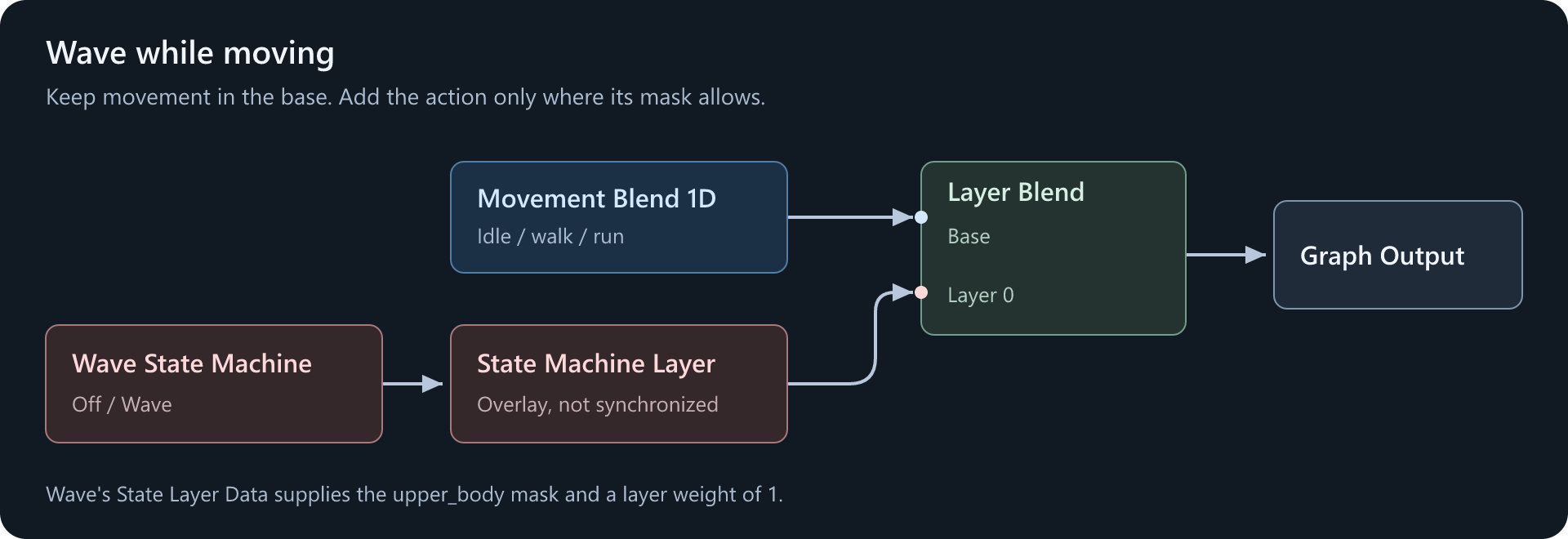
Set State Machine Layer's Blend Mode to Overlay and leave Is Synchronized off. The wave should run on its own timeline, not follow the walk cycle.
Use State Machine Layer, not Local Layer, for this action machine. It keeps evaluating state transitions even when the layer's weight is zero.
Try it
Set the preview's movement speed to a walking value. Turn b_wave on, then off after the action starts.
The upper body should wave, the legs should keep walking, and the action should fade away when complete.
| Problem | Check |
|---|---|
| The legs also wave | The mask is selected and connected in Wave's State Layer Data |
| The wave follows the walking rhythm | Is Synchronized is off |
| The wave repeats | Loop is off, and b_wave is cleared |
| The body twists or collapses | An ordinary wave uses Overlay, not Additive |
| Nothing happens from Off | The action uses State Machine Layer and its transition condition is connected |
For a simpler weighted pose, such as holding an item, use Local Layer with its Input, Weight, and Bone Mask inputs connected, then feed its Layer output into Layer Blend.