States and Transitions
Use a State Machine for distinct behaviors: moving, jumping, waving, or reloading. A state contains a pose graph. A transition decides when to leave it and how long the blend takes.
Let's make a character idle, wave once, then return to idle.
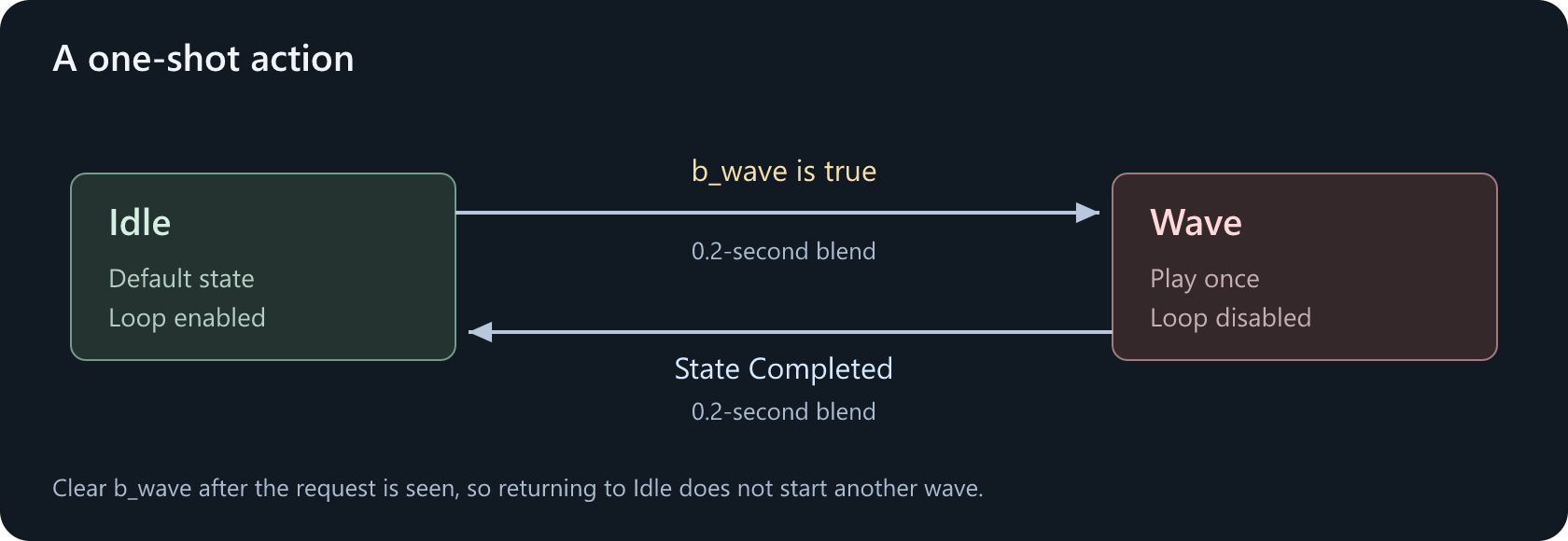
These arrows are state transitions, not pose connections.
Create the states
Add a Bool control parameter named b_wave, defaulting to false.
Add State Machine to the main graph and connect its result to Graph Output. Double-click it to open the state-machine view.
Rename the initial state Idle. Right-click the canvas and choose Add State, then name the new state Wave. Right-click Idle and choose Set as Default State if it is not already the default.
Double-click each state to build its pose graph:
| State | Pose graph | Clip setting |
|---|---|---|
| Idle | Animation Clip (idle.anim) ---> Graph Output |
Loop on |
| Wave | Animation Clip (wave.anim) ---> Graph Output |
Loop off |
You can replace Idle's single clip with the movement blend later. A state can contain a whole blend tree, not just one animation.
Add the transition into Wave
Hold Alt and drag from Idle to Wave to create an arrow. Double-click the arrow to edit its transition graph.
The arrow is a conduit: it holds the transition rules for that route. Add a Transition node if the conduit does not already have one. Drag b_wave from Parameters into this graph and connect it to Condition.
b_wave ---> Transition.Condition
Select Transition and set Duration to 0.2 seconds. Leave Time Match as None so the wave starts from the beginning.
A transition with no condition connected is disabled. Drawing the arrow alone is not enough.
Return when the wave finishes
Create a second arrow from Wave to Idle. Inside that conduit, connect State Completed to a Transition's Condition. Set the transition duration to 0.2 seconds.
State Completed ---> Transition.Condition
By default, State Completed becomes true early enough for the transition to finish at the end of the source animation. Enable At Clip End if you want to wait until the exact end before starting the blend.
Try it
In the preview, turn b_wave on to enter Wave, then turn it off while the wave plays. The character should finish the animation and blend back to Idle.
If you leave b_wave true, the character can enter Wave again after returning. AG2 bools do not automatically reset. In game code, treat an action request as a pulse: keep it true for an animation update, then clear it on the next one. Setting it true and false before the graph evaluates may hide the request entirely.
This simple graph accepts wave requests only while in Idle. It does not queue requests or restart a wave already in progress.
Blend or state machine?
Use a blend for a continuous value, such as walking faster. Use states for a change of behavior with entry, exit, and interruption rules.
Do not replace this state machine with a Selector expecting it to watch b_wave continuously. Selectors choose on entry and keep that choice until their branch shuts down.
Next, put the wave on an upper-body layer so movement continues underneath.