Bindless API
What is Bindless
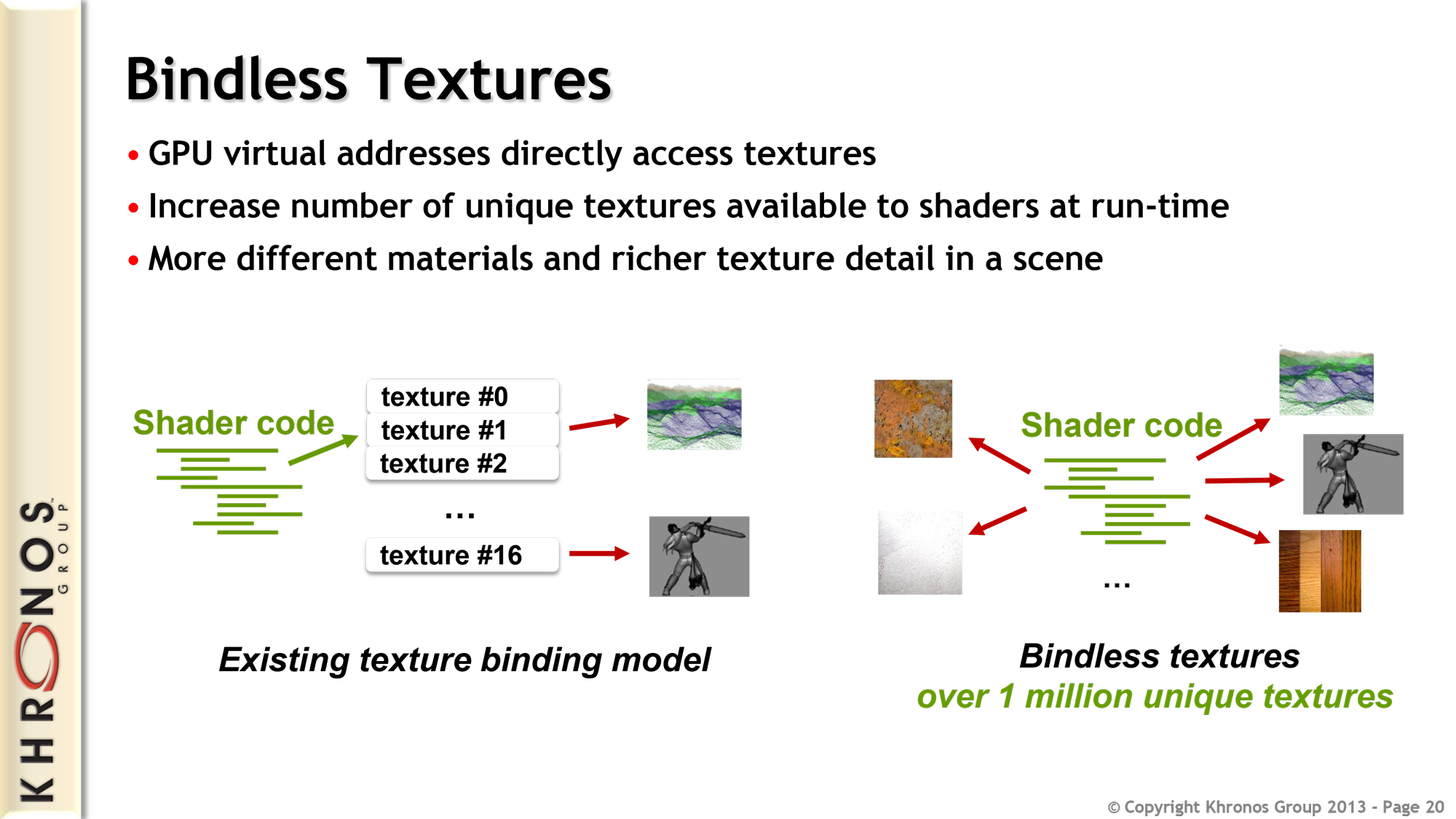
The fancy new way to do things in Vulkan / DX12 is bindless. This removes the limitations of the binding model allowing you to have access to far more textures and other resources within a shader and the ability to sample them from a dynamically provided identifier from buffers, vertex input, etc.
This allows a lot more versatility in your shaders, less CPU time spent binding textures and is the fundamental key to GPU driven rendering.
Bindless API
HLSL
The following methods are accessible from shaders:
Texture2D Bindless::GetTexture2D( int nIndex, bool srgb = false );
Texture3D Bindless::GetTexture3D( int nIndex );
TextureCube Bindless::GetTextureCube( int nIndex );
Texture2DArray Bindless::GetTexture2DArray( int nIndex );
TextureCubeArray Bindless::GetTextureCubeArray( int nIndex );
SamplerState Bindless::GetSampler( int nIndex );
sRGB variants of Texture2D can be sampled with Bindless::GetTexture2D( nIndex, true );
Additionally these methods are available in compute shaders only:
RWTexture2D<float4> Bindless::GetRWTexture2D( int nIndex );
RWTexture3D<float4> Bindless::GetRWTexture3D( int nIndex );
RWTexture2DArray<float4> Bindless::GetRWTexture2DArray( int nIndex );
Example: Bindless Textures
Here's how you would create a structured buffer in C# containing texture indices and consume them in a shader.
struct TerrainMaterial
{
  public int ColorTextureIndex;
  public int NormalTextureIndex;
}

GpuBuffer<TerrainMaterial> TerrainMaterialsBuffer = new( 1 );
TerrainMaterialsBuffer.SetData( new[] {
  new TerrainMaterial {
    ColorTextureIndex = ColorTexture.Index,
    NormalTextureIndex = NormalTexture.Index
  },
  // ...
} );

SceneModel.Attributes.Set( "TerrainMaterials", TerrainMaterialsBuffer );
struct TerrainMaterial
{
  int ColorTextureIndex;
  int NormalTextureIndex;
};

StructuredBuffer<TerrainMaterial> TerrainMaterials < Attribute( "TerrainMaterials" ); >;

void SampleTerrain( float2 uv, in out float3 color, in out float3 normal )
{
  // Combine 4 dynamic terrain materials together
  for ( int i = 0; i < 4; i++ )
  {
    Texture2D ColorTexture = Bindless::GetTexture2D( TerrainMaterials[i].ColorTextureIndex, true ); // srgb
    Texture2D NormalTexture = Bindless::GetTexture2D( TerrainMaterials[i].NormalTextureIndex );

    color += ColorTexture.Sample( Sampler, uv );
    normal += NormalTexture.Sample( Sampler, uv );
  }
}
Example: Bindless Sampler State
You can also create a sampler state from C# and then expose it to shaders via bindless.
// Create a new component sampler property with bilinear filtering set as default
[Property] public SamplerState MyBindlessSampler { get; set; } = new() { Filter = FilterMode.Bilinear };

protected override void OnEnabled()
{
  Scene.RenderAttributes.Set( "MyBindlessSamplerIndex", MyBindlessSampler.Index );
}
And this is how you read this bindless index value from your shader:
// Add an attribute which reads "MyBindlessSamplerIndex" value from C#
int g_nMyBindlessSamplerId < Attribute( "MyBindlessSamplerIndex" ); Default( -1 ); >;

float4 MainPs( PixelInput i ) : SV_Target0
{
  SamplerState sBindlessSampler = Bindless::GetSampler( g_nMyBindlessSamplerId );
  float3 vColor = g_tColor.Sample( sBindlessSampler, i.vTextureCoords.xy ).rgb;

  return float4( vColor, 1.0f );
}
Non-uniform Resource Index
If your bindless resources index is going to vary across threads within a wave (this could happen if passed from a vertex input) it needs to be marked as non-uniform, otherwise you'll get undefined behavior. In pixel shaders the texture getters already apply NonUniformResourceIndex for you; samplers don't (it crashes some AMD drivers), so pass a NonUniform index instead:
Texture2D texture = Bindless::GetTexture2D( NonUniformResourceIndex( i.TextureIndex ) );

NonUniform samplerIndex = { i.SamplerIndex };
SamplerState sampler = Bindless::GetSampler( samplerIndex );