Light
If you want to access lighting information directly you can use this.
Lights
Lights can be easily accessed using this class, this already implies going over the surface of what's being drawn.
struct Light
{
    // The color is an RGB value in the linear sRGB color space.
    float3 Color;

    // The normalized light vector, in world space (direction from the
    // current fragment's position to the light).
    float3 Direction;

    // The position of the light in world space. This value is the same as
    // Direction for directional lights.
    float3 Position;

    // Attenuation of the light based on the distance from the current
    // fragment to the light in world space. This value between 0.0 and 1.0
    // is computed differently for each type of light (it's always 1.0 for
    // directional lights).
    float Attenuation;

    // Visibility factor computed from shadow maps or other occlusion data
    // specific to the light being evaluated. This value is between 0.0 and
    // 1.0.
    float Visibility;

    // Every light object contains binary light data, this is raw information that
    // comes from the scene in the CPU. See below for more details.
    BinnedLight LightData;

    // Gets the light structure given the world and screen-space position and
    // the light index.
    static Light From( float3 vPositionWs, float4 vPositionSs, uint nLightIndex, float2 vLightMapUV = 0.0f );

    // Number of lights in the current fragment.
    static uint Count( float4 vPositionSs );
};
Iterating over all lights
for( uint i = 0; i < Light::Count( ScreenPosition ); i++ )
{
    Light l = Light::From( WorldPosition, ScreenPosition, i );
    ...
}
This iterates both Dynamic and Static lights, this does all you need and returns with all optimizations from clustered light culling
Diffuse, Specular and Transmissive
In the editor, every light component supports toggling various kinds of lighting contributions: diffuse, specular, and transmissive. If you are writing your shading model, this may be useful for you.
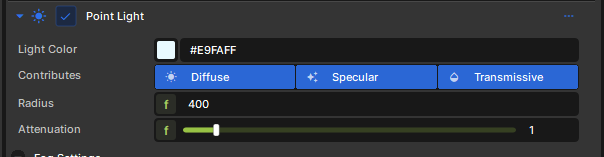
You can check if current light in the iteration has diffuse/specular/transmissive enabled by accessing object's raw BinnedLight data:
LightData.IsDiffuseEnabled();
LightData.IsSpecularEnabled();
LightData.IsTransmissiveEnabled();
// Iterate through every available light source in cluster
for( uint i = 0; i < Light::Count( ScreenPosition ); i++ )
{
    // Get the light object for current iteration
    Light light = Light::From( WorldPosition, ScreenPosition, i );

    // Check if current light has diffuse enabled
    if ( light.LightData.IsDiffuseEnabled() )
    {
        // <...>
    }

    // Check if current light has specular enabled
    if ( light.LightData.IsSpecularEnabled() )
    {
        // <...>
    }

    if ( light.LightData.IsTransmissiveEnabled() )
    {
        // <...>
    }
}
Light Types
If you need to check whether your current light is point, spot, or directional, you can do this by accessing its raw data from LightData. Additionally, you can use a fancy enum that references all available light types.
enum LightType
{
    LightTypePoint = 1,
    LightTypeDirectional = 2,
    LightTypeSpot = 3,
    LightTypeRect = 4
};
Here's a code example:
// Check if current light is a point
if ( light.LightData.Type == LightType::LightTypePoint )
{
    // ...
}

// Check if current light is directional (sun)
if ( light.LightData.Type == LightType::LightTypeDirectional )
{
    // ...
}
Directional Lights
Directional lights have a slightly unique implementation. To fetch sun's color and direction, you can use following constants:
float4 g_DirectionalLightColor;     // XYZ = color, W = fog strength
float4 g_DirectionalLightDirection; // XYZ = direction vector, W = blank
This data can be accessed from anywhere, even when you are not iterating lights in a loop.
Sampling sun shadows
Directional lights have their own shadow path, so if you want to sample a shadow that is being cast by sun, you should use DirectionalLightShadow class:
float flDirLightShadow = DirectionalLightShadow::GetVisibility( WorldPosition, ScreenPosition );
Binned Lights
This is the raw, internal information of lights that comes from the scene in the CPU, listed here for reference.
class BinnedLight
{
    uint Type;          // See the LightType enum above
    LightShape Shape;   // Sphere, Capsule, Rectangle, etc...
    uint Flags;

    float4x4 LightToWorld;

    float3 Color;
    float LinearFalloff;
    float QuadraticFalloff;
    float FalloffBias;
    float Radius;
    float RadiusSquared;
    float2 ShapeSize;

    float4 SpotLightInnerOuterConeCosines; // x - inner cone, y - outer cone, z - reciprocal between inner and outer angle, w - Tangent of outer angle
    float FogIntensity;
    uint ShadowMapIndex;            // Index in the shadow array, 0xFFFFFFFF if no shadow
    uint LightCookieTextureIndex;   // Light Cookies, fancy image projection on light, 0xFFFFFFFF if no cookie
    uint ShadowMaskTextureIndex;    // Custom shadow techniques precomputed on compute shader, RT, Screenspace shadows, Capsules, etc, 0xFFFFFFFF if no shadow mask, otherwise index in bindless array

	float3 GetPosition() 			{ return LightToWorld[3].xyz; }
	float3 GetDirection() 			{ return LightToWorld[0].xyz; }
	float3 GetDirectionUp() 		{ return LightToWorld[1].xyz; }

    bool IsSpotLight()              { return ( SpotLightInnerOuterConeCosines.x != 0.0f ); }
    bool IsDiffuseEnabled()         { return ( Flags & LightFlags::DiffuseEnabled ) != 0; }
    bool IsSpecularEnabled()        { return ( Flags & LightFlags::SpecularEnabled ) != 0; }
	bool IsTransmissiveEnabled() 	{ return ( Flags & LightFlags::TransmissiveEnabled ) != 0; }
    bool HasDynamicShadows() 	    { return ( ShadowMapIndex != 0xFFFFFFFF ); }
    bool HasLightCookie()           { return ( Flags & LightFlags::LightCookieEnabled ) != 0; }
	bool HasFogShadows()            { return ( Flags & LightFlags::NoFogShadows ) == 0; }
    bool IsIndexedLight()           { return ( Flags & LightFlags::IndexedLight ) != 0; }

    Texture2D GetLightCookieTexture()   { return Bindless::GetTexture2D( LightCookieTextureIndex ); }
};

StructuredBuffer<BinnedLight> BinnedLightBufferV2 < Attribute( "BinnedLightBufferV2" );  > ;

BinnedLight DynamicLightConstantByIndex( int index )
{
    return BinnedLightBufferV2[ index ];
}

BinnedLight BakedIndexedLightConstantByIndex( int index )
{
    return BinnedLightBufferV2[ BakedLightIndexMapping[index].x ];
}