Transforms & Clipping
Besides fill, stroke and text style, the painter carries a transform, a clip, an opacity and a blend mode. All of them apply to everything you draw after setting them, and all of them are saved and restored by Scope().
Transforms
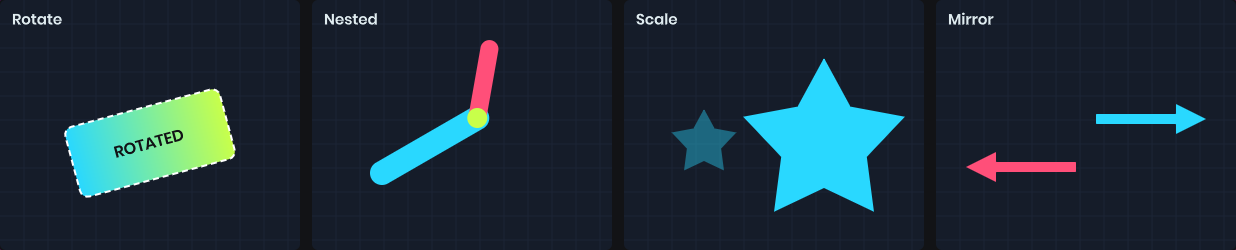
Translate, Rotate and Scale move the drawing axes. They compound, so each call is relative to the last. Stroke widths and text scale along with the shapes.
painter.Translate( painter.Bounds.Center );  // origin is now the panel center
painter.Rotate( Time.Now * 90 );            // spin around it
painter.Scale( 2 );

painter.Fill = Color.White;
painter.Rect( new Rect( -20, -20, 40, 40 ) );
Rotation is clockwise in degrees, around the current origin. To rotate around a shape's center, translate to the center first and draw the shape around zero.
A negative scale mirrors the drawing:
painter.Scale( -1, 1 ); // flip horizontally
You can also read and assign the whole matrix through Transform.
Clipping
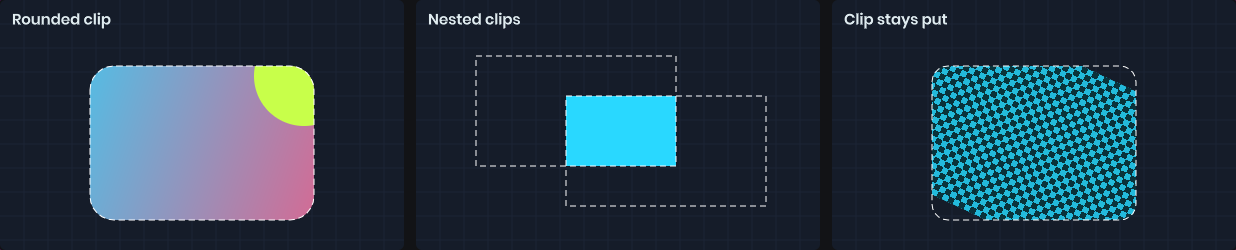
Clip restricts all further drawing to a rectangle, with optional rounded corners. It uses the transform in effect when you call it, so a clip set before a rotation stays put while the drawing rotates inside it.
using ( painter.Scope() )
{
	painter.Clip( new Rect( 0, 0, 200, 100 ), 16 );

	painter.Fill = texture;
	painter.Rect( new Rect( -50, -50, 300, 200 ) );  // only the clipped region shows
}
Clips nest: a second Clip intersects with the first. On panels, the panel's own CSS overflow clipping applies too.
Opacity and blend modes
Opacity multiplies the alpha of everything drawn. BlendMode changes how it combines with what's already there.
painter.Opacity = 0.5f;
painter.BlendMode = BlendMode.Multiply;
| Blend mode | Effect |
|---|---|
Normal |
Standard alpha blending. |
Multiply |
Darkens by multiplying colors. |
Lighten |
Keeps the lighter of the two colors. |
PremultipliedAlpha |
For textures with premultiplied alpha. |
On panels, Opacity stacks with the panel's CSS opacity. To fade a group of overlapping shapes as one, without the overlap showing through, use a layer instead.
Scopes
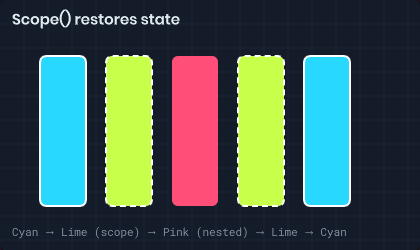
Scope() snapshots every piece of drawing state and restores it when disposed. Use it whenever you change state for just part of a drawing.
painter.Fill = Color.White;

using ( painter.Scope() )
{
	painter.Fill = Color.Red;
	painter.Translate( 50, 0 );
	painter.Clip( rect );
	painter.Circle( center, 10 );
}

painter.Circle( center, 10 );  // white, untranslated, unclipped
Scopes nest. Dispose them in the reverse order you opened them, which using does for you.