Text
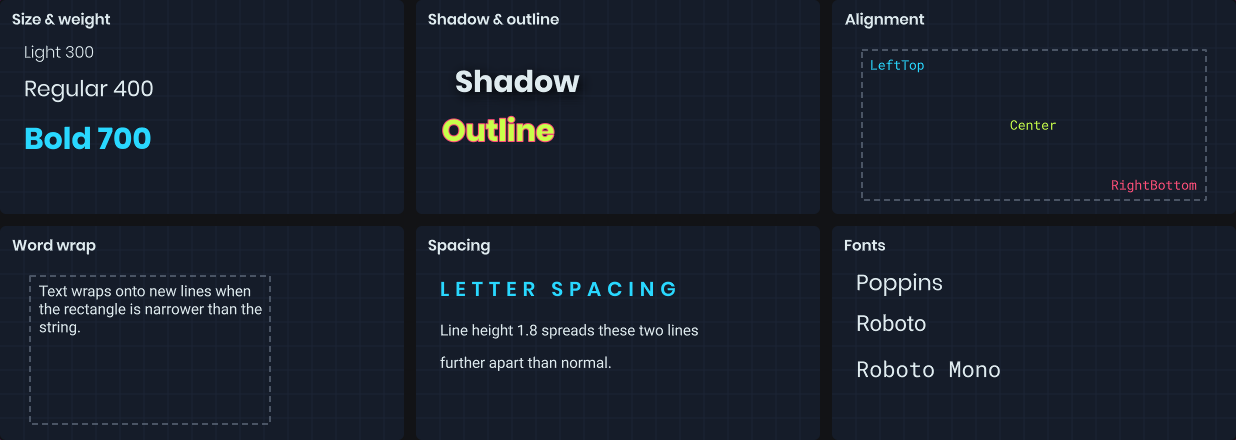
Text draws a string inside a rectangle using the painter's TextStyle. The rectangle is the layout area: text is aligned within it and wraps inside it when you ask it to.
painter.TextStyle = new TextStyle
{
	FontName = "Roboto",
	FontSize = 24,
	FontWeight = 700,
	Color = Color.White,
	Alignment = TextFlag.Center
};

painter.Text( "Hello!", painter.Bounds );
The default style is white, 16px Roboto, aligned to the top-left.
Styling
TextStyle is a record, so you can tweak a copy with with or the fluent helpers. Helpers are handy for sharing a base style and varying it.
var heading = TextStyle.Default.WithSize( 28 ).WithBold().WithColor( Color.Cyan );
var small = heading.WithSize( 12 ).WithBold( false ).WithColor( Color.Gray );

painter.TextStyle = heading;
painter.Text( "Score", rect );

painter.TextStyle = small;
painter.Text( "Last round: 1240", rect );
| Property | Helper | Notes |
|---|---|---|
FontName |
WithFont |
Falls back to the default font if unavailable. |
FontSize |
WithSize |
In pixels. On a panel, scaled the same as CSS font sizes. |
FontWeight |
WithWeight, WithBold |
100 to 900. Normal is 400, bold is 700. |
Italic |
WithItalic |
|
Color |
WithColor |
Alpha applies to the text and its effects. |
Alignment |
WithAlignment |
TextFlag values, see below. |
LineHeight |
WithLineHeight |
Multiplier, 1 is normal. |
LetterSpacing, WordSpacing |
WithLetterSpacing, WithWordSpacing |
Extra pixels. |
Shadow |
WithShadow, WithoutShadow |
One drop shadow with blur and offset. |
Outline |
WithOutline, WithoutOutline |
One outline with a width. |
painter.TextStyle = TextStyle.Default
	.WithSize( 32 )
	.WithShadow( Color.Black, blur: 4, offset: new Vector2( 2, 2 ) )
	.WithOutline( Color.Black, width: 2 );
Alignment and wrapping
Alignment combines a horizontal and vertical position with layout flags.
painter.TextStyle = painter.TextStyle with { Alignment = TextFlag.RightBottom };
painter.TextStyle = painter.TextStyle with { Alignment = TextFlag.CenterTop | TextFlag.WordWrap };
| Flag | Description |
|---|---|
LeftTop, Center, RightBottom, ... |
Position within the rectangle. |
WordWrap |
Wrap at word boundaries to fit the width. |
WrapAnywhere |
Wrap between any characters. |
SingleLine |
Never wrap. |
DontClip |
Let text overflow the rectangle. |
Measuring
MeasureText tells you how big a string will be with the current style, without drawing it. Use it to size a background behind a label, or to lay text out next to other shapes.
painter.TextStyle = TextStyle.Default.WithSize( 18 );

var size = painter.MeasureText( name );
var box = new Rect( position, size + new Vector2( 16, 8 ) );

painter.Fill = Color.Black.WithAlpha( 0.7f );
painter.Rect( box, 4 );
painter.Text( name, box.Shrink( 8, 4 ) );
There's also an overload that takes a rectangle and returns the exact rectangle Text will draw into, after alignment. Passing a size limits the layout width, so wrapped text measures correctly.