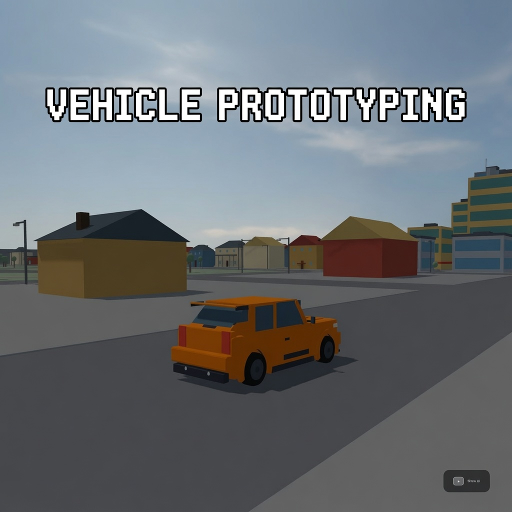
Vehicle Prototyping
Released
●1
A free, forkable driving-game baseline for s&box — a tuned car physics stack, a proving-ground track, and a playtest
UI/SessionMenu.razor
A Razor UI component for the in-game Session menu. It renders a two-column pause card with resume/respawn/quit actions, drive-assist and unit segmented controls, a master-volume draggable track, and a vehicle roster with thumbnail selectors and cycling hotkeys; it also handles input toggling, cursor visibility, and invoking CarSwitcher and UserSettings.
@using Sandbox;
@using Sandbox.UI;
@inherits PanelComponent
@namespace VehicleProto

@* Session menu (two-column redesign, 2026-07-16) — toggled by Tab ("Session"), closed by Esc.
   Dims + blurs the game, unlocks cursor. A 760px card: LEFT column = Resume / Respawn actions +
   labelled Drive-mode & Units segmented controls + red Quit-to-menu; RIGHT column = the vehicle
   roster as a 2x2 thumbnail grid (click a tile OR cycle with [ ]). Resume/Respawn/Quit are live;
   the assist selector writes onto the car, units onto UserSettings, car-switch goes through
   CarSwitcher (same path the picker and vp_car console command use). *@

<root>
	@if ( UiState.SessionOpen )
	{
		<div class="backdrop">
			<div class="card">

				<div class="header">
					<div class="titlecol">
						<span class="title">Session</span>
						<span class="mono ctx">@ContextLine</span>
					</div>
					<div class="hint">
						<span class="hintlabel">Resume</span>
						<span class="mono keycap">Tab</span>
					</div>
				</div>

				<div class="cols">

					<div class="leftcol">
						<div class="btn primary" onclick=@Resume>Resume</div>
						<div class="btn ghost" onclick=@Respawn>
							<span>Respawn car</span>
							<span class="mono keycap">R</span>
						</div>

						<div class="rule"></div>

						<div class="field">
							<div class="fieldlabel">
								<span class="lbl">Drive mode</span>
								<span class="mono val">@CurrentAssist.ToString().ToLower()</span>
							</div>
							<div class="segbar">
								@foreach ( var a in Levels )
								{
									var aa = a;
									<div class="mono seg @(CurrentAssist == aa ? "on" : "")" onclick=@( () => SetAssist( aa ) )>@aa.ToString().ToLower()</div>
								}
							</div>
						</div>

						<div class="field">
							<div class="fieldlabel">
								<span class="lbl">Units</span>
								<span class="mono val">@CurrentUnitLabel</span>
							</div>
							<div class="segbar">
								@foreach ( var u in UnitOptions )
								{
									var uu = u.Unit;
									<div class="mono seg @(CurrentUnit == uu ? "on" : "")" onclick=@( () => SetUnit( uu ) )>@u.Label</div>
								}
							</div>
						</div>

						<div class="field">
							<div class="fieldlabel">
								<span class="lbl">Sound</span>
								<span class="mono val">@Volume%</span>
							</div>
							@* Draggable master-volume track: click jumps, drag scrubs. The fill child is
							   pointer-events:none so events always target the track (keeps LocalPosition
							   track-relative). One shared handler branches jump (down=true, always act) vs
							   scrub (down=false, act only while pressed) via the bool per binding. *@
							<div class="voltrack" onmousedown=@( e => Slide( e, true ) ) onmousemove=@( e => Slide( e, false ) )>
								<div class="volfill" style="width: @Volume%"></div>
							</div>
						</div>

						<div class="spacer"></div>
						<div class="rule"></div>
						<div class="btn quit" onclick=@QuitToMenu>Quit</div>
					</div>

					<div class="vrule"></div>

					<div class="rightcol">
						<div class="rosterhead">
							<span class="lbl">Vehicle</span>
							<span class="cyclehint">
								<span class="mono keycap">[ ]</span>
								<span class="cyclelbl">cycle</span>
							</span>
						</div>

						<div class="roster">
							@for ( int i = 0; i < Picks.Length; i++ )
							{
								var pid = Picks[i].Id;
								var num = (i + 1).ToString();
								<div class="tile @(CurrentId == pid ? "on" : "")" onclick=@( () => PickCar( pid ) )>
									<CarThumb class="thumb" CarId=@pid Selected=@(CurrentId == pid) />
									<div class="tilefoot">
										<span class="name">@Picks[i].Label</span>
										<span class="mono status">@(CurrentId == pid ? "driving" : num)</span>
									</div>
								</div>
							}
						</div>

						<div class="caption">Switching respawns you in the new car at the same spot.</div>
					</div>

				</div>
			</div>
		</div>
	}
</root>

@code {
	public VehicleController Target { get; set; }

	static readonly AssistLevel[] Levels = { AssistLevel.Casual, AssistLevel.Sport, AssistLevel.Sim };
	AssistLevel CurrentAssist => Target?.Assists ?? AssistLevel.Casual;

	// Speed-unit selector — DISPLAY ONLY (UserSettings.SpeedUnit; every metric/spec/telemetry stays SI).
	static readonly (SpeedUnit Unit, string Label)[] UnitOptions =
	{
		(SpeedUnit.Kmh, "km/h"),
		(SpeedUnit.Mph, "mph"),
	};
	SpeedUnit CurrentUnit => UserSettings.SpeedUnit;
	string CurrentUnitLabel => UnitOptions.FirstOrDefault( u => u.Unit == CurrentUnit ).Label ?? "km/h";

	// Master audio volume, 0–100%. Backed by the persisted store; the setter applies to the engine
	// master mixer live, so dragging is audible immediately. Read for the fill width + the % readout.
	int Volume => UserSettings.MasterVolume;

	// Data-driven car picker: one tile per roster car, in cycle order. Each tile renders a live,
	// slowly-rotating 3D model of the car via CarThumb (a ScenePanel that assembles the part kit from
	// its manifest); if a kit fails to resolve, CarThumb falls back to the static ui/cars/<id>.png.
	// Adding a roster car = add a row here (id → kit is derived, not hand-wired), keeping its png as the
	// fallback. Ids resolve through VehiclePilot.ResolveCar (same table CarSwitcher uses).
	static readonly (string Id, string Label)[] Picks =
	{
		("hatch", "Hatch"),
		("coupe", "Coupe"),
		("kart", "Kart"),
		("pickup", "Pickup"),
	};

	// Which roster id the active car is, so the picker can highlight it + label its status "driving".
	string CurrentId => CarSwitcher.CurrentId( Target );

	string ContextLine => $"{Target?.Definition?.Name ?? "car"} · {CurrentAssist.ToString().ToLower()} assists";

	protected override void OnUpdate()
	{
		// Tab on keyboard, Start (the menu button) on gamepad — both fire the "Session" action
		// (Input.config binds tab + SwitchRightMenu). On the pad path the host may ALSO raise the
		// engine Escape flag for the same press; consume it on toggle so the engine pause menu
		// can't open on top of ours (a no-op when the flag isn't set, i.e. every keyboard Tab).
		if ( Input.Pressed( "Session" ) )
		{
			UiState.SessionOpen = !UiState.SessionOpen;
			Mouse.Visibility = UiState.SessionOpen ? MouseVisibility.Visible : MouseVisibility.Hidden;
			Input.EscapePressed = false;
		}

		// [ and ] cycle the roster prev/next — an Input action, so it also works while driving with the
		// menu closed. Frame-scoped Input.Pressed read in OnUpdate (per the edge-latch gotcha this is the
		// correct place; only OnFixedUpdate reads need the latch).
		if ( Input.Pressed( "CyclePrev" ) )
			CycleCar( -1 );
		if ( Input.Pressed( "CycleNext" ) )
			CycleCar( +1 );

		if ( UiState.SessionOpen )
		{
			Mouse.Visibility = MouseVisibility.Visible;

			// Esc = Resume. EscapePressed is a real GET/SET bool: read to detect, set false to CONSUME so
			// the engine doesn't then route to its own pause menu. Only consumed while our menu is open, so
			// other panels / the host keep their Esc.
			if ( Input.EscapePressed )
			{
				Input.EscapePressed = false;
				Resume();
			}
		}
	}

	void Resume()
	{
		UiState.SessionOpen = false;
		Mouse.Visibility = UiState.AnyCursorModalOpen ? MouseVisibility.Visible : MouseVisibility.Hidden;
		StateHasChanged();
	}

	void Respawn()
	{
		Target?.Respawn();
		Resume();
	}

	// Live car swap. Clicking a picker tile switches straight to that car in place via CarSwitcher —
	// which rewires camera/HUD/pilot (and re-points our own Target through UiRig.Retarget) — and closes
	// the menu back to driving. Re-picking the active car is a no-op (avoids a pointless despawn/respawn);
	// we still close.
	void PickCar( string id )
	{
		SwitchToId( id );
		Resume();
	}

	// [ / ] cycle: step to the prev/next roster car in Picks order and switch to it, WITHOUT changing the
	// menu's open/closed state (so you can keep tapping to flip through, open or closed). No-op result
	// (same car) can't happen here since we always move by one.
	void CycleCar( int dir )
	{
		int idx = System.Array.IndexOf( Roster, CurrentId );
		if ( idx < 0 ) idx = 0;
		int next = (idx + dir + Roster.Length) % Roster.Length;
		SwitchToId( Roster[next] );
		StateHasChanged();
	}

	static string[] Roster => CarSwitcher.Roster;

	void SwitchToId( string id )
	{
		if ( id == CurrentId )
			return;

		var scene = Target?.Scene ?? Game.ActiveScene;
		if ( scene is null )
			return;

		var next = CarSwitcher.SwitchTo( scene, id );
		if ( next is not null )
			Target = next;
	}

	void SetAssist( AssistLevel a )
	{
		if ( Target is not null )
			Target.Assists = a;
		StateHasChanged();
	}

	// Units write straight to the persisted store (default km/h) — applies to the HUD readout the same
	// frame; existing players who never touch it keep km/h byte-identically.
	void SetUnit( SpeedUnit u )
	{
		UserSettings.SpeedUnit = u;
		StateHasChanged();
	}

	// Master-volume drag/click. Value = cursor's local x over the track width, clamped and snapped to
	// an integer percent, then written to the persisted store (which applies it to the master mixer
	// live and only rewrites the file when the percent actually changes). Snapping to whole percent
	// keeps BuildHash churn bounded — the tree rebuilds once per percent-step, never per raw drag
	// frame — and 0..100 with Min=0 avoids the near-Min scientific-notation style trap.
	//   down=true  (onmousedown): always act — a bare click jumps to that position.
	//   down=false (onmousemove): act only while the track is pressed (Active), i.e. an active scrub.
	void Slide( Sandbox.UI.PanelEvent ev, bool down )
	{
		// The razor onmouse* binding hands us the base PanelEvent; the cursor position lives on the
		// MousePanelEvent subtype.
		if ( ev is not Sandbox.UI.MousePanelEvent e )
			return;

		if ( !down && !e.This.PseudoClass.HasFlag( Sandbox.UI.PseudoClass.Active ) )
			return;

		float w = e.This.Box.Rect.Width;
		if ( w <= 0f )
			return;

		float frac = Math.Clamp( e.LocalPosition.x / w, 0f, 1f );
		int pct = (int)MathF.Round( frac * 100f );

		if ( pct == UserSettings.MasterVolume )
			return;

		UserSettings.MasterVolume = pct;
		StateHasChanged();
	}

	// Quit to menu: leave the game to the s&box main menu. Game.Close() is the proven, whitelist-safe
	// leave path; in the editor it ends play mode sanely,
	// in a published client it returns to the menu. vp is single-player, so there's no live network
	// session to disconnect first.
	void QuitToMenu()
	{
		Game.Close();
	}

	protected override int BuildHash() => System.HashCode.Combine(
		UiState.SessionOpen, Target?.Definition?.Name, CurrentAssist, UserSettings.SpeedUnit,
		// Integer master-volume percent: rebuilds the fill width + % readout once per percent-step
		// while dragging (NOT the raw sub-pixel drag value, which would rebuild every frame).
		UserSettings.MasterVolume );

	/// <summary>Console parity for opening/closing the Tab session menu — same idiom as
	/// <see cref="GameBootstrap.VpSetWorld"/>: the Tab keypress can't be injected in headless UI
	/// verification, so this toggles (or forces) <see cref="UiState.SessionOpen"/> for screenshots.
	/// <c>vp_session</c> toggles; <c>vp_session 1</c>/<c>vp_session 0</c> force open/closed.</summary>
	[ConCmd( "vp_session" )]
	public static void VpSession( int open = -1 )
	{
		UiState.SessionOpen = open < 0 ? !UiState.SessionOpen : open != 0;
		Mouse.Visibility = UiState.SessionOpen ? MouseVisibility.Visible : MouseVisibility.Hidden;
	}
}